







Question: Interactive 3D display mode ( Draw the molecule on the canvas by choosing buttons from the Tools (for bonds), Atoms, and Advanced Template toolbars. The
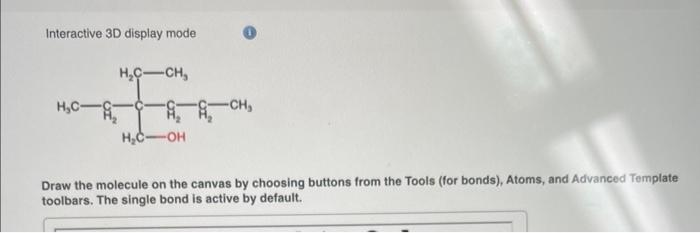
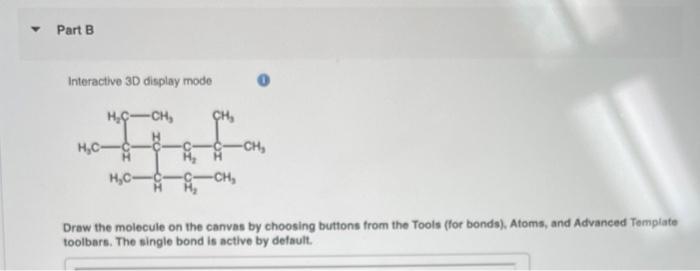
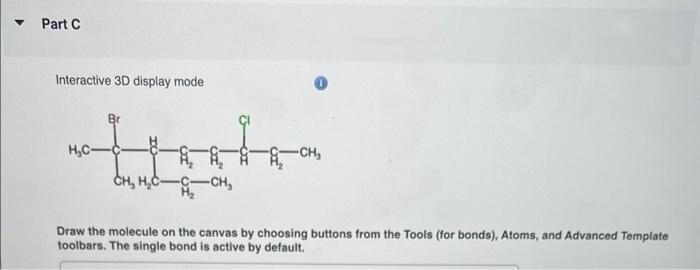
Interactive 3D display mode ( Draw the molecule on the canvas by choosing buttons from the Tools (for bonds), Atoms, and Advanced Template toolbars. The single bond is active by default. Interactive 3D display mode 0 Draw the molecule on the canvas by choosing buttons from the Tools (for bonds). Atoms, and Advanced Tomplate toolbars. The single bond is active by default. Interactive 3D display mode Draw the molecule on the canvas by choosing buttons from the Tools (for bonds), Atoms, and Advanced Template toolbars. The single bond is active by default. Interactive 3D display mode ( Draw the molecule on the canvas by choosing buttons from the Tools (for bonds), Atoms, and Advanced Template toolbars. The single bond is active by default. Interactive 3D display mode 0 Draw the molecule on the canvas by choosing buttons from the Tools (for bonds). Atoms, and Advanced Tomplate toolbars. The single bond is active by default. Interactive 3D display mode Draw the molecule on the canvas by choosing buttons from the Tools (for bonds), Atoms, and Advanced Template toolbars. The single bond is active by default
Step by Step Solution
There are 3 Steps involved in it

Get step-by-step solutions from verified subject matter experts
 Study Help