







Question: /** * Interface for the Programming Assignment: Base Converter */ public interface BaseConversion { /** * Convert from a decimal (base 10) string representation *
/** * Interface for the Programming Assignment: Base Converter */ public interface BaseConversion { /** * Convert from a decimal (base 10) string representation * to an int value * @param s The decimal (base 10) representation * @return The corresponding numerical value */ public int parseDecimalString(String s); /** * Convert from a hexadecimal (base 16) string representation * to an int value * @param s The hexadecimal (base 16) representation * @return The corresponding numerical value */ public int parseHexString(String s); /** * Convert from a binary (base 2) string representation * to an int value * @param s The binary (base 2) representation * @return The corresponding numerical value */ public int parseBinaryString(String s); /** * Generate the decimal (base 10) representation of an * integer value * @param num The integer value to represent * @return The decimal (base 10) representation */ public String toDecimalString(int num); /** * Generate the hexadecimal (base 16) representation of an * integer value * @param num The integer value to represent * @return The hexadecimal (base 16) representation */ public String toHexString(int num); /** * Generate the binary (base 2) representation of an * integer value * @param num The integer value to represent * @return The binary (base 2) representation */ public String toBinaryString(int num); /** * Convert from a string representation of an int value * in a given base to its numerical value * @param s The string representation * @param base The numerical base for the representation * @return The corresponding numerical value */ public int parseBasedString(String s, int base); /** * Generate the string representation of an * integer value in a given base * @param num The integer value to represent * @param base The base for the representation * @return The based representation */ public String toBasedString(int num, int base); }--------------------------------------------------------------------
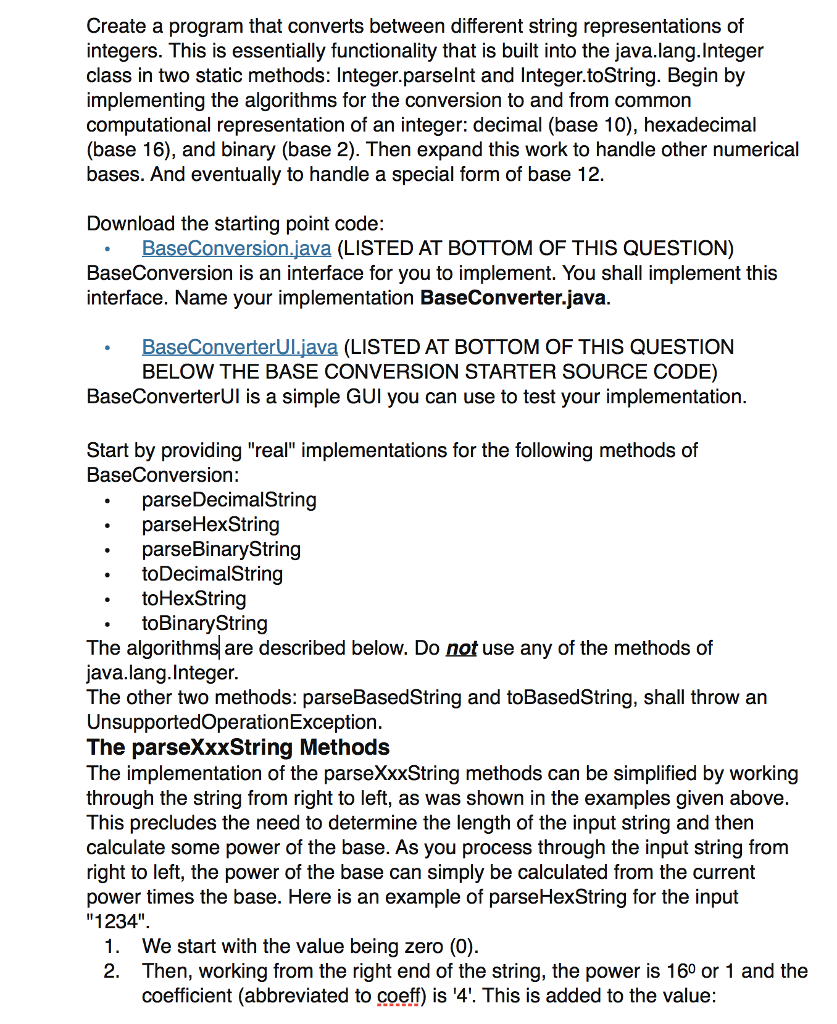
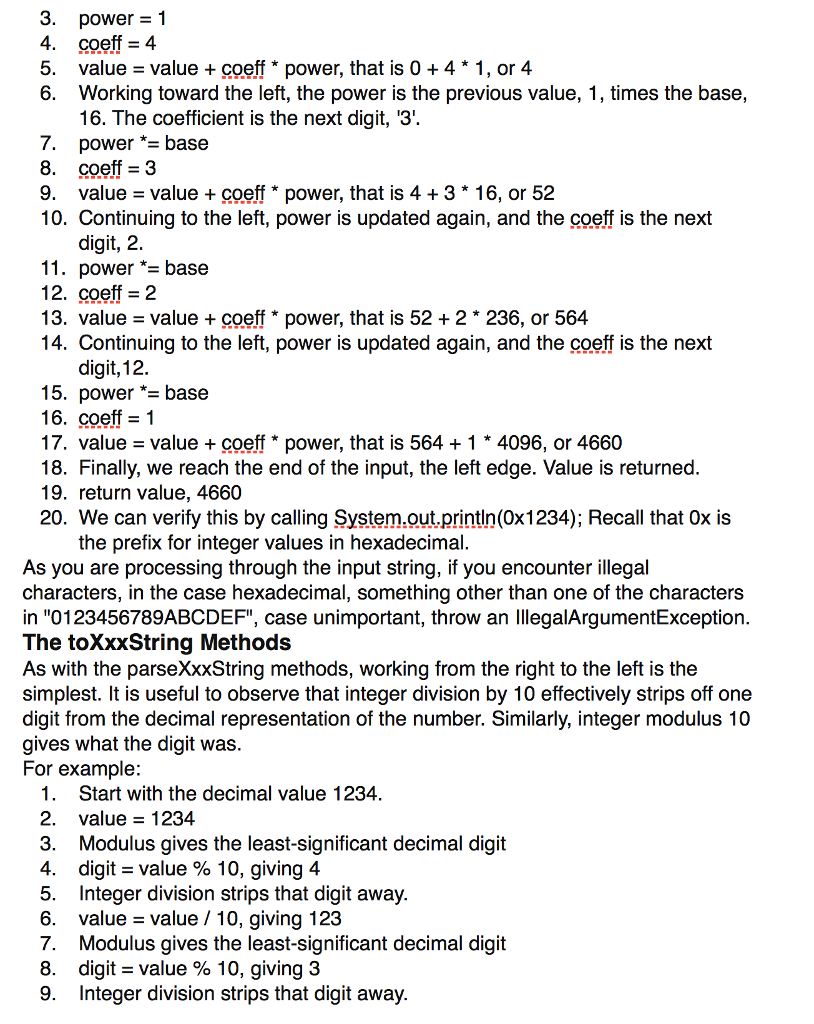
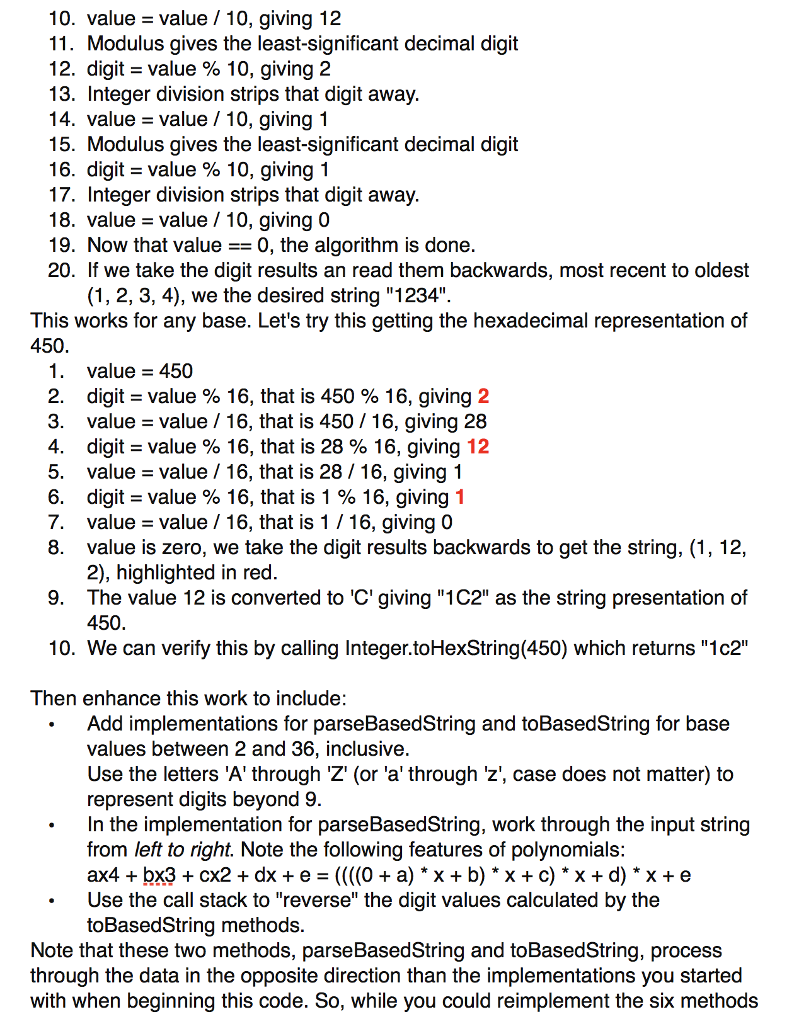
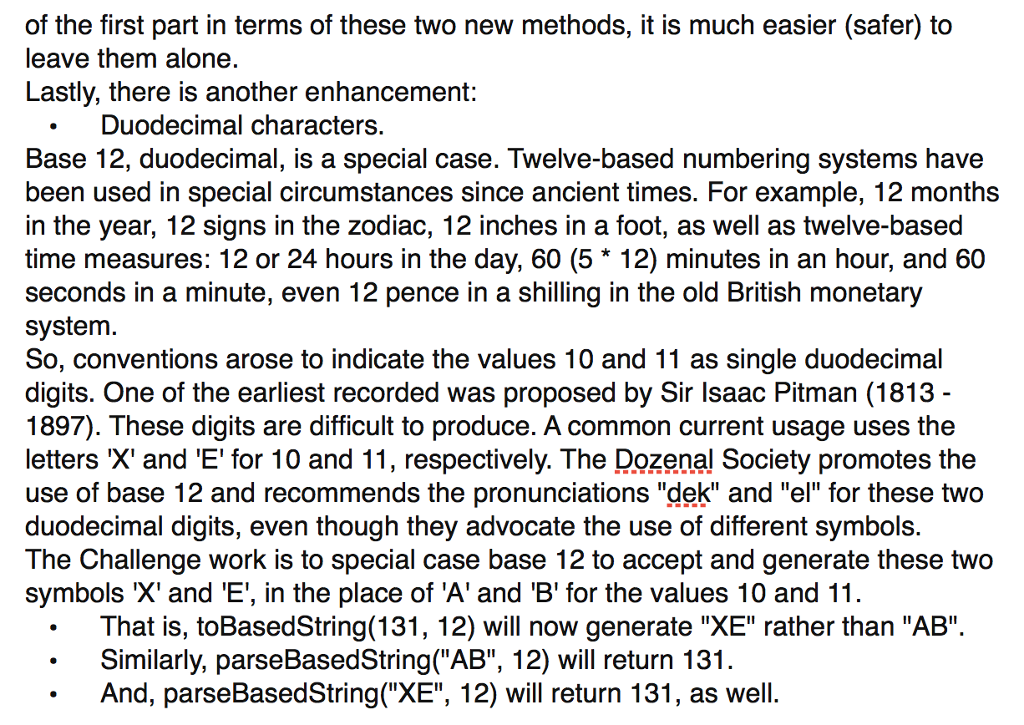
public class BaseConverterUI implements java.awt.event.ActionListener { private javax.swing.JTextField input; private javax.swing.JLabel output; private javax.swing.JRadioButton toDecimal; private javax.swing.JRadioButton toHex; private javax.swing.JRadioButton toBinary; private javax.swing.JRadioButton toBased; private javax.swing.JRadioButton fromDecimal; private javax.swing.JRadioButton fromHex; private javax.swing.JRadioButton fromBinary; private javax.swing.JRadioButton fromBased; private javax.swing.JSpinner fromBase; private javax.swing.JSpinner toBase; private javax.swing.JButton convert; private java.awt.Font display; private BaseConversion converter; public BaseConverterUI() { // instantiate the converter converter = new BaseConverter(); // create the GUI javax.swing.JFrame win = new javax.swing.JFrame("Base Converter"); win.setDefaultCloseOperation(javax.swing.JFrame.DISPOSE_ON_CLOSE); win.setLocation(25, 25); javax.swing.JPanel frame = new javax.swing.JPanel(); win.add(frame); javax.swing.Box contents = javax.swing.Box.createVerticalBox(); frame.add(contents); display = new java.awt.Font("Helvetica", java.awt.Font.BOLD, 24); // source (input) input = new javax.swing.JTextField("100", 10); input.setFont(display); input.setHorizontalAlignment(javax.swing.JTextField.CENTER); javax.swing.JPanel inputPanel = new javax.swing.JPanel(); inputPanel.add(input); javax.swing.border.TitledBorder inputTitle; inputTitle = javax.swing.BorderFactory.createTitledBorder("Source String"); inputPanel.setBorder(inputTitle); // target (output) output = new javax.swing.JLabel(" "); output.setFont(display); javax.swing.JPanel outputPanel = new javax.swing.JPanel(); outputPanel.add(output); javax.swing.border.TitledBorder outputTitle; outputTitle = javax.swing.BorderFactory.createTitledBorder("Output String"); outputPanel.setBorder(outputTitle); // go convert = new javax.swing.JButton("Convert"); convert.addActionListener(this); javax.swing.JPanel buttonPanel = new javax.swing.JPanel(); buttonPanel.add(convert); // box for base selection javax.swing.Box basePanel = javax.swing.Box.createHorizontalBox(); // select source base fromDecimal = new javax.swing.JRadioButton("decimal (base 10)"); fromHex = new javax.swing.JRadioButton("hexadecimal (base 16)"); fromBinary = new javax.swing.JRadioButton("binary (base 2)"); fromBased = new javax.swing.JRadioButton("select base"); javax.swing.SpinnerModel fromModel = new javax.swing.SpinnerNumberModel(10, 2, 36, 1); fromBase = new javax.swing.JSpinner(fromModel); javax.swing.ButtonGroup fromGroup = new javax.swing.ButtonGroup(); fromGroup.add(fromDecimal); fromGroup.add(fromHex); fromGroup.add(fromBinary); fromGroup.add(fromBased); fromDecimal.setSelected(true); fromDecimal.addActionListener(this); fromHex.addActionListener(this); fromBinary.addActionListener(this); fromBased.addActionListener(this); javax.swing.JPanel fromPanel = new javax.swing.JPanel(new java.awt.GridLayout(4,1)); fromPanel.add(fromDecimal); fromPanel.add(fromHex); fromPanel.add(fromBinary); javax.swing.Box fromSelect = javax.swing.Box.createHorizontalBox(); fromSelect.add(fromBased); fromSelect.add(fromBase); fromBase.setEnabled(false); fromPanel.add(fromSelect); javax.swing.border.TitledBorder fromTitle; fromTitle = javax.swing.BorderFactory.createTitledBorder("Source Base"); fromPanel.setBorder(fromTitle); basePanel.add(fromPanel); // select target base toDecimal = new javax.swing.JRadioButton("decimal (base 10)"); toHex = new javax.swing.JRadioButton("hexadecimal (base 16)"); toBinary = new javax.swing.JRadioButton("binary (base 2)"); toBased = new javax.swing.JRadioButton("select base"); javax.swing.SpinnerModel toModel = new javax.swing.SpinnerNumberModel(16, 2, 36, 1); toBase = new javax.swing.JSpinner(toModel); javax.swing.ButtonGroup toGroup = new javax.swing.ButtonGroup(); toGroup.add(toDecimal); toGroup.add(toHex); toGroup.add(toBinary); toGroup.add(toBased); toHex.setSelected(true); toBase.setValue(16); toDecimal.addActionListener(this); toHex.addActionListener(this); toBinary.addActionListener(this); toBased.addActionListener(this); javax.swing.JPanel toPanel = new javax.swing.JPanel(new java.awt.GridLayout(4,1)); toPanel.add(toDecimal); toPanel.add(toHex); toPanel.add(toBinary); javax.swing.Box toSelect = javax.swing.Box.createHorizontalBox(); toSelect.add(toBased); toSelect.add(toBase); toBase.setEnabled(false); toPanel.add(toSelect); javax.swing.border.TitledBorder toTitle; toTitle = javax.swing.BorderFactory.createTitledBorder("Target Base"); toPanel.setBorder(toTitle); basePanel.add(toPanel); // assemble window contents.add(inputPanel); contents.add(basePanel); contents.add(outputPanel); contents.add(buttonPanel); win.setVisible(true); win.pack(); } public void actionPerformed(java.awt.event.ActionEvent e) { Object source = e.getSource(); if(source == toDecimal || source == toHex || source == toBinary) { toBase.setEnabled(false); } else if(source == toBased) { toBase.setEnabled(true); } else if(source == fromDecimal || source == fromHex || source == fromBinary) { fromBase.setEnabled(false); } else if(source == fromBased) { fromBase.setEnabled(true); } else if(source == convert) { try { int value = getInput(); output.setText(getOutput(value)); output.setFont(display); output.setForeground(java.awt.Color.black); input.selectAll(); input.requestFocus(); } catch(UnsupportedOperationException ex) { output.setText("Unsupported Operation"); output.setFont(null); output.setForeground(java.awt.Color.red); } catch(Exception ex) { output.setText("Some exception occurred"); output.setFont(null); output.setForeground(java.awt.Color.red); } } else { throw new IllegalStateException("No input base selected"); } } private int getInput() { String source = input.getText(); if(fromDecimal.isSelected()) { return converter.parseDecimalString(source); } else if(fromHex.isSelected()) { return converter.parseHexString(source); } else if(fromBinary.isSelected()) { return converter.parseBinaryString(source); } else if(fromBased.isSelected()) { int base; base = Integer.parseInt(fromBase.getValue().toString()); return converter.parseBasedString(source, base); } else { throw new IllegalStateException("We should never get here"); } } private String getOutput(int value) { if(toDecimal.isSelected()) { return converter.toDecimalString(value); } else if(toHex.isSelected()) { return converter.toHexString(value); } else if(toBinary.isSelected()) { return converter.toBinaryString(value); } else if(toBased.isSelected()) { int base; base = Integer.parseInt(toBase.getValue().toString()); return converter.toBasedString(value, base); } else { throw new IllegalStateException("We should never get here"); } } public static void main(String[] args) { new BaseConverterUI(); } } Create a program that converts between different string representations of integers. This is essentially functionality that is built into the java.lang.Integer class in two static methods: Integer.parselnt and Integer.toString. Begin by implementing the algorithms for the conversion to and from common computational representation of an integer: decimal (base 10), hexadecimal (base 16), and binary (base 2). Then expand this work to handle other numerical bases. And eventually to handle a special form of base 12. Download the starting point code a (LISTED AT BOTTOM OF THIS QUESTION) BaseConversion is an interface for you to implement. You shall implement this interface. Name your implementation BaseConverter.java a (LISTED AT BOTTOM OF THIS QUESTION BELOW THE BASE CONVERSION STARTER SOURCE CODE) BaseConverterUl is a simple GUI you can use to test your implementation Start by providing "real" implementations for the following methods of BaseConversion: parseDecimalString parseHexString parseBinaryString oDecimalString . toHexString .toBinaryString The algorithms are described below. Do not use any of the methods of java.lang.Integer. The other two methods: parseBasedString and toBasedString, shall throw arn UnsupportedOperationException The parseXxxString Methods The implementation of the parseXxxString methods can be simplified by working through the string from right to left, as was shown in the examples given above. This precludes the need to determine the length of the input string and then calculate some power of the base. As you process through the input string from right to left, the power of the base can simply be calculated from the current power times the base. Here is an example of parseHexString for the input "1234" 1. 2. We start with the value being zero (0) Then, working from the right end of the string, the power is 160 or 1 and the coefficient (abbreviated to coeff) is '4'. This is added to the value 3. power 1 4. ":4 5. value value coeff * power, that is 0 4 1, or 4 6. Working toward the left, the power is the previous value, 1, times the base, 16. The coefficient is the next digit, '3'. 7. powerbase 8. coeff - 3 9. value value +coeff * power, that is 4+3* 16, or 52 10. Continuing to the left, power is updated again, and the coeff is the next digit, 2. 11. power *- base 12. coeff 2 13. value value coeff* power, that is 52 +2 " 236, or 564 14. Continuing to the left, power is updated again, and the coeff is the next digit,12. 15. power base 16. coeff - 1 17. value value coeff " power, that is 5641 4096, or 4660 18. Finally, we reach the end of the input, the left edge. Value is returned 19. return value, 4660 20. We can verify this by calling System.out.println(0x1234); Recall that 0x is the prefix for integer values in hexadecimal. As you are processing through the input string, if you encounter illegal characters, in the case hexadecimal, something other than one of the characters in "0123456789ABCDEF", case unimportant, throw an lllegalArgumentExceptiorn The toXxxString Methods As with the parseXxString methods, working from the right to the left is the simplest. It is useful to observe that integer division by 10 effectively strips off one digit from the decimal representation of the number. Similarly, integer modulus 10 gives what the digit was For example: 1. Start with the decimal value 1234 2. value 1234 3. Modulus gives the least-significant decimal digit 4, digit-value % 10, giving 4 5. Integer division strips that digit away 6. value value 10, giving 123 7. Modulus gives the least-significant decimal digit 8. digit-value % 10, giving 3 9. Integer division strips that digit away 10. value-value / 10, giving 12 11. Modulus gives the least-significant decimal digit 12. digit-value % 10, giving 2 13. Integer division strips that digit away 14. value -value /10, giving 1 15. Modulus gives the least-significant decimal digit 16, digit-value % 10, giving 1 17. Integer division strips that digit away 18. value value /10, giving 0 19. Now that value-0, the algorithm is done 20. If we take the digit results an read them backwards, most recent to oldest (1, 2, 3, 4), we the desired string "1234". This works for any base. Let's try this getting the hexadecimal representation of 450. 1. value 450 2. digit value % 16, that is 450 % 16, giving 2 3. value value 16, that is 450 /16, giving 28 4, digit-value % 16, that is 28 % 16, giving 12 5. value value / 16, that is 28 /16, giving 1 6, digit-value % 16, that is 1 % 16, giving 1 7. value -value / 16, that is 1 /16, giving 0 8. value is zero, we take the digit results backwards to get the string, (1, 12, 2), highlighted in red. 9. The value 12 is converted to 'C' giving "1C2" as the string presentation of 450. 10. We can verify this by calling Integer.toHexString(450) which returns "1c2'" Then enhance this work to include Add implementations for parseBasedString and toBasedString for base values between 2 and 36, inclusive Use the letters 'A' through 'Z' (or 'a' through 'z', case does not matter) to represent digits beyond 9. In the implementation for parseBasedString, work through the input string from left to right. Note the following features of polynomials: ax4 + bx3 + cx2 + dx + e = ((((0 + a) * x + b) * x + c) * x + d) * x + e Use the call stack to "reverse" the digit values calculated by the toBasedString methods. . Note that these two methods, parseBasedString and toBasedString, process through the data in the opposite direction than the implementations you started with when beginning this code. So, while you could reimplement the six methods of the first part in terms of these two new methods, it is much easier (safer) to leave them alone. Lastly, there is another enhancement: Duodecimal characters. Base 12, duodecimal, is a special case. Twelve-based numbering systems have been used in special circumstances since ancient times. For example, 12 months in the year, 12 signs in the zodiac, 12 inches in a foot, as well as twelve-based time measures: 12 or 24 hours in the day, 60 (5 12) minutes in an hour, and 60 seconds in a minute, even 12 pence in a shilling in the old British monetary system. So, conventions arose to indicate the values 10 and 11 as single duodecimal digits. One of the earliest recorded was proposed by Sir Isaac Pitman (1813 1897). These digits are difficult to produce. A common current usage uses the letters 'X' and 'E' for 10 and 11, respectively. The Dozenal Society promotes the use of base 12 and recommends the pronunciations "dek" and "el" for these two duodecimal digits, even though they advocate the use of different symbols. The Challenge work is to special case base 12 to accept and generate these two symbols 'X' and 'E', in the place of 'A' and 'B' for the values 10 and 11 That is, toBasedString(131, 12) will now generate "XE" rather than "AB". Similarly, parseBasedString("AB", 12) will return 131 And, parseBasedString("XE", 12) will return 131, as well. Create a program that converts between different string representations of integers. This is essentially functionality that is built into the java.lang.Integer class in two static methods: Integer.parselnt and Integer.toString. Begin by implementing the algorithms for the conversion to and from common computational representation of an integer: decimal (base 10), hexadecimal (base 16), and binary (base 2). Then expand this work to handle other numerical bases. And eventually to handle a special form of base 12. Download the starting point code a (LISTED AT BOTTOM OF THIS QUESTION) BaseConversion is an interface for you to implement. You shall implement this interface. Name your implementation BaseConverter.java a (LISTED AT BOTTOM OF THIS QUESTION BELOW THE BASE CONVERSION STARTER SOURCE CODE) BaseConverterUl is a simple GUI you can use to test your implementation Start by providing "real" implementations for the following methods of BaseConversion: parseDecimalString parseHexString parseBinaryString oDecimalString . toHexString .toBinaryString The algorithms are described below. Do not use any of the methods of java.lang.Integer. The other two methods: parseBasedString and toBasedString, shall throw arn UnsupportedOperationException The parseXxxString Methods The implementation of the parseXxxString methods can be simplified by working through the string from right to left, as was shown in the examples given above. This precludes the need to determine the length of the input string and then calculate some power of the base. As you process through the input string from right to left, the power of the base can simply be calculated from the current power times the base. Here is an example of parseHexString for the input "1234" 1. 2. We start with the value being zero (0) Then, working from the right end of the string, the power is 160 or 1 and the coefficient (abbreviated to coeff) is '4'. This is added to the value 3. power 1 4. ":4 5. value value coeff * power, that is 0 4 1, or 4 6. Working toward the left, the power is the previous value, 1, times the base, 16. The coefficient is the next digit, '3'. 7. powerbase 8. coeff - 3 9. value value +coeff * power, that is 4+3* 16, or 52 10. Continuing to the left, power is updated again, and the coeff is the next digit, 2. 11. power *- base 12. coeff 2 13. value value coeff* power, that is 52 +2 " 236, or 564 14. Continuing to the left, power is updated again, and the coeff is the next digit,12. 15. power base 16. coeff - 1 17. value value coeff " power, that is 5641 4096, or 4660 18. Finally, we reach the end of the input, the left edge. Value is returned 19. return value, 4660 20. We can verify this by calling System.out.println(0x1234); Recall that 0x is the prefix for integer values in hexadecimal. As you are processing through the input string, if you encounter illegal characters, in the case hexadecimal, something other than one of the characters in "0123456789ABCDEF", case unimportant, throw an lllegalArgumentExceptiorn The toXxxString Methods As with the parseXxString methods, working from the right to the left is the simplest. It is useful to observe that integer division by 10 effectively strips off one digit from the decimal representation of the number. Similarly, integer modulus 10 gives what the digit was For example: 1. Start with the decimal value 1234 2. value 1234 3. Modulus gives the least-significant decimal digit 4, digit-value % 10, giving 4 5. Integer division strips that digit away 6. value value 10, giving 123 7. Modulus gives the least-significant decimal digit 8. digit-value % 10, giving 3 9. Integer division strips that digit away 10. value-value / 10, giving 12 11. Modulus gives the least-significant decimal digit 12. digit-value % 10, giving 2 13. Integer division strips that digit away 14. value -value /10, giving 1 15. Modulus gives the least-significant decimal digit 16, digit-value % 10, giving 1 17. Integer division strips that digit away 18. value value /10, giving 0 19. Now that value-0, the algorithm is done 20. If we take the digit results an read them backwards, most recent to oldest (1, 2, 3, 4), we the desired string "1234". This works for any base. Let's try this getting the hexadecimal representation of 450. 1. value 450 2. digit value % 16, that is 450 % 16, giving 2 3. value value 16, that is 450 /16, giving 28 4, digit-value % 16, that is 28 % 16, giving 12 5. value value / 16, that is 28 /16, giving 1 6, digit-value % 16, that is 1 % 16, giving 1 7. value -value / 16, that is 1 /16, giving 0 8. value is zero, we take the digit results backwards to get the string, (1, 12, 2), highlighted in red. 9. The value 12 is converted to 'C' giving "1C2" as the string presentation of 450. 10. We can verify this by calling Integer.toHexString(450) which returns "1c2'" Then enhance this work to include Add implementations for parseBasedString and toBasedString for base values between 2 and 36, inclusive Use the letters 'A' through 'Z' (or 'a' through 'z', case does not matter) to represent digits beyond 9. In the implementation for parseBasedString, work through the input string from left to right. Note the following features of polynomials: ax4 + bx3 + cx2 + dx + e = ((((0 + a) * x + b) * x + c) * x + d) * x + e Use the call stack to "reverse" the digit values calculated by the toBasedString methods. . Note that these two methods, parseBasedString and toBasedString, process through the data in the opposite direction than the implementations you started with when beginning this code. So, while you could reimplement the six methods of the first part in terms of these two new methods, it is much easier (safer) to leave them alone. Lastly, there is another enhancement: Duodecimal characters. Base 12, duodecimal, is a special case. Twelve-based numbering systems have been used in special circumstances since ancient times. For example, 12 months in the year, 12 signs in the zodiac, 12 inches in a foot, as well as twelve-based time measures: 12 or 24 hours in the day, 60 (5 12) minutes in an hour, and 60 seconds in a minute, even 12 pence in a shilling in the old British monetary system. So, conventions arose to indicate the values 10 and 11 as single duodecimal digits. One of the earliest recorded was proposed by Sir Isaac Pitman (1813 1897). These digits are difficult to produce. A common current usage uses the letters 'X' and 'E' for 10 and 11, respectively. The Dozenal Society promotes the use of base 12 and recommends the pronunciations "dek" and "el" for these two duodecimal digits, even though they advocate the use of different symbols. The Challenge work is to special case base 12 to accept and generate these two symbols 'X' and 'E', in the place of 'A' and 'B' for the values 10 and 11 That is, toBasedString(131, 12) will now generate "XE" rather than "AB". Similarly, parseBasedString("AB", 12) will return 131 And, parseBasedString("XE", 12) will return 131, as well
Step by Step Solution
There are 3 Steps involved in it

Get step-by-step solutions from verified subject matter experts
 Study Help