







Question: Interpret this surface figure Surface Viewer: LAC_CONTROLLER - X File Edit View Options 24 AC 20 18 0 0 200 50 400 100 Light Temp
Interpret this surface figure
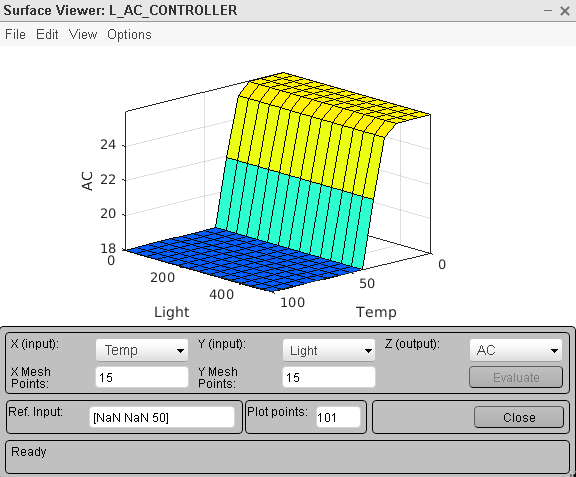
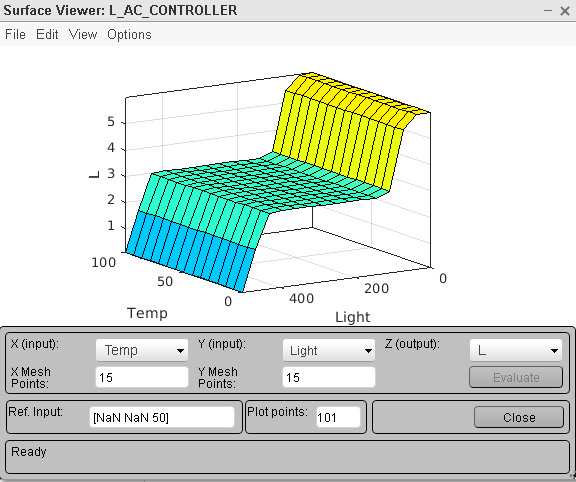
Surface Viewer: LAC_CONTROLLER - X File Edit View Options 24 AC 20 18 0 0 200 50 400 100 Light Temp X (input): Temp Y (input): Light Z (output): AC X Mesh Y Mesh Points: 15 Points: 15 Evaluate Ref. Input: [NaN NaN 50] Plot points: 101 Close ReadySurface Viewer: LAC_CONTROLLER - X File Edit View Options 5 4 WU 2 100 50 0 200 0 400 Temp Light X (input): Temp Y (input): Light Z (output): L X Mesh 15 Y Mesh Points: 15 Evaluate Points: Ref. Input: [NaN NaN 50] Plot points: 101 Close Ready
Step by Step Solution
There are 3 Steps involved in it
1 Expert Approved Answer
Step: 1 Unlock

Question Has Been Solved by an Expert!
Get step-by-step solutions from verified subject matter experts
Step: 2 Unlock
Step: 3 Unlock
 Study Help