







Question: Interpreting scan results 1. What software version was nmap able to identify for the ports (not all may have versions)? What operating system is the
Interpreting scan results
1. What software version was nmap able to identify for the ports (not all may have versions)? What operating system is the host running (general purpose)?
2. As an attacker, what would be your next step in planning to exploit the information you have gathered? What type of server does this system appear to be (web, DNS, etc.)?
3. As a network administrator charged with defending this network, what are some actions you would take in defending this network? Hint: Should all those ports/services be exposed on the Internet?
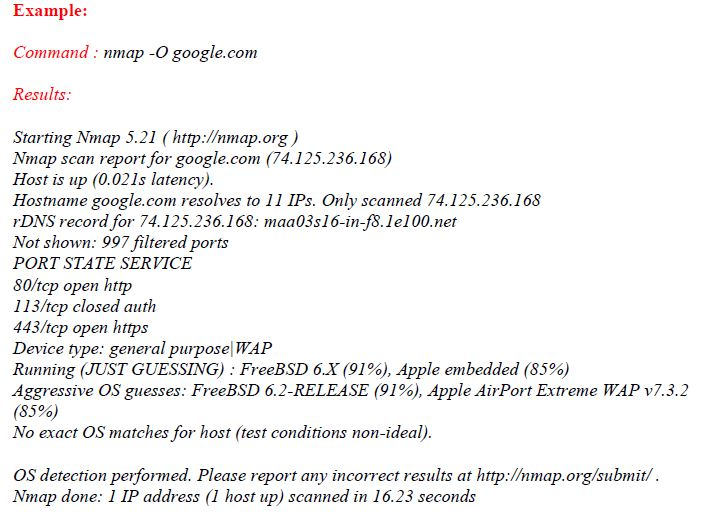
Example: Command: nmap -Ogoogle.com Results Starting Nmap 5.21 (http:/map.org) Nmap scan report for google.com (74.125.236.168) Host is up (0.021s latency) Hostname google.com resolves to 11 IPs. Only scanned 74.125.236.168 rDNS record for 74.125.236.168: maa03s16-in-f8.le100.net Not shown: 997 filtered ports PORT STATE SERVICE 80/tcp open http 113/tcp closed auth 443/tcp open https Device type: general purpose|WAP Running (JUST GUESSING) : FreeBSD 6X (91%), Apple embedded (8596) Aggressive OS guesses: FreeBSD 6.2-RELEASE (91%), Apple AirPort Extreme WAP v7.3.2 (85%) No exact OS matches for host (test conditions non-ideal) OS detection performed. Please report any incorrect results at http:/lnmap.org/submit/. Nmap done: 1 IP address (1 host up) scanned in 16.23 second.s
Step by Step Solution
There are 3 Steps involved in it

Get step-by-step solutions from verified subject matter experts
 Study Help