







Question: InterVLAN Lab: Complete the network configuration shown below using Packet Tracer If you are not sure how to get started, there is a helpful
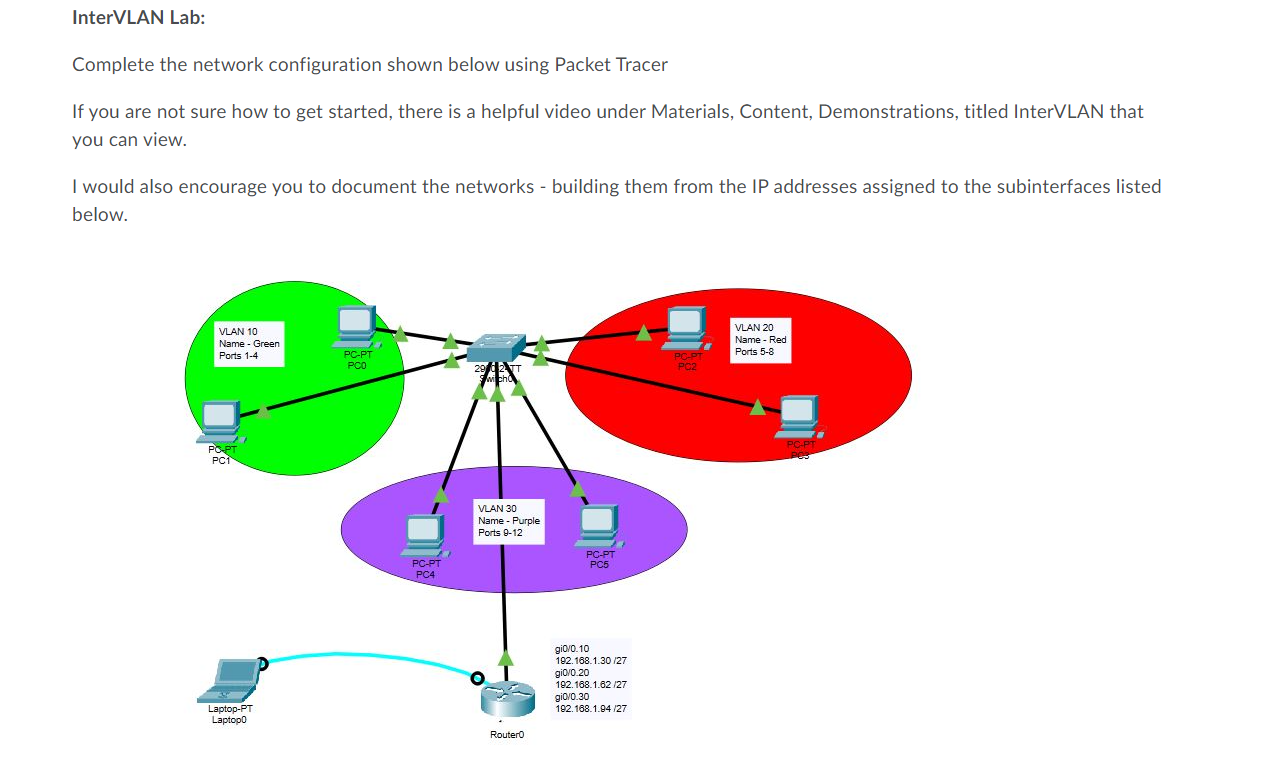
InterVLAN Lab: Complete the network configuration shown below using Packet Tracer If you are not sure how to get started, there is a helpful video under Materials, Content, Demonstrations, titled InterVLAN that you can view. I would also encourage you to document the networks - building them from the IP addresses assigned to the subinterfaces listed below. VLAN 10 Name - Green Ports 1-4 PC-PT PC0 PC-PT VLAN 20 Name - Red Ports 5-8 29 62 TT PC2 Swicho PC-PT PC1 PC-PT PC4 VLAN 30 Name - Purple Ports 9-12 Laptop-PT Laptop0 RouterO PC-PT PC5 gi0/0.10 192.168.1.30/27 192.168.1.62/27 gi0/0.20 gi0/0.30 192.168.1.94/27 PC-PT PC3
Step by Step Solution
There are 3 Steps involved in it

Get step-by-step solutions from verified subject matter experts
 Study Help