







Question: Intro to software engineering Create the UML Design Model (class diagram) based on the requirements stated in Assignment #1 and the artifacts developed in Assignment
Intro to software engineering
Create the UML Design Model (class diagram) based on the requirements stated in Assignment #1 and the artifacts developed in Assignment #1
Create the UML Design Model (sequence diagram) based on the fully dressed use-case you developed in assignment #1 and the design Model class diagram produced in this assignment
Assignment Deliverables:
Submit your assignment as a single PDF document that has the following:
Complete list of classes used in your design model
Complete UML Design model diagram (class diagram)
Complete UML Design model diagram (sequence diagram)
Capture the design model class diagram(s) and Sequence
Diagrams (using shft+PrtScr) and save them as image(s) in the PDF
file that you are submitting as the solution for this assignment.
All screen-shots for the Diagram shall be captured and saved in the homework you are submitting
Create your homework using MS-Word and then generate a PDF file for it; you can download FREE PDF generator to your laptop from http://cutepdf.com/
Requirements:
This assignment will complement Assignment #1 to achieve the following:
In the unified process, artifacts are built incrementally through
iterations and refinements in the different phases. Refine any artifacts you built in Assignment #1 if you see necessary
Create the UML Design Model (class diagram) based on the requirements stated in Assignment #1 and the artifacts developed in Assignment #1
Create the UML Design Model (sequence diagram) based on the fully dressed use-case you developed in assignment #1 and the design Model class diagram produced in this assignment
****Assignment 1 details****
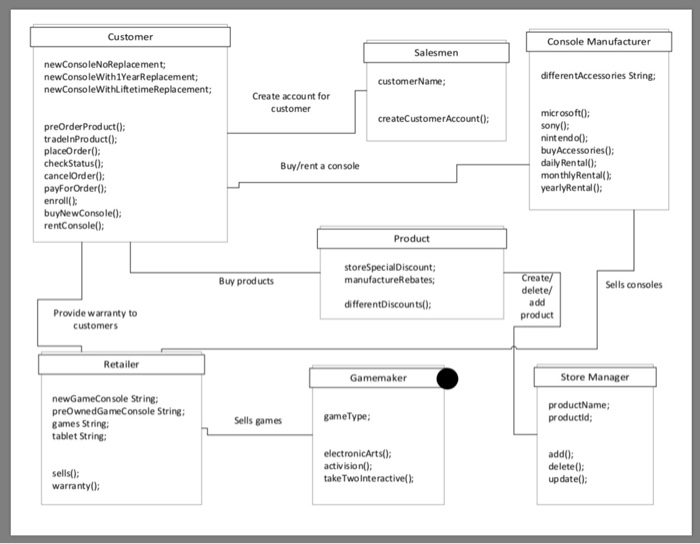
Customer Console Manufacturer Salesmen newConsoleNoReplacement newConsoleWith1YearReplacement newConsoleWithLiftetimeReplacement; differentAccessories String customerName Create account for customer microsoft: sony0 nint endol buyAccessories) daiy RentalO mon thlyRental(h yearlyRental( createCustomerAccount0: tradelnProduct) placeOrder) checkStatus(): cancelOrder): payForOrder() enroll() buyNewConsole() rentConsole: Buy/rent a con sole Product storeSpecialDiscount; manufactureRebates Buy products Sells consoles add product differentDiscounts(): Provide warranty to customers Retailer Gamemaker Store Manager newGameConsole String preOwnedGameConsole String: games St ring: tablet String productName productld Sells games gameType electronicArts) activision take Two Interactive ); add) delete): update) sells0: warranty Customer Console Manufacturer Salesmen newConsoleNoReplacement newConsoleWith1YearReplacement newConsoleWithLiftetimeReplacement; differentAccessories String customerName Create account for customer microsoft: sony0 nint endol buyAccessories) daiy RentalO mon thlyRental(h yearlyRental( createCustomerAccount0: tradelnProduct) placeOrder) checkStatus(): cancelOrder): payForOrder() enroll() buyNewConsole() rentConsole: Buy/rent a con sole Product storeSpecialDiscount; manufactureRebates Buy products Sells consoles add product differentDiscounts(): Provide warranty to customers Retailer Gamemaker Store Manager newGameConsole String preOwnedGameConsole String: games St ring: tablet String productName productld Sells games gameType electronicArts) activision take Two Interactive ); add) delete): update) sells0: warranty
Step by Step Solution
There are 3 Steps involved in it

Get step-by-step solutions from verified subject matter experts
 Study Help