







Question: Introduction In this case study you will implement a simple logging service built on top of a message queue. 2 Specification The task is broken
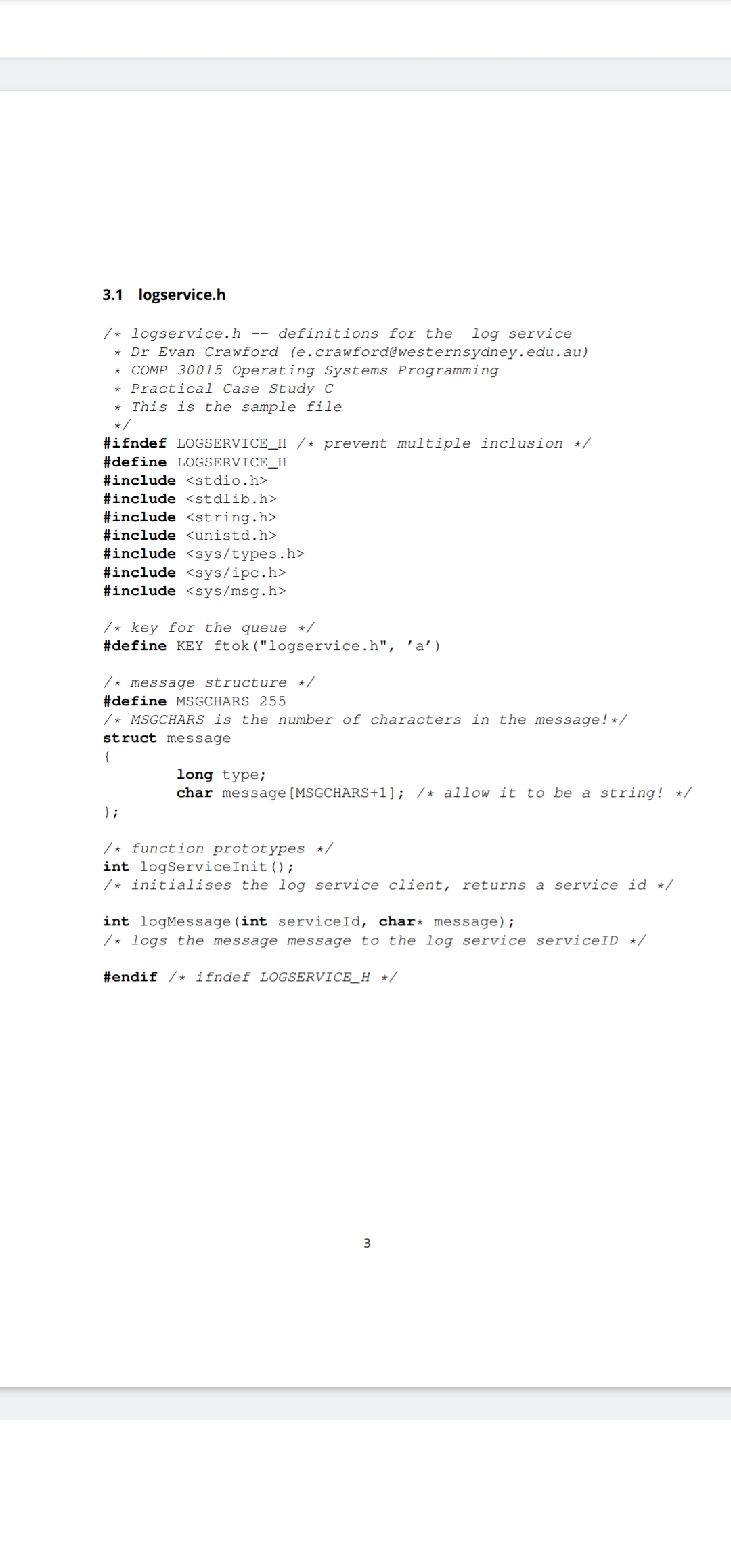
Introduction In this case study you will implement a simple logging service built on top of a message queue. SpecificationThe task is broken into two parts, a message logging server, and a library to log messages. Themessage server listens to a message queue and extracts the log messages from it The libraryprovides a more convenient way access the message queue.You have been provided with a program to test that your library communicates with yourserver You will need to review the lecture notes, and the documentation supplied in Section to implement these programs. Message Logging ServerThe message logging server should attempt to create the message queue, if this fails then itshould terminate with an error message, it should not run if the message queue actually existsIPCEXCL will help hereOnce connected to the message queue, the program should sit in a loop, receiving a message and printing it to the stdout. Messages should be formatted:id: messagewhere id is the type from the message structure and message is the message field.The server should shutdown cleanly ie delete the message queue on receipt of a SIGINTgenerated by pressing control and C keys at the same timeThe sample code files logserviceh and logserverc should form the basis ofyour solution for this part. There are a number of comments in this file to help you structureyour code. Messaging libraryThe messaging library consists of two functions, both defined in logserviceh:int initLogServiceThis function should initialise the message queue to log messages to returningan id if successful, and on error.This function should not attempt to create the message queue, only attach it tothe process
int logMessageint id char messageThis function logs the message passed as the string message to the logservice id It should return on success and on error.When sending a message, the function should encode the processes pid intothe type field of the message, and the string into the message field.It is your choice what to do if the message is too long ie longer thanMSGCHARS sample behaviours include breaking the message up intosmaller pieces or simply rejecting it Whatever the choice, the documentation inthe header file should reflect this choice.The sample code files logserviceh and logservicec should form the basis ofyour solution for this part. Sample CodeIn addition to the sample code files, two additional files have been provided, a makefilethat contains build rules, and a server launch script.The make utility simplifies the build process for large projects, introductory documentation for make is included in the documentation section Sec To use make to automate compile process simply type make at the terminal in the same directory as the otherfiles it will use the rules defined in the makefile to build both the logserver andlogclient executables from the source files, and it will also ensure that thelaunch server.sh script is executable. If none of the source files have changed sincethe last build based on their timestamps the make utility will not rebuild the executables.There should be no need to modify the makefile, its format is a bit fussy so it is safer todownload the file from vUWS than type it upThe launch server.sh script will open the logserver program in a new terminal window for you. This script detects the host operating system and performs an equivalentaction after this detection. There is nop need to understand how this file achieves its goal. logservice logservicec logclientc logserverc makefile
launchserver.sh
Step by Step Solution
There are 3 Steps involved in it
1 Expert Approved Answer
Step: 1 Unlock

Question Has Been Solved by an Expert!
Get step-by-step solutions from verified subject matter experts
Step: 2 Unlock
Step: 3 Unlock
 Study Help