







Question: Introduction The IMDB ( Assignment 2 . xIsx ) data shows the top 1 0 0 0 movies rated on the website IMDB. You will
Introduction
The IMDB AssignmentxIsx data shows the top movies rated on the website IMDB. You will be describing the data using summary and statistics functions as well as creating a userfriendly worksheet to display information based on what a user selects.
Download Assignmentxlsx for the assignment. Follow the instructions below carefully.
Section : Data Preparation
The first task is to apply the text manipulation skills from Chapter to break up column F Genre into the types Comedy, Animation, Romance, and Horror.
a Insert four columns after column F Genre and name a column Comedy, Animation, Romance, and Horror.
b For each column use ISNUMBER and SEARCH to find if a cell contains the genre type that the column is named.
c It should look like this:
tableGI,JKGenreComedy,Animation,Romance,HorrorDramaFALSE,FALSE,FALSE,FALSECrime Drama,FALSE,FALSE,FALSE,FALSEAction Crime, Drama,FALSE,FALSE,FALSE,FALSECrime Drama,FALSE,FALSE,FALSE,FALSECrime Drama,FALSE,FALSE,FALSE,FALSEAction Adventure, Drama,FALSE,FALSE,FALSE,FALSECrime Drama,FALSE,FALSE,FALSE,FALSEBiography Drama, History,FALSE,FALSE,FALSE,FALSEAction Adventure, SciFiFALSE,FALSE,FALSE,FALSEDramaFALSE,FALSE,FALSE,FALSEAction Adventure, Drama,FALSE,FALSE,FALSE,FALSEDrama Romance,FALSE,FALSE,TRUE,FALSEWesternFALSE,FALSE,FALSE,FALSEAction Adventure, Drama,FALSE,FALSE,FALSE,FALSEAction SciFiFALSE,FALSE,FALSE,FALSEBiography Crime, Drama,FALSE,FALSE,FALSE,FALSEAction Adventure, Fantasy,FALSE,FALSE,FALSE,FALSEDramaFALSE,FALSE,FALSE,FALSE
The second task is to apply the text manipulation skills from Chapter to remove "min" from Runtime.
a Insert a new column after Column E Runtime and call it Run Time Minutes.
b Referencing the cells in the Runtime column, use the LEFT and FIND functions to get only the numbers in the cells.
c It should look like the following:
Section : Summarize the Data
In the worksheet called, Summarize the Data you will write functions to answer the following
questions.
Use the COUNTIE function to count the TRUE and FALSE values for each genre type.
a How many movies involved the comedy genre?
b How many movies involved the animation genre?
c How many movies involved the romance genre?
d How many movies involved the horror genre?
e Apply conditional formatting to the counts of each genre to show a data bar.
In the section B: Answer Questions, use the functions indicated to answer to the
following questions.
a What is the maximum Gross total money made by a movie? Use the MAX
function.
b What is the oldest movie on in the top according to the ReleasedYear? Use the
MIN function.
c What is the most frequently used rating? Use the MODE function.
i What is the average rating?
ii Explain why you might use one measure over the other in analysis?
d What are the average IMDBRatings for the following Certificates?
i
ii
iii. PG
ive How many movies did not release a number for Gross total revenue made Use
COUNTBLANK
ection : Create an Interactive Movie Fact Sheet
Duplicate the imdbtop worksheet and call the worksheet Table. Use Ctrl T to make
the data a table and name the table movies.
a This will be the data that you will refence in the Movie Fact Sheet.
b It will look like this:
In the Movie Fact Sheet worksheet cell A create a dropdown list of all the titles in the
SeriesTitle column. Use data validation to create the dropdown mentioned in chapter
of the book
a Create an input Message Title: Movie and Input message: Select a movie.
Use Index and match functions from chapters and of the book to fill in the information
for ReleasedYear, Certificate, Runtime, IMDBRating, and Gross. Be sure to reference cell
A the dropdown list in your formula.
a Format the values to the right side.
b Format the Gross value as currency with no decimals.
Make cell A equal the ReleaseYear cell B to get a dynamic Title.
In cell A use the FILTER function to get a list of movies titles from the SeriesTitle column
from the same year of the movie chosen in the dropdown list.
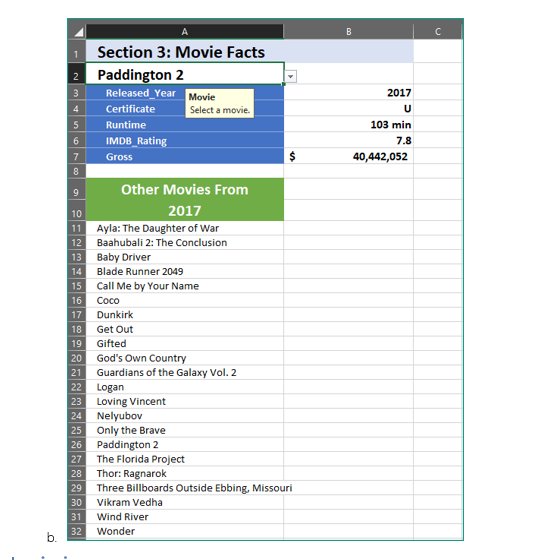
a The finished result should look like this when a movie is selected:tableABCSection : Movie Fact,,Paddington grad,ReleasedYear Movie,Certificate Select a movie.,URuntime,min,IMDBRating,Gross,Other Movies From,,Ayla: The Daughter of War,,Baahubali : The Conclusion,,Baby Driver,,Blade Runner Call Me by Your Name,,Coco,,Dunkirk,,Get Out,,Gifted,,God's
Step by Step Solution
There are 3 Steps involved in it
1 Expert Approved Answer
Step: 1 Unlock

Question Has Been Solved by an Expert!
Get step-by-step solutions from verified subject matter experts
Step: 2 Unlock
Step: 3 Unlock
 Study Help