



Question: Introduction to Computer Graphics using OpenGL Can someone tell me what shall I do to connect between the LineClipping, drawing the line, and rectangle function?
Introduction to Computer Graphics using OpenGL
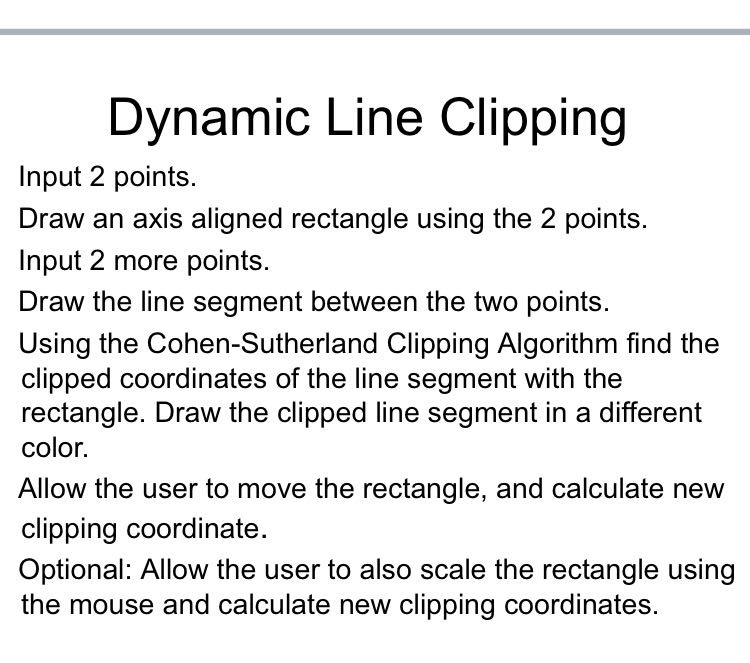
Can someone tell me what shall I do to connect between the LineClipping, drawing the line, and rectangle function? I wrote the code below for the above question:
#include
#include
const int screenWidth = 800; const int screenHeight = 600;
double xmax, xmin, ymax, ymin; typedef int OutCode; double xvmin, yvmin, xvmax, yvmax;
int clicks = 0;
Point positions[4];
bool flag = false; const int INSIDE = 0; // 0000 const int LEFT = 1; const int RIGHT = 2; const int BOTTOM = 4; // 0100 const int TOP = 8;
OutCode ComputeOutCode(double x, double y) { OutCode code;
code = INSIDE;
if (x xmax) code |= RIGHT; if (y ymax) code |= TOP;
return code; }
void LineClipping(double x0, double y0, double x1, double y1) { OutCode outcode0 = ComputeOutCode(x0, y0); OutCode outcode1 = ComputeOutCode(x1, y1); bool accept = false; bool done = false;
while (done) { if (!(outcode0 | outcode1)) // Trivially accept and get out of loop { accept = true; done = true; break; }
else if (outcode0 & outcode1) // Trivially reject and get out of loop { done = true; break; }
else { // failed both tests, so calculate the line segment to clip // from an outside point to an intersection with clip edge double x, y;
// At least one endpoint is outside the clip rectangle; pick it. OutCode outcodeOut = outcode0 ? outcode0 : outcode1;
// Now find the intersection point; if (outcodeOut & TOP) { // point is above the clip rectangle x = x0 + (x1 - x0) * (ymax - y0) / (y1 - y0); y = ymax; } else if (outcodeOut & BOTTOM) { // point is below the clip rectangle x = x0 + (x1 - x0) * (ymin - y0) / (y1 - y0); y = ymin; } else if (outcodeOut & RIGHT) { // point is to the right of clip rectangle y = y0 + (y1 - y0) * (xmax - x0) / (x1 - x0); x = xmax; } else if (outcodeOut & LEFT) { // point is to the left of clip rectangle y = y0 + (y1 - y0) * (xmin - x0) / (x1 - x0); x = xmin; }
if (outcodeOut == outcode0) { x0 = x; y0 = y; outcode0 = ComputeOutCode(x0, y0); } else { x1 = x; y1 = y; outcode1 = ComputeOutCode(x1, y1); } } } if (accept) { // window to viewport mapping /* double sx = (xvmax - xvmin) / (xmax - xmin);// scale parameter in x direction double sy = (yvmax - yvmin) / (ymax - ymin);// scale parameter in y direction double vx0 = xvmin + (x0 - xmin)*sx; double vy0 = yvmin + (y0 - ymin)*sy; double vx1 = xvmin + (x1 - xmin)*sx; double vy1 = yvmin + (y1 - ymin)*sy;*/ //draw a red color viewport glColor3f(1.0, 0.0, 0.0); glBegin(GL_LINE_LOOP); glVertex2f(xmin, ymin); glVertex2f(xmax, ymin); glVertex2f(xmax, ymax); glVertex2f(xmin, ymax); glEnd(); glColor3f(0.0, 0.0, 1.0); glBegin(GL_LINES); glVertex2d(x0, y0); glVertex2d(x1, y1); glEnd(); }
}
//>>>>>>>>>>>>>>>>>>> void myInit(void) { glClearColor(1.0, 1.0, 1.0, 0.0); // set white background color glColor3f(0.4f, 0.7f, 0.2f); // set the drawing color glPointSize(8.0); // a dot is 4 by 4 pixels
}
void setWindow(GLdouble left, GLdouble right, GLdouble bottom, GLdouble top) { glMatrixMode(GL_PROJECTION); glLoadIdentity(); gluOrtho2D(left, right, bottom, top); }
// Set the screen viewport using thisfunction void setViewport(GLint left, GLint right, GLint bottom, GLint top) { glViewport(left, bottom, right - left, top - bottom); }
//>>>>>>>>>>>>>>>> void myDisplay(void) { glClear(GL_COLOR_BUFFER_BIT); // clear the screen
setWindow(0, screenWidth, 0, screenHeight); setViewport(0, screenWidth, 0, screenHeight);
xmax = double(positions[0].x); xmin = double(positions[1].x); ymax = double(positions[0].y); ymin = double(positions[1].y);
if (clicks >1) { { glBegin(GL_LINE_LOOP); glVertex2i(positions[0].x, positions[0].y); glVertex2i(positions[1].x, positions[0].y); glVertex2i(positions[1].x, positions[1].y); glVertex2i(positions[0].x, positions[1].y); glEnd();
} } glColor3f(0.0, 1.0, 0.0);
glBegin(GL_LINES); for (int i = 0; i
glVertex2i(positions[i].x, positions[i].y); } glEnd();
// draw a blue colored window
for (int i = 0; i
void myKeyboard(unsigned char key, int x, int y) {
if (key == 'i') flag = true;
} void myMouse(int button, int state, int x, int y) { if (button == GLUT_RIGHT_BUTTON && state == GLUT_DOWN) { if (clicks == 4) clicks = 0; positions[clicks] = Point(x, screenHeight - y); clicks++; }
if (button == GLUT_MIDDLE_BUTTON && state == GLUT_DOWN) clicks = 0;
glutPostRedisplay(); }
void main(int argc, char** argv) { glutInit(&argc, argv); // initialize the toolkit glutInitDisplayMode(GLUT_DOUBLE | GLUT_RGB | GLUT_MULTISAMPLE); // set display mode glutInitWindowSize(screenWidth, screenHeight); // set window size glutInitWindowPosition(100, 100); // set window position on screen glutCreateWindow("cohen sutherland clipping"); // open the screen window glutDisplayFunc(myDisplay); // register redraw function glutMouseFunc(myMouse); //glutMotionFunc(myMouseMove); //glutKeyboardFunc(myKeyboard);
myInit(); glutMainLoop(); // go into a perpetual loop }
Dynamic Line Clipping Input 2 points. Draw an axis aligned rectangle using the 2 points. Input 2 more points Draw the line segment between the two points Using the Cohen-Sutherland Clipping Algorithm find the clipped coordinates of the line segment with the rectangle. Draw the clipped line segment in a different color. Allow the user to move the rectangle, and calculate new clipping coordinate. Optional: Allow the user to also scale the rectangle using the mouse and calculate new clipping coordinates
Step by Step Solution
There are 3 Steps involved in it

Get step-by-step solutions from verified subject matter experts