







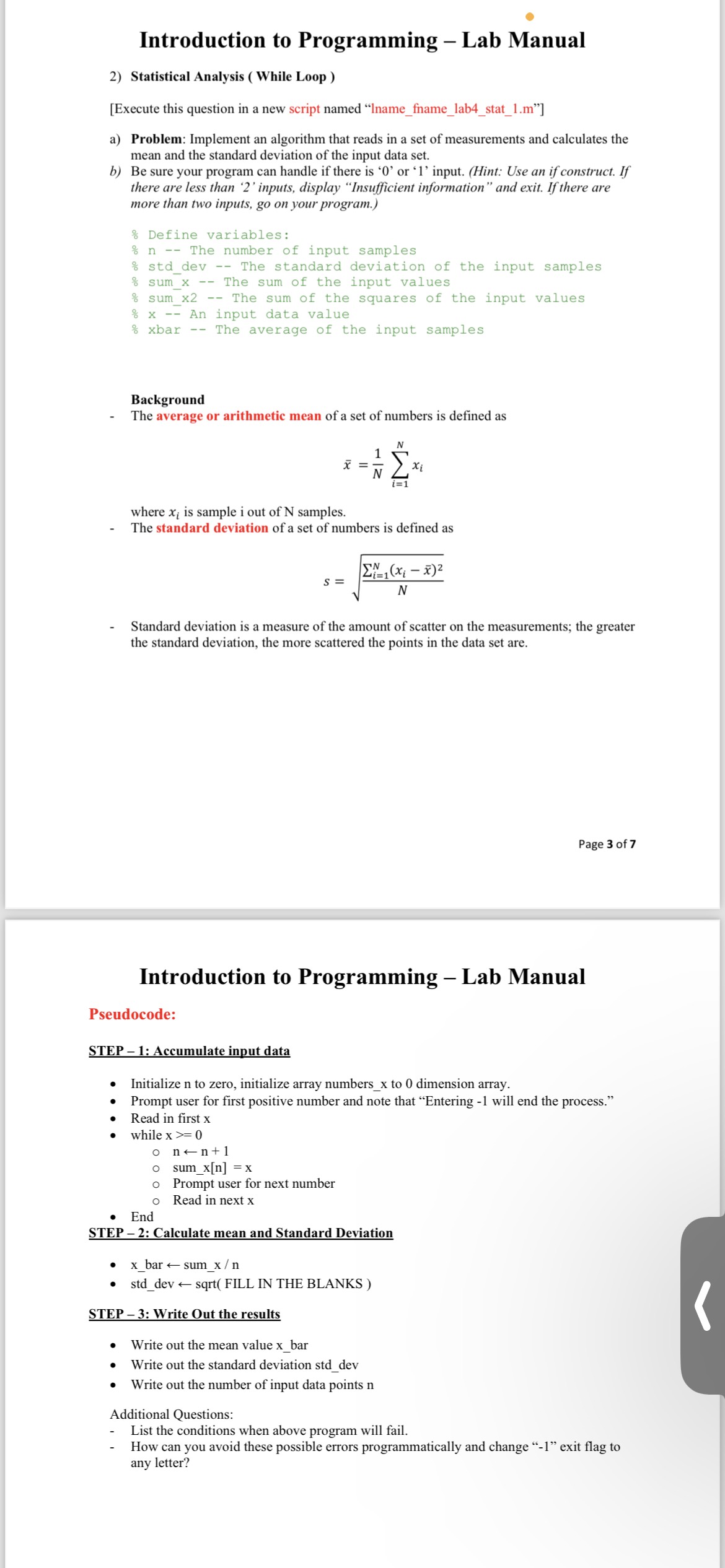
Question: Introduction to Programming - Lab Manual Statistical Analysis ( While Loop ) [ Execute this question in a new script named Iname _ fname _
Introduction to Programming Lab Manual
Statistical Analysis While Loop
Execute this question in a new script named "Inamefnamelabstatm
a Problem: Implement an algorithm that reads in a set of measurements and calculates the
mean and the standard deviation of the input data set.
b Be sure your program can handle if there is or input. Hint: Use an if construct. If
there are less than inputs, display "Insufficient information" and exit. If there are
more than two inputs, go on your program.
Define variables:
The number of input samples
dev The standard deviation of the input samples
sum The sum of the input values
sum The sum of the squares of the input values
An input data value
xbar The average of the input samples
Background
The average or arithmetic mean of a set of numbers is defined as
where is sample i out of N samples.
The standard deviation of a set of numbers is defined as
Standard deviation is a measure of the amount of scatter on the measurements; the greater
the standard deviation, the more scattered the points in the data set are.
Introduction to Programming Lab Manual
Pseudocode:
STEP : Accumulate input data
Initialize to zero, initialize array numbersx to dimension array.
Prompt user for first positive number and note that "Entering will end the process."
Read in first
while
@nlarrn
@
sumxn x
Prompt user for next number
Read in next
End
STEP : Calculate mean and Standard Deviation
bar larr sumx n
stddev larr sqrt FILL IN THE BLANKS
STEP : Write Out the results
Write out the mean value xbar
Write out the standard deviation stddev
Write out the number of input data points
Additional Questions:
List the conditions when above program will fail.
How can you avoid these possible errors programmatically and change exit flag to
any letter?
Step by Step Solution
There are 3 Steps involved in it
1 Expert Approved Answer
Step: 1 Unlock

Question Has Been Solved by an Expert!
Get step-by-step solutions from verified subject matter experts
Step: 2 Unlock
Step: 3 Unlock
 Study Help