



Question: Introduction Welcome to the optional challenge activity, your challenge response is to be submitted as a single word or pdf document with the associated Packet
Introduction Welcome to the optional challenge activity, your challenge response is to be submitted as a single word or pdf document with the associated Packet Tracer file via Canvas Dropbox. This activity can be used as a make up for your Hands on or Written Evaluation # grade or can be completed for additional practice.
Individual Challenge outline To demonstrate your networking expertise, you have been asked to complete the wired computer network solution for the included scenario.
Scenario
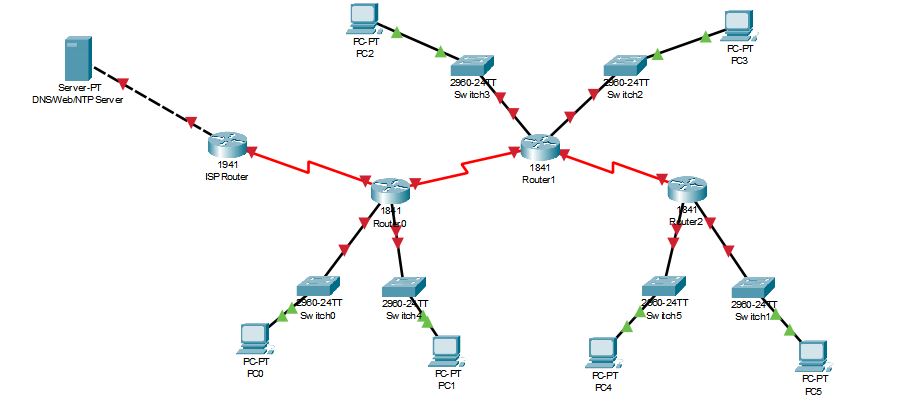
Three routers are connected via a serial interface with one also connecting to the ISPs router for internet connection. Network switches on each router support LANs in total corresponding to departments Marketing users Sales users Accounts users Payroll users HR and IT users with the following requirements:
Select a private IP address range for your network and use the th address in the subnet of your choice from public for the DNSWebNTP sever, since Sales and Marketing are larger departments use DHCP to assign the addresses while the other IP assignment can be static.
Use the appropriate subnet sizes that makes the best use of address space with minimal waste. Router serial interfaces will all use
For static assignments use the first available IP addresses for interfaces and the last possible valid network address for the host PCs add a second PC to demonstrate DHCP as needed with appropriate default gateway and DNS addresses.
Secure access to all equipment with relevant passwords and prompts. Name the switches to indicate the department PCs they connect.
Use the dynamic routing protocol of your choice and static routes where necessary to connect to the internet via the ISP router.
Configure NTP CDP with security in mind and use ACLs to restrict Payroll and Accounts from having any Internet access except to send and receive email.
Include in your submission document
IP configuration table showing equipment interfaces and IP assignments.
Subnets and passwords used.
Your running configurations showing the configuration for each network component
Step by Step Solution
There are 3 Steps involved in it
1 Expert Approved Answer
Step: 1 Unlock

Question Has Been Solved by an Expert!
Get step-by-step solutions from verified subject matter experts
Step: 2 Unlock
Step: 3 Unlock