







Question: IPv4 Multicasting For this project you will write both a UDP server (the multicast source or beacon) and a client program that will join the
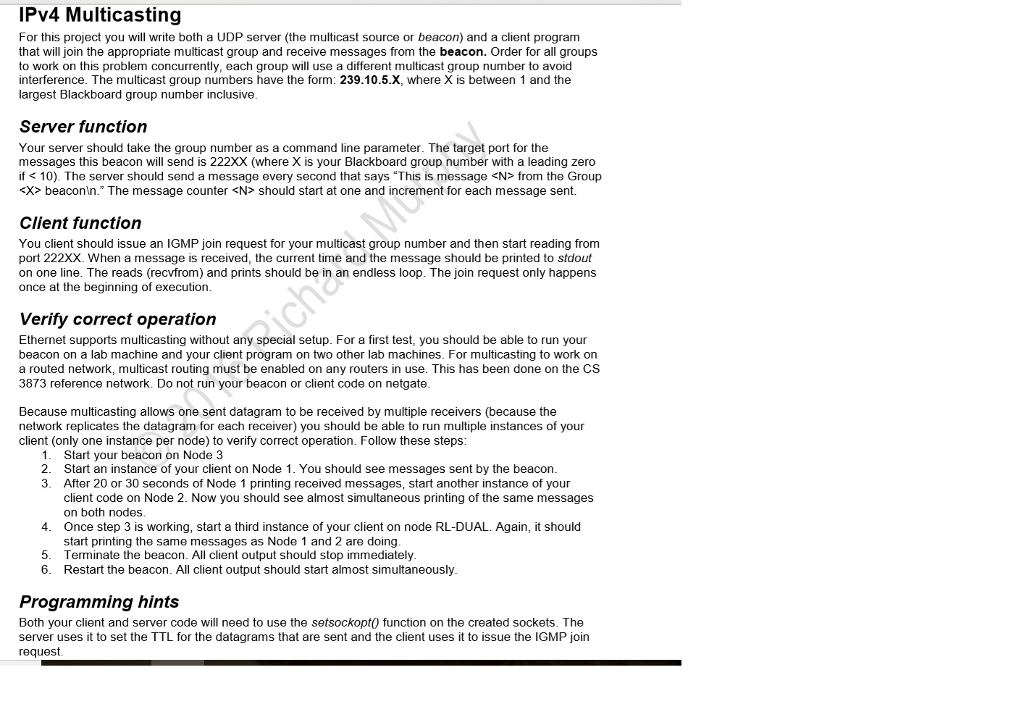
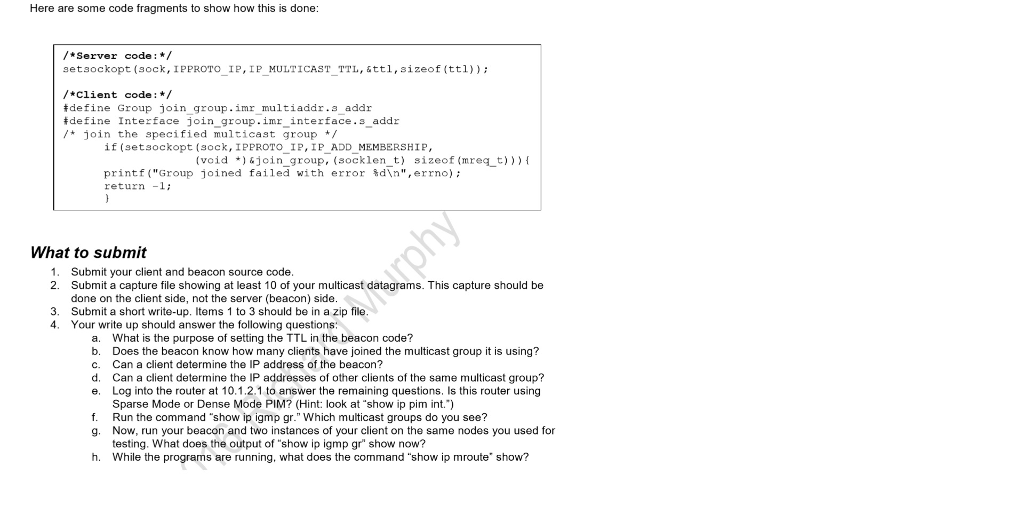
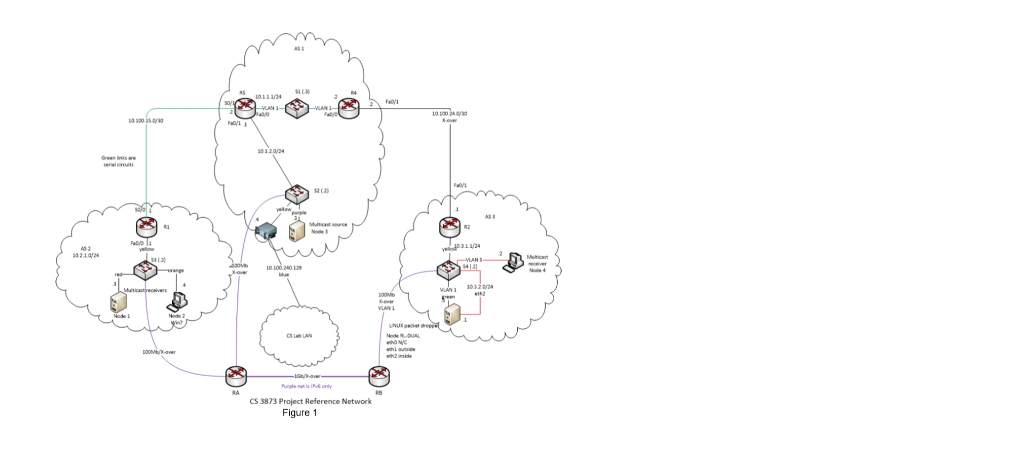
IPv4 Multicasting For this project you will write both a UDP server (the multicast source or beacon) and a client program that will join the appropriate multicast group and receive messages from the beacon. Order for all groups to work on this problem concurrently, each group will use a different multicast group number to avoid interference. The multicast group numbers have the form: 239.10.5.X, where X is between 1 and the largest Blackboard group number inclusive Server function Your server should take the group number as a command line parameter. The target port for the messages this beacon will send is 222XX (where X is your Blackboard group number with a leading zero if from the Group Xbeaconln. The message counter should start at one and increment for each message sent. Client function You client should issue an IGMP join request for your multicast group number and then start reading from port 222XX. When a message is received, the current time and the message should be printed to stdout on one line. The reads (recvfrom) and prints should be in an endless loop. The join request only happens once at the beginning of execution Verify correct operation Ethernet supports multicasting without any special setup. For a first test, you should be able to run your beacon on a lab machine and your client program on two other lab machines. For multicasting to work on a routed network, multicast routing must be enabled on any routers in use. This has been done on the CS 3873 reference network. Do not run your beacon or client code on netgate Because multicasting allows one sent datagram to be received by multiple receivers (because the network replicates the datagram for each receiver) you should be able to run multiple instances of your client (only one instance per node) to verify correct operation. Follow these steps 1. 2. 3. Start your beacon on Node 3 Start an instance of your client on Node 1. You should see messages sent by the beacon After 20 or 30 seconds of Node 1 printing received messages, start another instance of your client code on Node 2. Now you should see almost simultaneous printing of the same messages on both nodes Once step 3 is working, start a third instance of your client on node RL-DUAL. Again, it should start printing the same messages as Node 1 and 2 are doing Terminate the beacon. All client output should stop immediately Restart the beacon. All client output should start almost simultaneously 4. 5. 6. Programming hints Both your client and server code will need to use the setsockopt0 function on the created sockets. The server uses it to set the TTL for the datagrams that are sent and the client uses it to issue the IGMP join request IPv4 Multicasting For this project you will write both a UDP server (the multicast source or beacon) and a client program that will join the appropriate multicast group and receive messages from the beacon. Order for all groups to work on this problem concurrently, each group will use a different multicast group number to avoid interference. The multicast group numbers have the form: 239.10.5.X, where X is between 1 and the largest Blackboard group number inclusive Server function Your server should take the group number as a command line parameter. The target port for the messages this beacon will send is 222XX (where X is your Blackboard group number with a leading zero if from the Group Xbeaconln. The message counter should start at one and increment for each message sent. Client function You client should issue an IGMP join request for your multicast group number and then start reading from port 222XX. When a message is received, the current time and the message should be printed to stdout on one line. The reads (recvfrom) and prints should be in an endless loop. The join request only happens once at the beginning of execution Verify correct operation Ethernet supports multicasting without any special setup. For a first test, you should be able to run your beacon on a lab machine and your client program on two other lab machines. For multicasting to work on a routed network, multicast routing must be enabled on any routers in use. This has been done on the CS 3873 reference network. Do not run your beacon or client code on netgate Because multicasting allows one sent datagram to be received by multiple receivers (because the network replicates the datagram for each receiver) you should be able to run multiple instances of your client (only one instance per node) to verify correct operation. Follow these steps 1. 2. 3. Start your beacon on Node 3 Start an instance of your client on Node 1. You should see messages sent by the beacon After 20 or 30 seconds of Node 1 printing received messages, start another instance of your client code on Node 2. Now you should see almost simultaneous printing of the same messages on both nodes Once step 3 is working, start a third instance of your client on node RL-DUAL. Again, it should start printing the same messages as Node 1 and 2 are doing Terminate the beacon. All client output should stop immediately Restart the beacon. All client output should start almost simultaneously 4. 5. 6. Programming hints Both your client and server code will need to use the setsockopt0 function on the created sockets. The server uses it to set the TTL for the datagrams that are sent and the client uses it to issue the IGMP join request
Step by Step Solution
There are 3 Steps involved in it

Get step-by-step solutions from verified subject matter experts
 Study Help