







Question: IS 3 0 0 for Spring 2 0 2 4 Management Information Systems - Homework 3 on Excel Lesson 2 Learning Objectives: Spreadsheet Modeling and
IS for Spring
Management Information Systems Homework on Excel Lesson
Learning Objectives: Spreadsheet Modeling and Analysis Using Excel
What if Analysis Using Scenario Manager
What if Analysis Using Goal Seek
Estimating Revenue with Markdowns
Determining Future Value of retirement investments
Determining Present Value of Investment goals and College Tuition
Determine your grades, estimating the overall semester grade
This homework assignment uses the following Excel file found on Canvas under Week File
Excel Lesson for Homework Excel Data file. Note: You must turn in an Excel file, no PDF
format will be accepted.
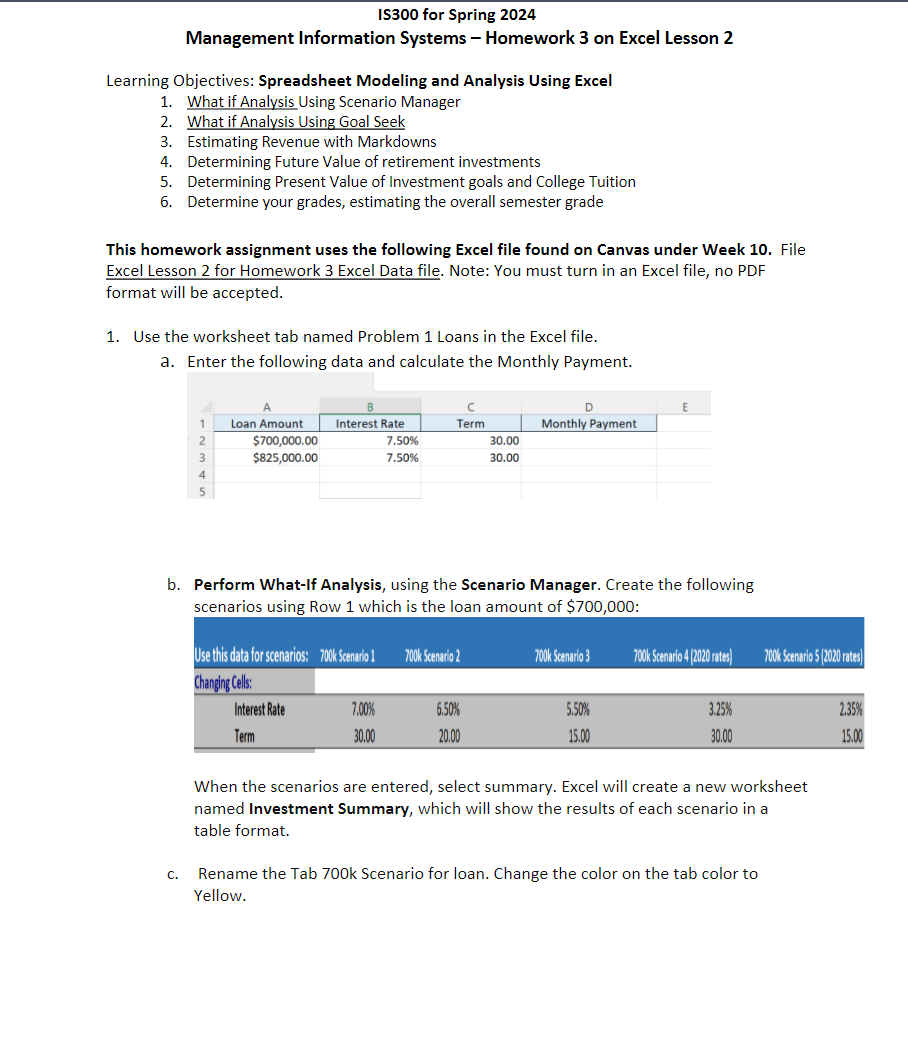
Use the worksheet tab named Problem Loans in the Excel file.
a Enter the following data and calculate the Monthly Payment.
b Perform WhatIf Analysis, using the Scenario Manager. Create the following
scenarios using Row which is the loan amount of $ :
When the scenarios are entered, select summary. Excel will create a new worksheet
named Investment Summary, which will show the results of each scenario in a
table format.
c Rename the Tab k Scenario for loan. Change the color on the tab color to
Yellow.
Step by Step Solution
There are 3 Steps involved in it
1 Expert Approved Answer
Step: 1 Unlock

Question Has Been Solved by an Expert!
Get step-by-step solutions from verified subject matter experts
Step: 2 Unlock
Step: 3 Unlock
 Study Help