







Question: IS3063 DATABASE. PLEASE WRITE THIS IN SQL QUERY. THANK YOU 2. List the name and list price of products that were sold on a sale
IS3063 DATABASE. PLEASE WRITE THIS IN SQL QUERY. THANK YOU
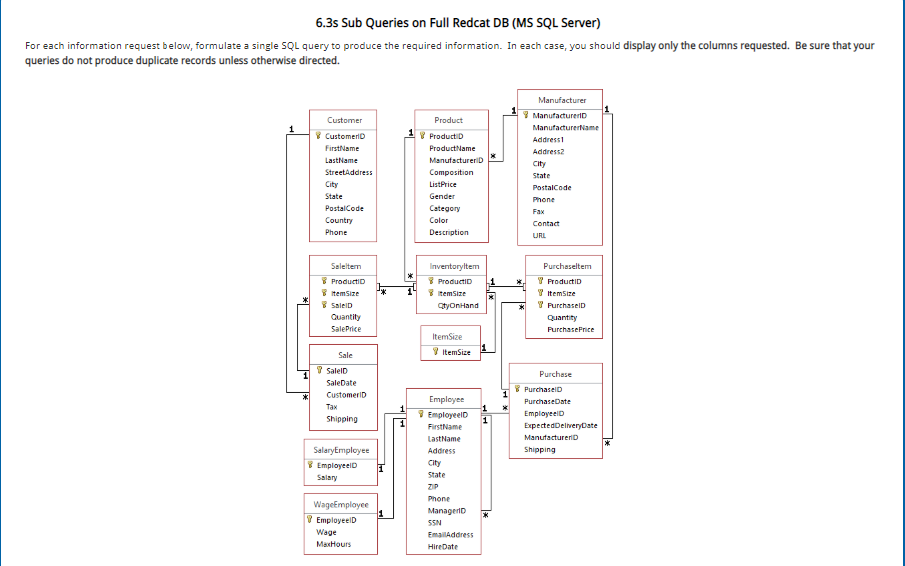
2. List the name and list price of products that were sold on a sale for which the shipping cost was over $60. (use two levels of subqueries in where clauses.)
3. List Employees (first and last names) and their hire dates of employees who were hired before their managers. (whose hire date is earlier than their managers hire date). Use a subquery in the where clause.
4. Count the number of unique values of the set of values of PurchaseDate and EmployeeID from the Purchase table. (Use a subquery in FROM) (name column NumbOfEmpPurch)
5. What is the total amount of purchases made in 2015 made by each employee? Include EmployeeID, First and Last names and total amount. (Use a join with a select subquery in the FROM clause. Remember to name the subquery.) Name the column TotalPurchases. When you create it, use both the round and sum functions, i.e. Round (Sum ( ... ) , 2).
6. What is the total amount of purchases made in 2015 made by each employee. Include EmployeeID, First and Last names, and total amount. (Use a select subquery in the SELECT clause). Name the column TotalPurchases. When you create it, use both the round and sum functions, i.e. Round (Sum ( ... ) , 2).
7. What is the largest purchase made by each employee? Include EmployeeID, FirstName, LastName and amount of the largest purchase. (Name it MaxAmt). (Hint, use a subquery in the FROM clause to total each Purchase. To create a total use the Sum ( ) function. Use a MAX function in the main select query to get the max on the total for each Purchase. Use joins in main query and subquery. ) Note: Due to an idiosyncracy of SQL Server, to evaluate the problem correctly, you must also use the round function to elimnate extraneous decimal digits, i.e. to create the total use Round (Sum (....), 2). Otherwise you may not get full credit.
6.3s Sub Queries on Full Redcat DB (MS SQL Server) For each information request below, formulate a single SQL query to produce the required information. In each case, you should display only the columns requested. Be sure that your queries do not produce duplicate records unless otherwise directed Product Addressl ManutacturerD City City Gender URL ProductID ProductID ProductiD ItemSize SaleID Purchase!D ItemSize SalelD Purchase PurchaselD CustomerID FirstName 1 City tate Manager!D Wage
Step by Step Solution
There are 3 Steps involved in it

Get step-by-step solutions from verified subject matter experts
 Study Help