







Question: It is important for project management professionals to be able to review numbers and report on what they are saying. It is also important for
It is important for project management professionals to be able to review numbers and report on what they are saying. It is also important for you, as a project manager, to be able to use software that helps you keep timelines and projects running on time and smoothly. This assignment will continue to help prepare you for your responsibilities.
As the project manager, you have been asked to create an initial project schedule for a project known as the Technology Refresh Project introduced in Topic 1. The prior project manager assembled the project information and put it onto a spreadsheet. Based on this information, you are to create an initial project schedule using Microsoft Project.
Open the attached document "Project Durations and WBS Template." In this Microsoft Excel workbook file, you will notice a series of project tasks; optimistic, most likely, and pessimistic durations for each lowest-level task; and predecessor information. It is already decomposed into a logical Work Breakdown Structure.Do not alter this information.
In the "PERT Expected Duration (days)" column, calculate the PERT Expected Duration for each lowest-level task. Round the duration entries to the nearest integer.
Help Creating a new MPP file (i.e., a Microsoft Project file). Enter the tasks shown in the "Project Durations and WBS Template" into the "Initial Project Schedule" (i.e., Microsoft Project file) you are creating.
Based on the task hierarchy in the "Project Durations and WBS Template" file, demote the appropriate tasks using the green indent and outdent arrows in the TASK Ribbon, SCHEDULE group. Notice how the WBS field is automatically updated as tasks are indented and outdented. Be sure that your Microsoft Project task hierarchy exactly matches the task hierarchy in the "Project Durations and WBS Template."
Based on your computed PERT Expected Durations from above, enter these durations in the "Duration" field in the Microsoft Project file. Note the following:
- Be sure that you do not directly enter durations into Microsoft Project summary tasks (i.e., the bold tasks). Note that the Microsoft Project summary task durations and dates are automatically updated as durations are entered into the lowest level tasks.
- Be sure that lowest level task durations are entered as whole numbers.
Based on the predecessor information in "Project Durations and WBS Template," update the "Predecessor" column in "Initial Project Schedule." Note the following:
- The "Successor" column updates automatically, as predecessors are entered. Thus, there is no need to enter any information in the Successor column.
- Be sure that the summary tasks (i.e., the bold tasks) do not contain predecessors or successors. Predecessors and successors are only entered at the lowest level task level.
- Ensure that lowest level tasks have at least one predecessor (except the first task) and at least one successor (except the last task).
Display the critical path. Go to the FORMAT ribbon and check the "Critical Tasks" box in the BAR STYLES group. Note that the critical path task bars will turn red. Also, take note that the Total Slack column contains 0 days for the critical path tasks.
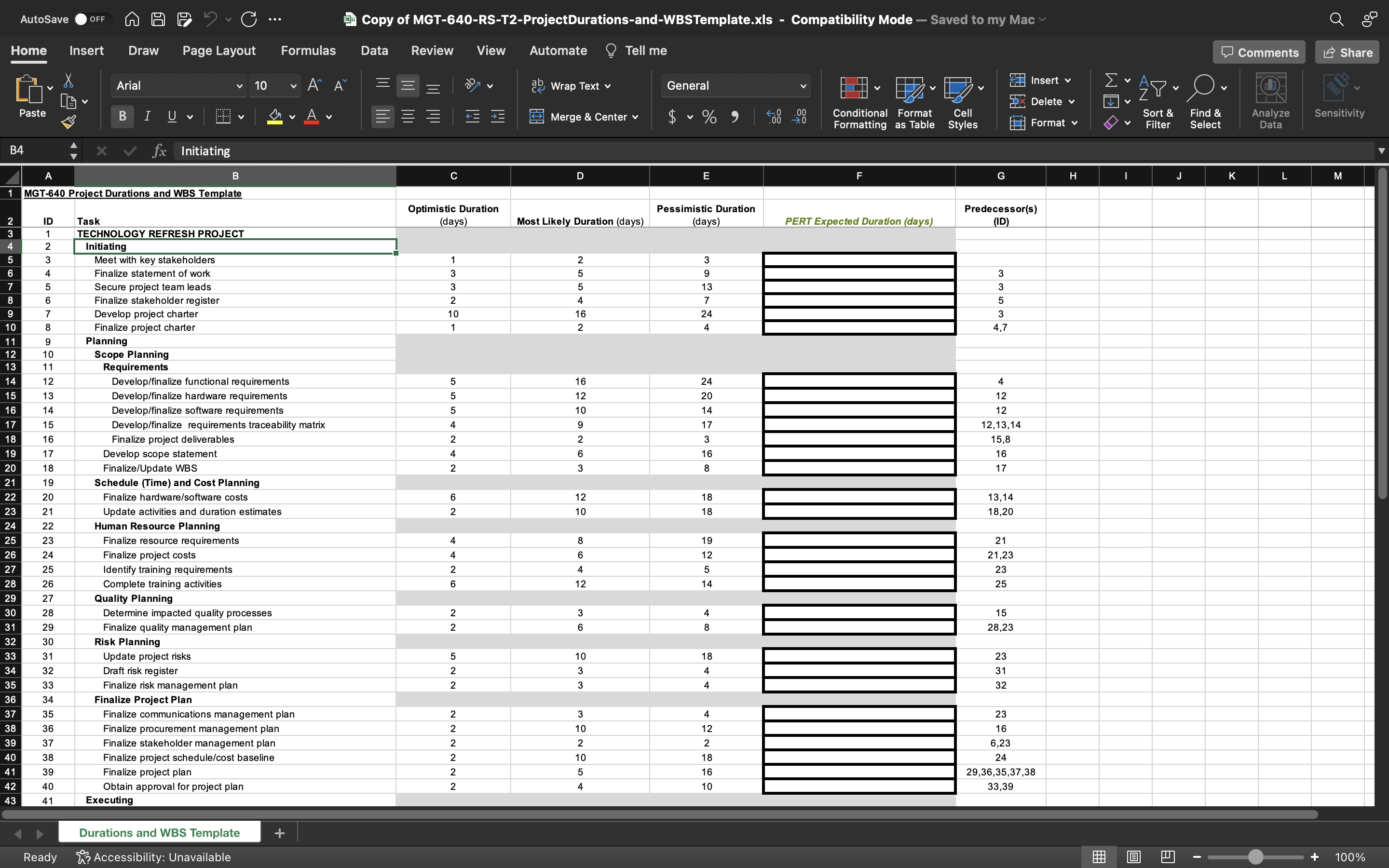
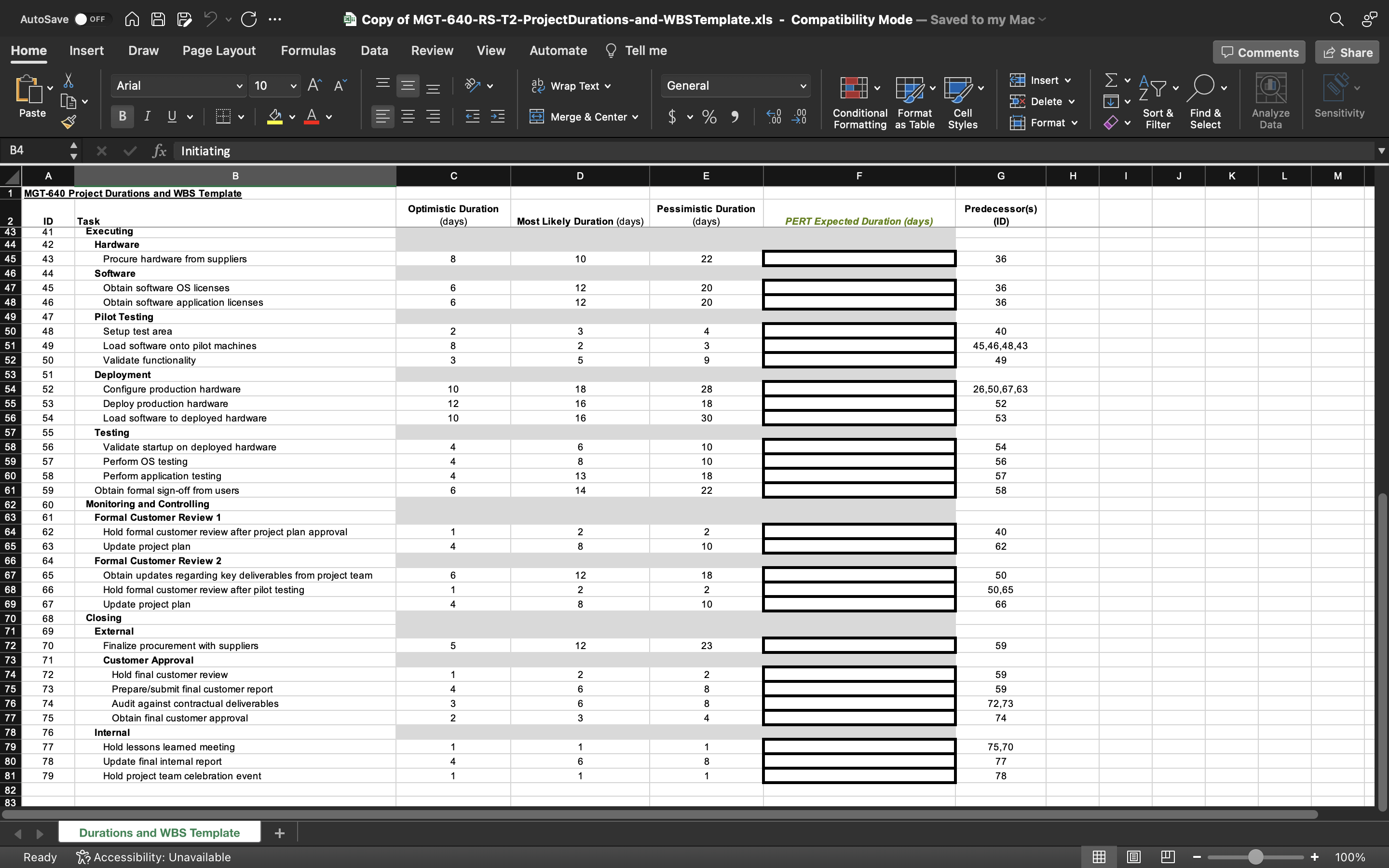
AutoSave OFF A A F C ... Copy of MGT-640-RS-T2-ProjectDurations-and-WBSTemplate.xIs - Compatibility Mode - Saved to my Mac Home Insert Draw Page Layout Formulas Data Review View Automate ? Tell me Comments L Share Arial 10 A ab Wrap Text v General Insert v Delete Sort & Analyze Paste BIUV A Merge & Center v $ ~ % " Conditional Format Cell Find & Sensitivity Formatting as Table Styles Format Filter Select Data B4 X V fx Initiating B C D E G H K M MGT-640 Project Durations and WBS Template Optimistic Duration Pessimistic Duration Predecessor(s) Task (days) Most Likely Duration (days) days PERT Expected Duration (days) (ID TECHNOLOGY REFRESH PROJECT D UI AWN Initiating Meet with key stakeholders Finalize statement of work Secure project team lead - ON W W - NOACOIN Finalize stakeholder register Develop project charter Finalize project charter Planning Scope Planning 11 Requirements Develop/finalize functional requirements 4 Develop/finalize hardware requirements 12 Develop/finalize software requirements 12 Develop/finalize requirements traceability matrix 2, 13, 14 WONOONO Finalize project deliverables 15 ,8 17 Develop scope statement 16 17 Finalize/Update WBS 19 Schedule (Time) and Cost Planning 20 Finalize hardware/software costs 13, 14 NO 21 Update activities and duration estimates 18,20 22 Human Resource Planning Finalize resource requirements 21 Finalize project costs 21,23 ONAA NAO OO 25 Identify training requirements 23 26 Complete training activities 25 27 Quality Planning 28 Determine impacted quality processes 15 O W NN 29 Finalize quality management plan 28,23 30 Risk Planning 31 Update project risks 23 32 AA OO 31 Draft risk register w w 35 33 32 Finalize risk management plan 34 Finalize Project Plan 35 Finalize communications management plan 23 16 38 36 Finalize procurement management plan 39 37 6.23 Finalize stakeholder management plan ACONOW O O OO N N A NNNNNN 40 38 24 Finalize project schedule/cost baseline 41 39 Finalize project plan 29,36,35,37,38 42 40 Obtain approval for project plan 33,39 43 41 Executing Durations and WBS Template + 100% Ready K? Accessibility: UnavailableAutoSave OFF A A F C ... Copy of MGT-640-RS-T2-ProjectDurations-and-WBSTemplate.xIs - Compatibility Mode - Saved to my Mac Home Automate ? Tell me Comments L Share Insert Draw Page Layout Formulas Data Review View Insert v Arial 10 A ab Wrap Text v General Delete Cell Sort & $ ~ % " Conditional Format Find & Analyze Sensitivity Paste BIUV A Merge & Center v Formatting as Table Styles Format Filter Select Data B4 X V fx Initiating K M B C D E G H MGT-640 Project Durations and WBS Template Optimistic Duration Pessimistic Duration Predecessor(s) (days) Most Likely Duration (days) days PERT Expected Duration (days) (ID ID Task Executing 42 Hardware 36 45 43 Procure hardware from suppliers 8 10 22 46 44 Software 12 20 36 45 Obtain software OS licenses 46 Obtain software application licenses 12 20 36 47 Pilot Testing 40 50 48 Setup test area UI N W CO W A 45,46,48,43 W CO N Load software onto pilot machines 49 Validate functionality Deployment 26,50,67,63 Configure production hardware 10 28 55 Deploy production hardware 12 16 18 52 10 30 53 Load software to deployed hardware Testing Validate startup on deployed hardware 54 56 Perform OS testing OAAA 57 Perform application testing 58 Obtain formal sign-off from users Monitoring and Controlling Formal Customer Review 1 Hold formal customer review after project plan approval 40 CO N A - 62 Update project plan Formal Customer Review 2 50 Obtain updates regarding key deliverables from project team CO N N A - O 50,6 Hold formal customer review after pilot testing 66 Update project plan Closing Externa 59 70 Finalize procurement with suppliers 23 71 Customer Approval 59 72 Hold final customer review 59 73 Prepare/submit final customer report A CO CO N W O ON NWAS 2,73 74 Audit against contractual deliverables 74 75 Obtain final customer approval 76 Interna 75,70 79 77 Hold lessons learned meeting A - - 00 - 77 80 78 Update final intemal report 78 81 70 Hold project team celebration event 82 83 Durations and WBS Template + 100% Ready K? Accessibility: Unavailable
Step by Step Solution
There are 3 Steps involved in it

Get step-by-step solutions from verified subject matter experts
 Study Help