







Question: It keeps giving me a notification of Object variable or Will block variable missing but I cant figure out what I am missing. Someone please
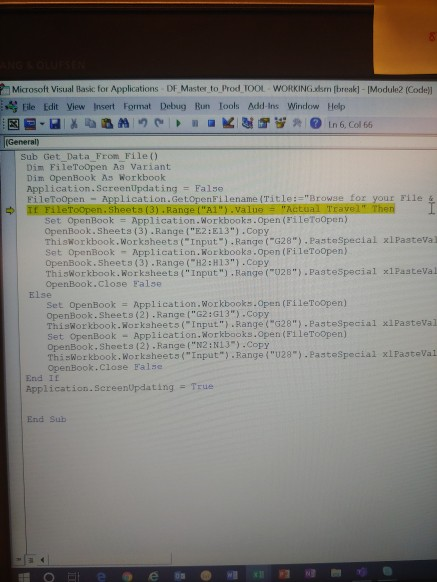
It keeps giving me a notification of "Object variable or Will block variable missing" but I cant figure out what I am missing. Someone please help me out.
This is the entire code I have. I don't have a source code.
Microsoft Visual Basic for Applications DF Master to Prod TOOL WORKINGm (break-Module Codell file Edit View Insert Format Debug Run Tools Add-ins Window Help - XXM KST in 6. Col 66 (General) Sub Get Data From File() Dim File ToOpen As Variant Dim OpenBook As Workbook Application.ScreenUpdating = False File ToOpen - Application.GetOpen Filename (Title:="Browse for your File 4 I FileToOpen. Sheets (3) .Range("A").Value = "Actual Travel" Then Set OpenBook = Application. Workbooks.Open(File Topen) OpenBook.Sheets (3).Range("E2:E13").Copy ThisWorkbook. Worksheets("Input").Range("G28"). Paste Special xl Pasteva Set OpenBook - Application. Workbooks.Open(FileToopen) OpenBook. Sheets (3) .Range("H2H13").Copy ThisWorkbook.Worksheets("Input").Range("020"). PasteSpecial x1 Pasteva OpenBook.close false Else Set OpenBook = Application. Workbooks.Open(FileToOpen) OpenBook. Sheets (2) .Range("G2:13").Copy ThisWorkbook. Worksheets("Input").Range("028"). PasteSpecial xl Pastoval Set OpenBook - Application. Workbooks.Open(File ToOpen) OpenBook.Sheeta (2) .Range("N2: N13").Copy ThisWorkbook. Worksheets("Input").Range("029"). PasteSpecial xirasteval OpenBook. Close False End If Application.ScreenUpdating = True End Sub
Step by Step Solution
There are 3 Steps involved in it

Get step-by-step solutions from verified subject matter experts
 Study Help