



Question: It must be C# Calculate measures shapes In this exercise, you will create a form that accepts the length, width, height, base, and radius from
It must be C#
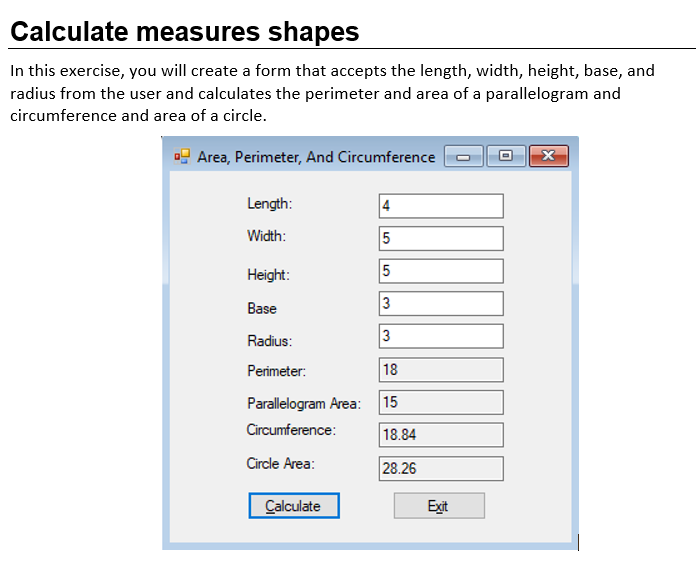
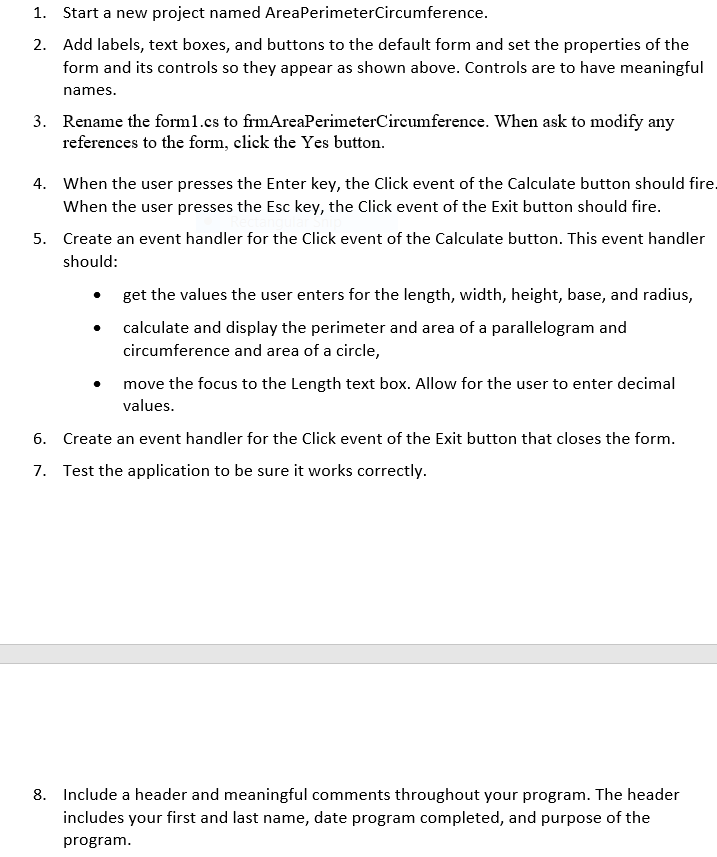
Calculate measures shapes In this exercise, you will create a form that accepts the length, width, height, base, and radius from the user and calculates the perimeter and area of a parallelogram and circumference and area of a circle. Area, Perimeter, And Circumference x Length: 4 Width: 5 6 3 Height: 5 Base 3 Radius: 3 Perimeter: 18 Parallelogram Area: 15 Circumference: 18.84 Circle Area: 28.26 Calculate Exit 1. Start a new project named AreaPerimeterCircumference. 2. Add labels, text boxes, and buttons to the default form and set the properties of the form and its controls so they appear as shown above. Controls are to have meaningful names. 3. Rename the forml.es to frmAreaPerimeterCircumference. When ask to modify any references to the form, click the Yes button. 4. When the user presses the Enter key, the Click event of the Calculate button should fire. When the user presses the Esc key, the Click event of the Exit button should fire. 5. Create an event handler for the Click event of the Calculate button. This event handler should: get the values the user enters for the length, width, height, base, and radius, calculate and display the perimeter and area of a parallelogram and circumference and area of a circle, move the focus to the Length text box. Allow for the user to enter decimal values. 6. Create an event handler for the Click event of the Exit button that closes the form. 7. Test the application to be sure it works correctly. 8. Include a header and meaningful comments throughout your program. The header includes your first and last name, date program completed, and purpose of the program
Step by Step Solution
There are 3 Steps involved in it

Get step-by-step solutions from verified subject matter experts