







Question: its business mathematics help . Math excer Case Scenario Phantom Tire manufactures an all weather tire that has a list price of $659. With varying
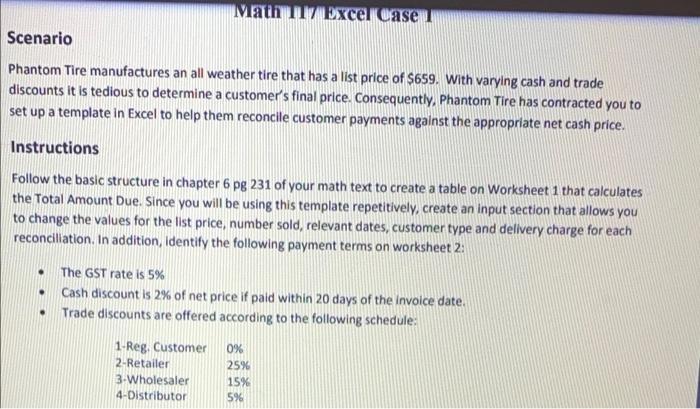
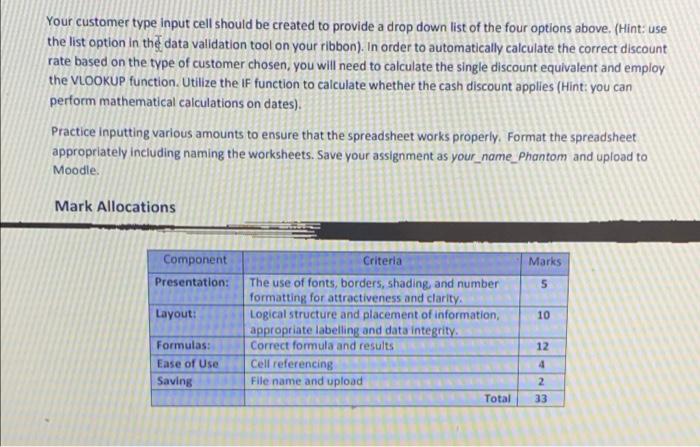
Math excer Case Scenario Phantom Tire manufactures an all weather tire that has a list price of $659. With varying cash and trade discounts it is tedious to determine a customer's final price. Consequently, Phantom Tire has contracted you to set up a template in Excel to help them reconcile customer payments against the appropriate net cash price. Instructions Follow the basic structure in chapter 6 pg 231 of your math text to create a table on Worksheet 1 that calculates the Total Amount Due. Since you will be using this template repetitively, create an input section that allows you to change the values for the list price, number sold, relevant dates, customer type and delivery charge for each reconciliation. In addition, identify the following payment terms on worksheet 2: The GST rate is 5% Cash discount is 2% of net price if paid within 20 days of the invoice date. Trade discounts are offered according to the following schedule: 1-Reg. Customer 0% 2-Retailer 3Wholesaler 15% 4-Distributor . . 25% 596 Your customer type Input cell should be created to provide a drop down list of the four options above. (Hint: use the list option in the data validation tool on your ribbon). In order to automatically calculate the correct discount rate based on the type of customer chosen, you will need to calculate the single discount equivalent and employ the VLOOKUP function. Utilize the IF function to calculate whether the cash discount applies (Hint: you can perform mathematical calculations on dates). Practice inputting various amounts to ensure that the spreadsheet works properly. Format the spreadsheet appropriately including naming the worksheets. Save your assignment as your_name_Phantom and upload to Moodle. Mark Allocations Criteria Marks Component Presentation: 5 Layout: 10 The use of fonts, borders, shading, and number formatting for attractiveness and clarity Logical structure and placement of information, appropriate labelling and data integrity Correct formula and results Cell referencing File name and upload Total Formulas: Ease of Use Saving 12 4 2 33 Math excer Case Scenario Phantom Tire manufactures an all weather tire that has a list price of $659. With varying cash and trade discounts it is tedious to determine a customer's final price. Consequently, Phantom Tire has contracted you to set up a template in Excel to help them reconcile customer payments against the appropriate net cash price. Instructions Follow the basic structure in chapter 6 pg 231 of your math text to create a table on Worksheet 1 that calculates the Total Amount Due. Since you will be using this template repetitively, create an input section that allows you to change the values for the list price, number sold, relevant dates, customer type and delivery charge for each reconciliation. In addition, identify the following payment terms on worksheet 2: The GST rate is 5% Cash discount is 2% of net price if paid within 20 days of the invoice date. Trade discounts are offered according to the following schedule: 1-Reg. Customer 0% 2-Retailer 3Wholesaler 15% 4-Distributor . . 25% 596 Your customer type Input cell should be created to provide a drop down list of the four options above. (Hint: use the list option in the data validation tool on your ribbon). In order to automatically calculate the correct discount rate based on the type of customer chosen, you will need to calculate the single discount equivalent and employ the VLOOKUP function. Utilize the IF function to calculate whether the cash discount applies (Hint: you can perform mathematical calculations on dates). Practice inputting various amounts to ensure that the spreadsheet works properly. Format the spreadsheet appropriately including naming the worksheets. Save your assignment as your_name_Phantom and upload to Moodle. Mark Allocations Criteria Marks Component Presentation: 5 Layout: 10 The use of fonts, borders, shading, and number formatting for attractiveness and clarity Logical structure and placement of information, appropriate labelling and data integrity Correct formula and results Cell referencing File name and upload Total Formulas: Ease of Use Saving 12 4 2 33
Step by Step Solution
There are 3 Steps involved in it

Get step-by-step solutions from verified subject matter experts
 Study Help