







Question: its in java follow the requirements please follow each comment and add it to the code so I can follow along thank u I need
![it fast please [4.5+1+2+1+2+4.5+1=16 marks ] The following code is a simple](https://dsd5zvtm8ll6.cloudfront.net/si.experts.images/questions/2024/09/66f0949aaab5d_71466f0949a53bf2.jpg)
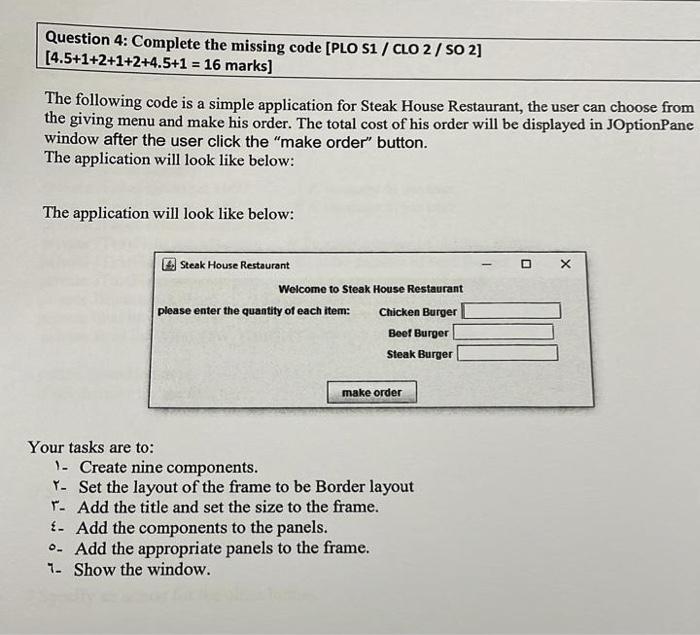
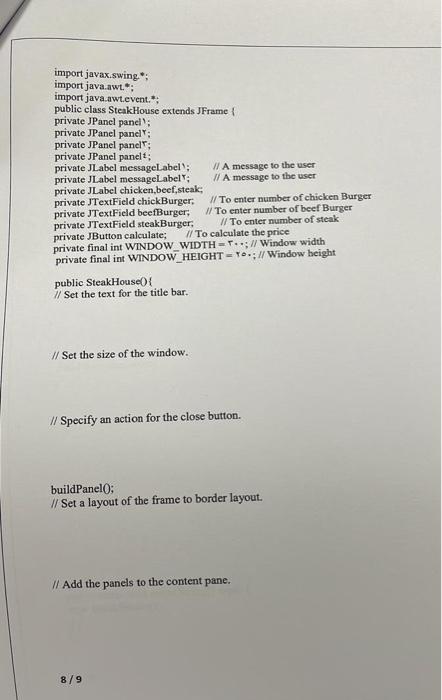
[4.5+1+2+1+2+4.5+1=16 marks ] The following code is a simple application for Steak House Restaurant, the user can choose from the giving menu and make his order. The total cost of his order will be displayed in JOptionPane window after the user click the "make order" button. The application will look like below: The application will look like below: Your tasks are to: 1. Create nine components. Y. Set the layout of the frame to be Border layout r. Add the title and set the size to the frame. \&. Add the components to the panels. -. Add the appropriate panels to the frame. 1. Show the window. import javax.swing.*; import java.awt.*: import java.awt.event. *: public class SteakHouse extends JFrame \& private JPanel pancl': private JPanel panelY; private JPanel panel T: private JPanel panelt: private JLabel messagelabel : If A message to the user private JLabel messagelabelt; II A message to the user private JLabel chicken, beef,steak; private JTextField chickBurger; // To enter number of chicken Burger private JT extField beefBurger; /1. To enter number of beef Burger private JTextField steakBurger, If To enter number of steak private JButton calculate; II To calculate the price private final int WINDOW WIDTH =T;/l Window width private final int WINDOW HEIGHT = ro*; /l Window beight public SteakHouse() I/ Set the text for the title bar. I/ Set the size of the window. // Specify an action for the close button. buildPanel0; // Set a layout of the frame to border layout. If Add the panels to the content pane. // Display the window. public void buildPanel( ) f //create the 1 components: //add the components
Step by Step Solution
There are 3 Steps involved in it

Get step-by-step solutions from verified subject matter experts
 Study Help