







Question: ivity 3 - Data Cleaning and Manipulation using DATE functions ( Tutorial ) asked in cols E and x always reference E 6 . Date
ivity Data Cleaning and Manipulation using DATE functions Tutorial
asked in cols and always reference
Date Parts
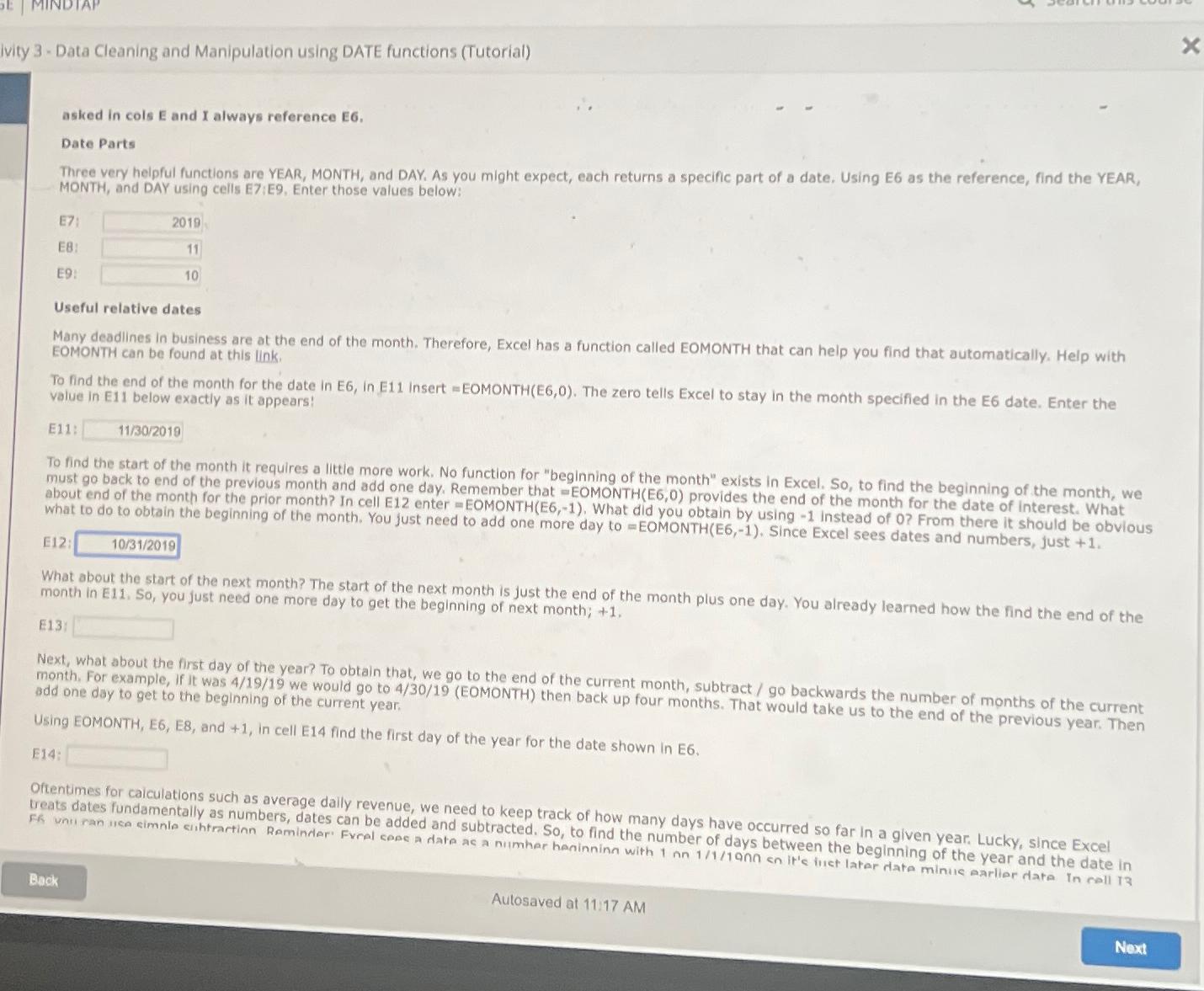
Three very helpful functions are YEAR, MONTH, and DAY, As you might expect, each returns a specific part of a date. Using E as the reference, find the YEAR, MONTH, and DAY using cells E:E Enter those values below:
E:
E:
E:
Usefut relative dates
Many deadlines in business are at the end of the month. Therefore, Excel has a function called EOMONTH that can help you find that automatically. Help with EOMONTH can be found at this link.
To find the end of the month for the date in E in E insert EOMONTH The zero tells Excel to stay in the month specified in the E date. Enter the value in Eii below exactly as it appears:
E:
To find the start of the month it requires a littie more work. No function for "beginning of the month" exists in Excel. So to find the beginning of the month, we must go back to end of the previous month and add one day. Remember that EOMONTH provides the end of the month for the date of interest. What what to do to obtain the beginning of the month. You juster EOMONTH What did you obtain by using instead of From there it should be obvious E:
What about the start of the next month? The start of the next month is just the end of the month plus one day. You already learned how the find the end of the month in E So you just need one more day to get the beginning of next month;
E:
Next, what about the first day of the year? To obtain that, we go to the end of the current month, subtract go backwards the number of months of the current month. For example, if it was we would go to EOMONTH then back up four months. That would take us to the end of the previous year. Then add one day to get to the beginning of the current year.
Using EOMONTH, E E and in cell E find the first day of the year for the date shown in E
E:
Oftentimes for caiculations such as average daily revenue, we need to keep track of how many days have occurred so far in a given year. Lucky, since Excel treats dates fundamentally as numbers, dates can be added and subtracted. So to find the number of days between the beginning of the year and the date in
Autosaved at : AM
Step by Step Solution
There are 3 Steps involved in it
1 Expert Approved Answer
Step: 1 Unlock

Question Has Been Solved by an Expert!
Get step-by-step solutions from verified subject matter experts
Step: 2 Unlock
Step: 3 Unlock
 Study Help