







Question: java 1 help starter code: import java.util.Scanner; public class NewPasswords { public static void main(String[] args) { Scanner input = new Scanner(System.in); String password; String
![public static void main(String[] args) { Scanner input = new Scanner(System.in); String](https://dsd5zvtm8ll6.cloudfront.net/si.experts.images/questions/2024/09/66f4fc3be0673_38766f4fc3b7f206.jpg)
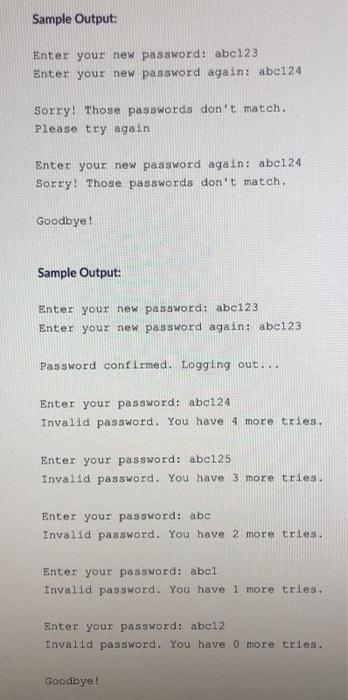
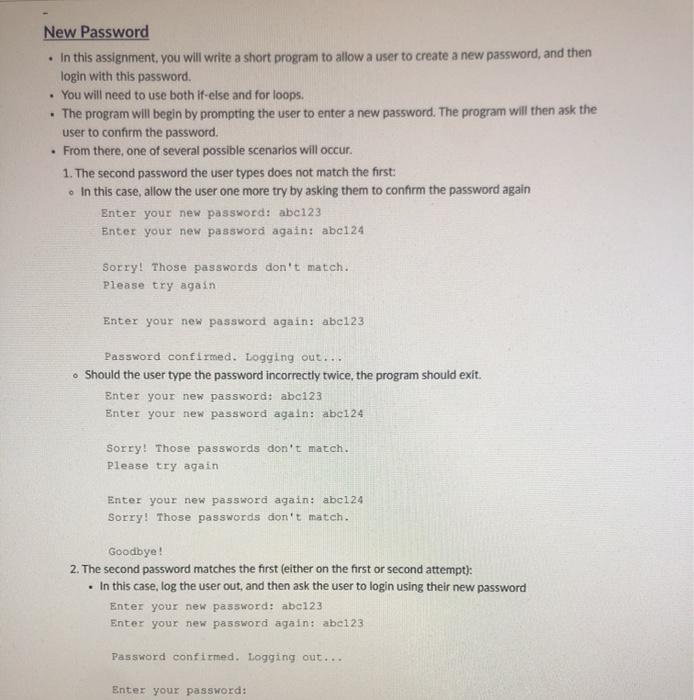
New Password In this assignment, you will write a short program to allow a user to create a new password, and then login with this password. You will need to use both if-else and for loops. . The program will begin by prompting the user to enter a new password. The program will then ask the user to confirm the password. . From there, one of several possible scenarios will occur. 1. The second password the user types does not match the first: In this case, allow the user one more try by asking them to confirm the password again Enter your new password: abc123 ter your new password again: abc124 Sorry! Those passwords don't match. Please try again Enter your new password again: abc123 Password confirmed. Logging out... Should the user type the password incorrectly twice, the program should exit. Enter your new password: abc123 Enter your new password again: abc124 Sorry! Those passwords don't match. Please try again Enter your new password again: abc124 Sorry! Those passwords don't match. Goodbye! 2. The second password matches the first (either on the first or second attempt): . In this case, log the user out, and then ask the user to login using their new password Enter your new password: abc123 Enter your new password again: abc123 Password confirmed. Logging out... Enter your password: 2. The second password matches the first either on the frst or second attempt . In this case, log the user out, and then ask the user to login using their new password Enter your new password: abc123 Enter your new password again: abe123 Password confirmed. Logging out... Enter your password: Give the user exactly 5 tries to type in their new password correctly use a for loop) - reporting the number of tries remaining, for each attempt: Should the user type the password correctly within the 5 tries, log the user in Password confirmed. Logging out.... Enter your password: abc124 Invalid password. You have 4 more tries. Enter your password: abc125 Invalid password. You have 3 more tries. Enter your password: abc123 Welcome! You are now logged in. Otherwise, should the user not type the password correctly within 5 tries, exit the program. Password confirmed. Logging out... Enter your password: ab Invalid password. You have 4 more tries. Enter your password: abc Invalid password. You have 3 more tries. Enter your password: ab 3 Invalid password. You have 2 more tries. Enter your password: abel Invalid password. You have 1 more tries. Enter your password: abe12 Invalid password. You have more tries. Goodbye! Starter Code: Copy and paste the below starter code into a hle NewPasswords.java Sample Output: Enter your new password: abc123 Enter your new password again: abei24 Sorry! Those passwords don't match. Please try again Enter your new password again: abc124 Sorry! Those passwords don't match. Goodbye! Sample Output: Enter your new password: abc123 Enter your new password again: abe123 Password confirmed. Logging out... Enter your password: abc124 Invalid password. You have 4 more tries. Enter your password: abc125 Invalid password. You have 3 more tries. Enter your password: abc Invalid password. You have 2 more tries. Enter your password: abel Invalid password. You have 1 more tries. Enter your password: abci2 Invalid password. You have o more tries. Goodbye
Step by Step Solution
There are 3 Steps involved in it

Get step-by-step solutions from verified subject matter experts
 Study Help