







Question: Java 2D Drawing Application. he application will contain the following elements: a) an Undo button to undo the last shape drawn. b) a Clear button
Java 2D Drawing Application.
he application will contain the following elements:
a) an Undo button to undo the last shape drawn. b) a Clear button to clear all shapes from the drawing. c) a combo box for selecting the shape to draw, a line, oval, or rectangle. d) a checkbox which specifies if the shape should be filled or unfilled. e) a checkbox to specify whether to paint using a gradient. f) two JButtons that each show a JColorChooser dialog to allow the user to choose the first and second color in the gradient. g) a text field for entering the Stroke width. h) a text field for entering the Stroke dash length. I) a checkbox for specifying whether to draw a dashed or solid line. j) a JPanel on which the shapes are drawn. k) a status bar JLabel at the bottom of the frame that displays the current location of the mouse on the draw panel.
If the user selects to draw with a gradient, set the Paint on the shape to be a gradient of the two colors chosen by the user. If the user does not chose to draw with a gradient, then Paint with a solid color of the 1st Color.
Note: When dragging the mouse to create a new shape, the shape should be drawn as the mouse is dragged.
Note: Do not use the NetBeans GUI generator for this assignment.
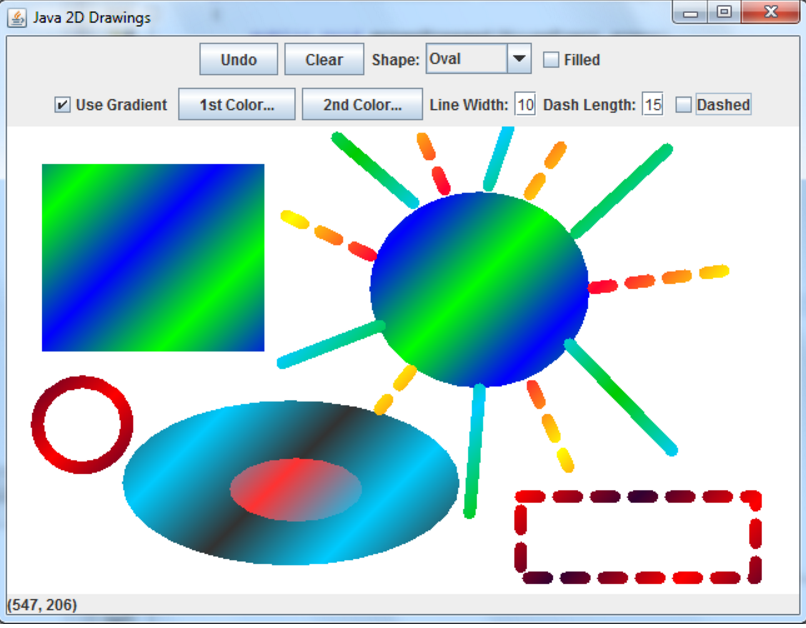
Java 2D Drawings Undo Clear Shape: oval Filled Use Gradient 1st Color... 2nd Color... Line Width 10 Dash Length: 15 Dashed 547, 206)
Step by Step Solution
There are 3 Steps involved in it

Get step-by-step solutions from verified subject matter experts
 Study Help