







Question: Java BMI program please read the requirement below Body mass index (BMI) is a measure of the body's fat based on height and weight. BMI
Java BMI program please read the requirement below
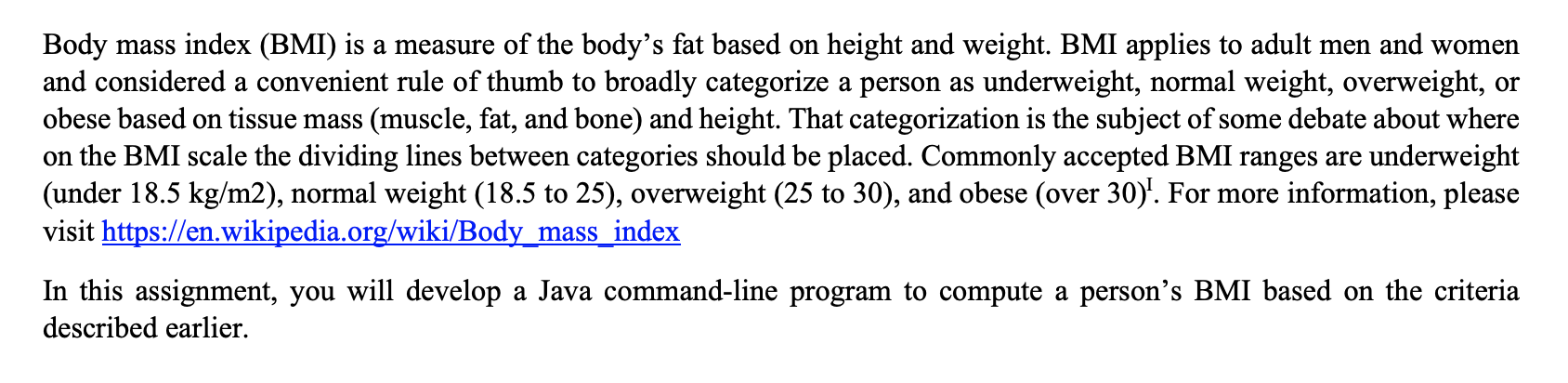
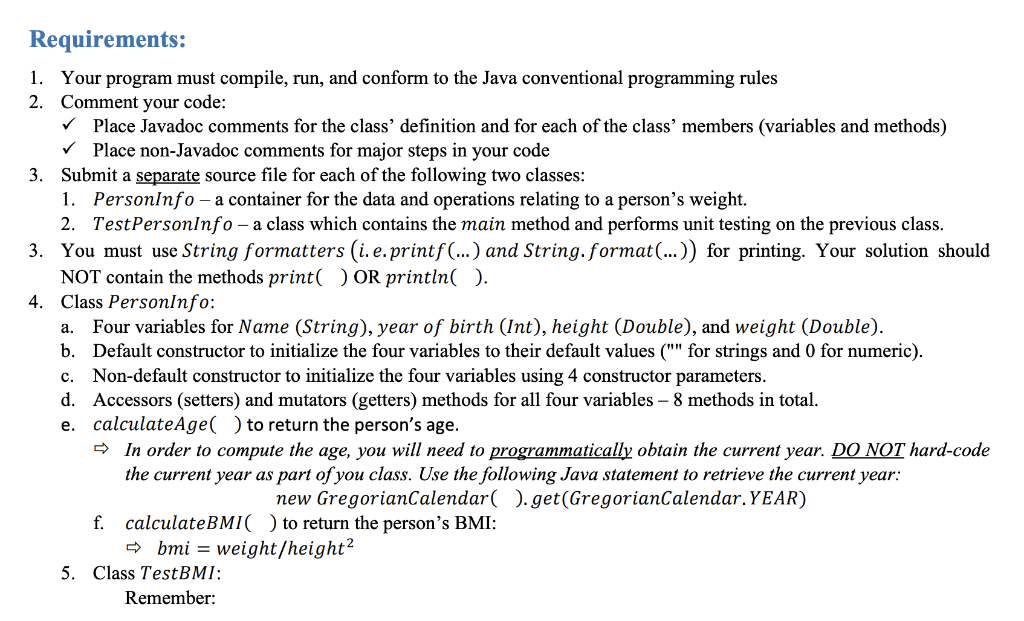
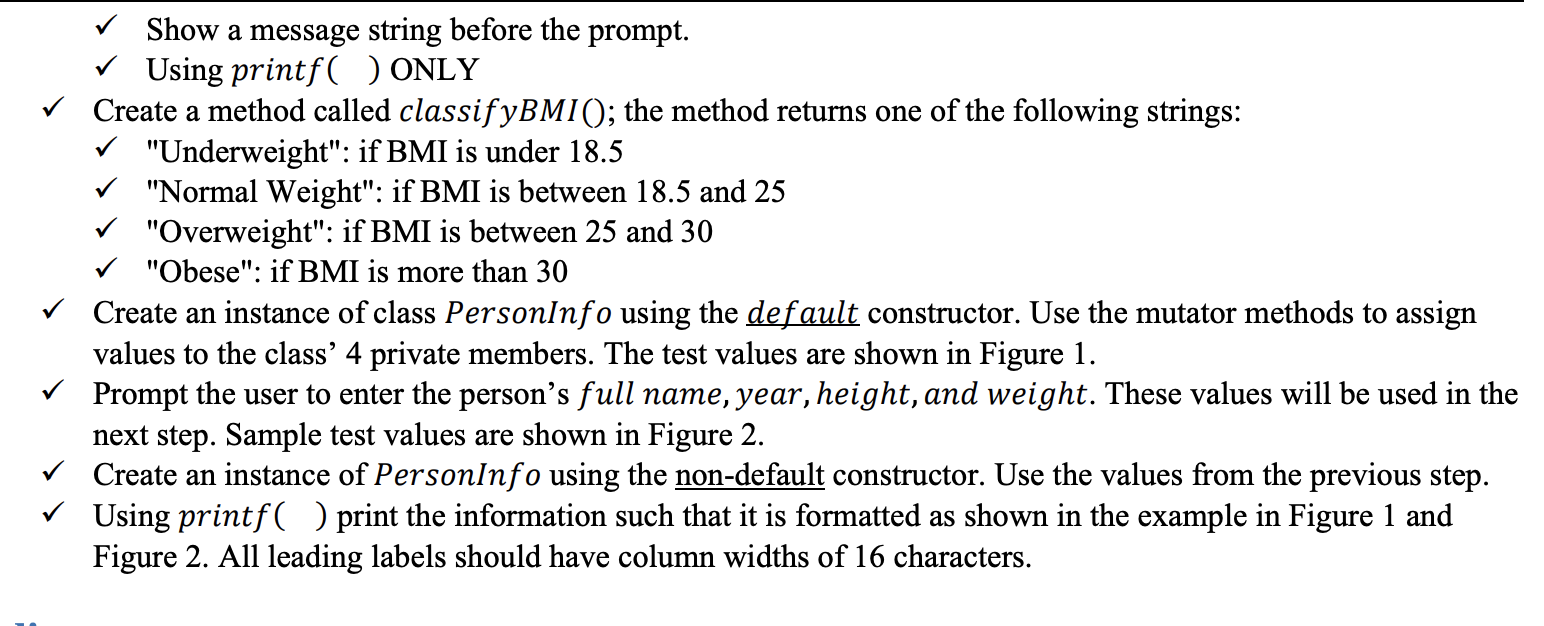
Body mass index (BMI) is a measure of the body's fat based on height and weight. BMI applies to adult men and women and considered a convenient rule of thumb to broadly categorize a person as underweight, normal weight, overweight, or obese based on tissue mass (muscle, fat, and bone) and height. That categorization is the subject of some debate about where on the BMI scale the dividing lines between categories should be placed. Commonly accepted BMI ranges are underweight (under 18.5 kg/m2), normal weight (18.5 to 25), overweight (25 to 30), and obese (over 30)'. For more information, please visit https://en.wikipedia.org/wiki/Body_mass_index In this assignment, you will develop a Java command-line program to compute a person's BMI based on the criteria described earlier. Requirements: 1. Your program must compile, run, and conform to the Java conventional programming rules 2. Comment your code: Place Javadoc comments for the class' definition and for each of the class' members (variables and methods) Place non-Javadoc comments for major steps in your code 3. Submit a separate source file for each of the following two classes: 1. Personinfo - a container for the data and operations relating to a person's weight. 2. TestPersonInfo - a class which contains the main method and performs unit testing on the previous class. 3. You must use String formatters (i. e.printf(...) and String.format(...)) for printing. Your solution should NOT contain the methods print() OR println(). 4. Class PersonInfo: Four variables for Name (String), year of birth (Int), height (Double), and weight (Double). b. Default constructor to initialize the four variables to their default values ("" for strings and 0 for numeric). c. Non-default constructor to initialize the four variables using 4 constructor parameters. d. Accessors (setters) and mutators (getters) methods for all four variables - 8 methods in total. e. calculate Age() to return the person's age. In order to compute the age, you will need to programmatically obtain the current year. DO NOT hard-code the current year as part of you class. Use the following Java statement to retrieve the current year: new GregorianCalendar().get(GregorianCalendar. YEAR) f. calculateBMI to return the person's BMI: => bmi = weight/height? 5. Class TestBMI: Remember: a. Show a message string before the prompt. Using printf( ) ONLY Create a method called classifyBMI(); the method returns one of the following strings: "Underweight": if BMI is under 18.5 "Normal Weight": if BMI is between 18.5 and 25 "Overweight": if BMI is between 25 and 30 "Obese": if BMI is more than 30 Create an instance of class PersonInfo using the default constructor. Use the mutator methods to assign values to the class' 4 private members. The test values are shown in Figure 1. Prompt the user to enter the person's full name, year, height, and weight. These values will be used in the next step. Sample test values are shown in Figure 2. Create an instance of PersonInfo using the non-default constructor. Use the values from the previous step. Using printf( ) print the information such that it is formatted as shown in the example in Figure 1 and Figure 2. All leading labels should have column widths of 16 characters
Step by Step Solution
There are 3 Steps involved in it

Get step-by-step solutions from verified subject matter experts
 Study Help