







Question: Java cod Graphical user interface Please dont use GUI/form designer tool Tip Calculator Program Create a graphical tip calculator program. The user should enter their
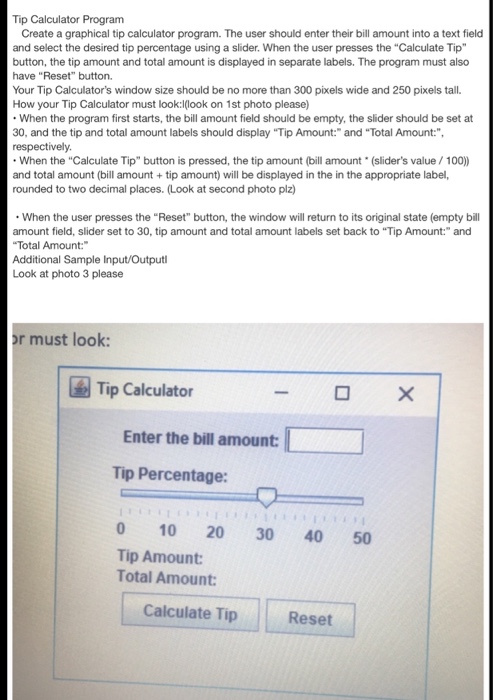
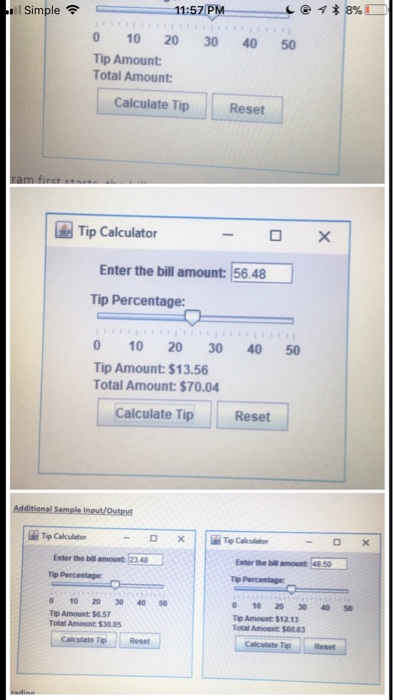
Tip Calculator Program Create a graphical tip calculator program. The user should enter their bill amount into a text field and select the desired tip percentage using a slider. When the user presses the "Calculate Tip" button, the tip amount and total amount is displayed in separate labels. The program must also have "Reset" button. Your Tip Calculator's window size should be no more than 300 pixels wide and 250 pixels tall. How your Tip Calculator must look:look on 1st photo please) When the program first starts, the bill amount field should be empty, the slider should be set at 30, and the tip and total amount labels should display "Tip Amount:" and "Total Amount:", respectively When the "Calculate Tip" button is pressed, the tip amount (bill amount (slider's value/100) and total amount (bill amount+ tip amount) will be displayed in the in the appropriate label, rounded to two decimal places. (Look at second photo plz) When the user presses the "Reset" button, the window will return to its original state (empty bill amount field, slider set to 30, tip amount and total amount labels set back to "Tip Amount:" and Total Amount: Additional Sample Input/Output Look at photo 3 please r must look Tip Calculator Enter the bill amount Tip Percentage: 0 10 20 30 40 50 Tip Amount Total Amount: Calculate Tip Reset
Step by Step Solution
There are 3 Steps involved in it

Get step-by-step solutions from verified subject matter experts
 Study Help