







Question: JAVA CODE HELP PLESE! You will be implementing your own version of a list(any way you like). Download and extract ListAssignment.zip (provided as Driver.java and
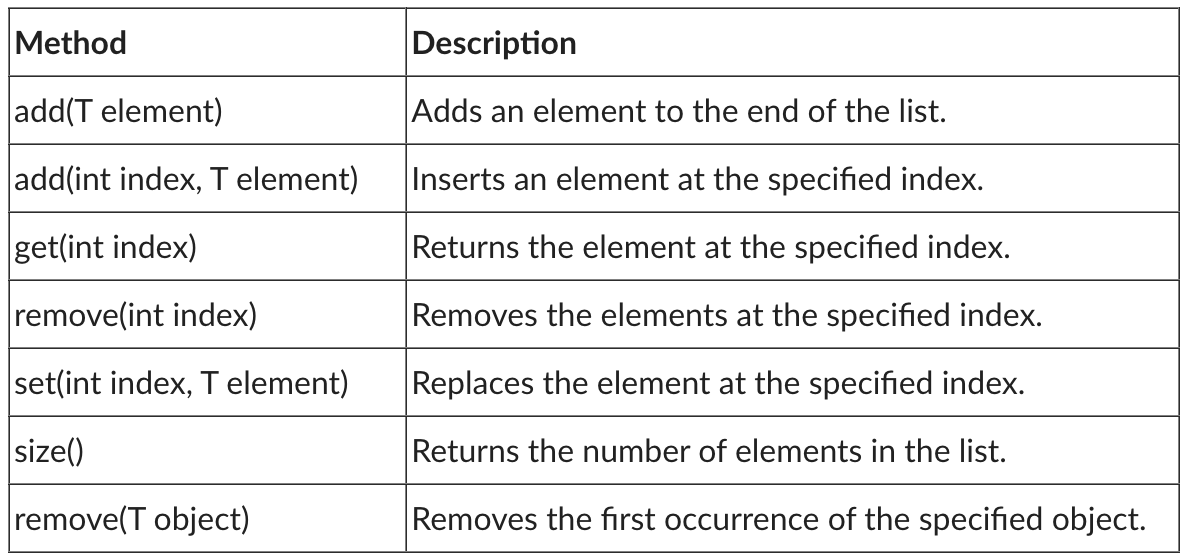
JAVA CODE HELP PLESE! You will be implementing your own version of a list(any way you like). Download and extract ListAssignment.zip (provided as Driver.java and List.java below). Once you have implemented your list, you can use Driver.java to test your List. You can temporarily modify Driver.java to test your List implementation as you develop but you will need to use my version of Driver.java to test your finished List . You will be modifying List.java to support the operations below:
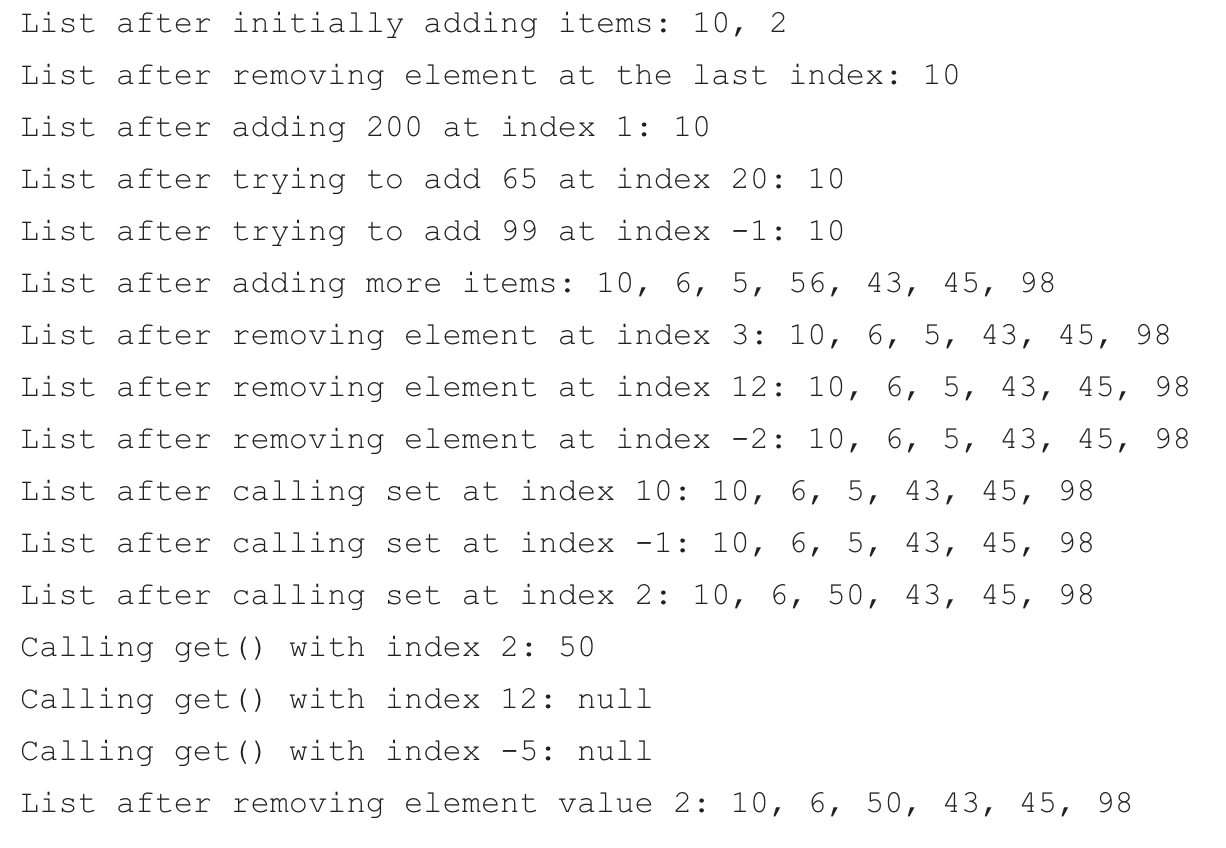
Testing: Use the provided Driver.java file to test your List. When running the version of Driver.java that I provided, you should see the following output:
 Driver.java
public class Driver {
public static void main(String[] args) {
List
list.add(10);
list.add(2);
System.out.print(" List after initially adding items: ");
joinAndPrint(list);
list.remove(list.size() - 1);
System.out.print(" List after removing element at the last index: ");
joinAndPrint(list);
list.add(1, 200);
System.out.print(" List after adding 200 at index 1: ");
joinAndPrint(list);
list.add(20, 65);
System.out.print(" List after trying to add 65 at index 20: ");
joinAndPrint(list);
list.add(-1, 99);
System.out.print(" List after trying to add 99 at index -1: ");
joinAndPrint(list);
list.add(6);
list.add(5);
list.add(56);
list.add(43);
list.add(45);
list.add(98);
System.out.print(" List after adding more items: ");
joinAndPrint(list);
list.remove(3);
System.out.print(" List after removing element at index 3: ");
joinAndPrint(list);
list.remove(12);
System.out.print(" List after removing element at index 12: ");
joinAndPrint(list);
list.remove(-2);
System.out.print(" List after removing element at index -2: ");
joinAndPrint(list);
list.set(10, 600);
System.out.print(" List after calling set at index 10: ");
joinAndPrint(list);
list.set(-1, 5400);
System.out.print(" List after calling set at index -1: ");
joinAndPrint(list);
list.set(2, 50);
System.out.print(" List after calling set at index 2: ");
joinAndPrint(list);
System.out.print(" Calling get() with index 2: " + list.get(2));
System.out.print(" Calling get() with index 12: " + list.get(12));
System.out.print(" Calling get() with index -5: " + list.get(-5));
list.remove(Integer.valueOf(2));
System.out.print(" List after removing element value 2: ");
joinAndPrint(list);
}
public static void joinAndPrint(List
for (int i = 0; i
System.out.print(list.get(i));
if (i
System.out.print(", ");
}
}
}
}
List.java
public class List
private T[] items = (T[])new Object[10];
private int size = 0;
public void add(T a) {
if (items.length == this.size) {
// resize the array.
this.resize();
}
this.items[size] = a;
this.size++;
}
public T get(int index) {
if (index
return this.items[index];
}
return null;
}
private void resize() {
T[] newItems =(T[]) new Object[this.items.length * 2];
for (int i = 0; i
newItems[i] = this.items[i];
}
this.items = newItems;
}
}
\begin{tabular}{|l|l|} \hline Method & Description \\ \hline add(T element) & Adds an element to the end of the list. \\ \hline add(int index, T element) & Inserts an element at the specified index. \\ \hline get(int index) & Returns the element at the specified index. \\ \hline remove(int index) & Removes the elements at the specified index. \\ \hline set(int index, T element) & Replaces the element at the specified index. \\ \hline size() & Returns the number of elements in the list. \\ \hline remove(T object) & Removes the first occurrence of the specified object. \\ \hline \end{tabular} List after initially adding items: 10,2 List after removing element at the last index: 10 List after adding 200 at index 1:10 List after trying to add 65 at index 20:10 List after trying to add 99 at index 1:10 List after adding more items: 10,6,5,56,43,45,98 List after removing element at index 3:10,6,5,43,45,98 List after removing element at index 12:10,6,5,43,45,98 List after removing element at index 2:10,6,5,43,45,98 List after calling set at index 10:10,6,5,43,45,98 List after calling set at index 1:10,6,5,43,45,98 List after calling set at index 2:10,6,50,43,45,98 Calling get() with index 2: 50 Calling get() with index 12 : null Calling get() with index -5 : null List after removing element value 2:10,6,50,43,45,98
Step by Step Solution
There are 3 Steps involved in it

Get step-by-step solutions from verified subject matter experts
 Study Help