





Question: java code level: beginner write a method In Streamline class - The starter code does not react to key presses, because we haven't defined how

java code

level: beginner

write a method
java code level: beginner write a method In Streamline class - Thestarter code does not react to key presses, because we haven't defined
In Streamline class -

how to handle the key presses yet. We will define wha each

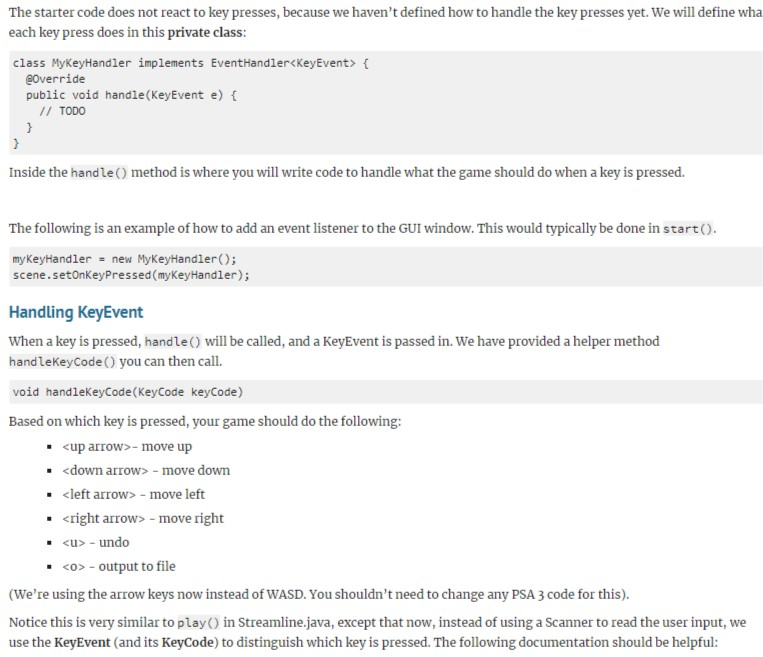
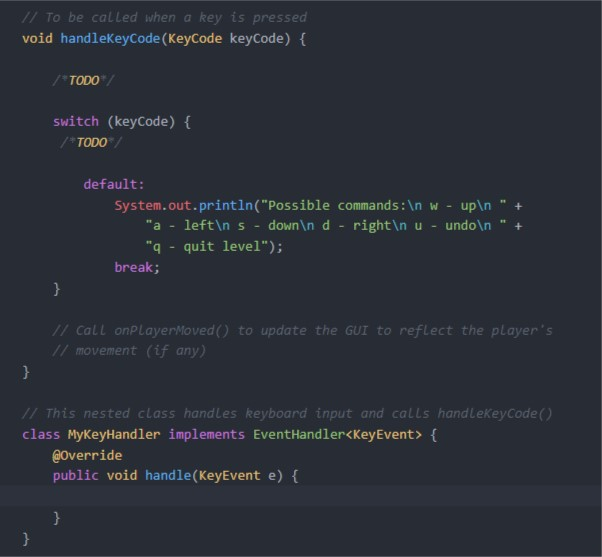
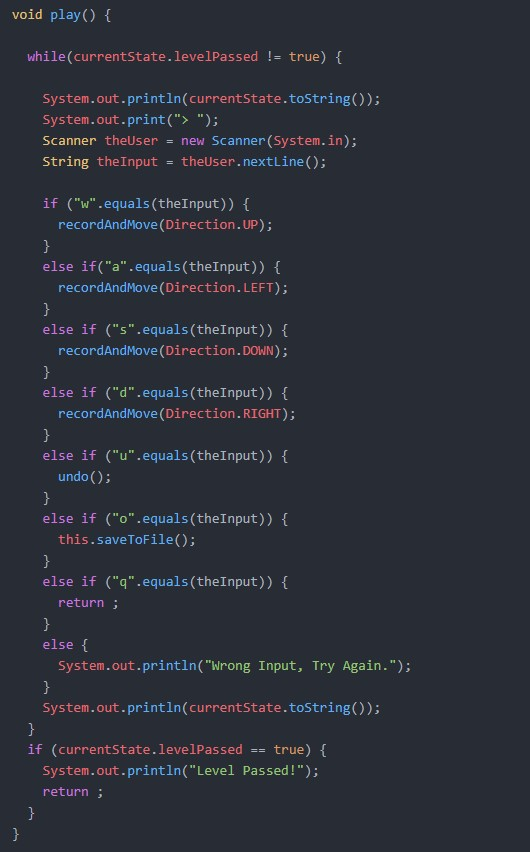
The starter code does not react to key presses, because we haven't defined how to handle the key presses yet. We will define wha each key press does in this private class: class MyKeyHandler implements EventHandler t gOverride public void handle(KeyEvent e) f // Inside the handle) method is where you will write code to handle what the game should do when a key is pressed. The following is an example of how to add an event listener to the GUI window. This would typically be done in start ( ) . myKeyhandler new MyKeyHandler(); scene.setOnKeyPressed (myKeyHandler); Handling KeyEvent When a key is pressed, handle) will be called, and a KeyEvent is passed in. We have provided a helper method handlekeyCode() you can then call. void handlekeyCode (KeyCode keyCode) Based on which key is pressed, your game should do the following -move up . -undo -output to file (We're using the arrow keys now instead of WASD. You shouldn't need to change any PSA 3 code for this). Notice this is very similar to play) in Streamline.java, except that now, instead of using a Scanner to read the user input, we use the KeyEvent (and its KeyCode) to distinguish which key is pressed. The following documentation should be helpful / To be calLed when a key is pressed void handleKeyCode (KeyCode keyCode) ( TODO switch (keyCode) [ TODO default: System.out.println( "Possible commands: In w upln"+ "a leftln s - down In d rightin u undoln "+ q - quit level"); break; Call onPlayerMoved() to update the GUI to reflect the player's 7movement (if any) Lass handles Reyboard input and // This nested c calls handlekeyCode() class MyKeyHandler implements EventHandler @Override public void handle(KeyEvent e) f void play() while(currentstate.levelPassed !-true) System.out.println(currentstate.toString ()); System.out.print(">) Scanner theUser new Scanner (System.in); string theinput theUser.nextLine(); if ("w".equals (theInput)) t recordAndMove (Direction.UP); else if("a".equals (theInput)) f recordAndMove (Direction. LEFT); else if ("s".equals (theInput)) t recordAndMove (Direction. DOWN); else if ("d".equals (theInput)) t recordAndMove (Direction. RIGHT) else if ("u".equals (theInput)) undo (); else if ("o".equals (theInput)) t this.saveToFile() else if ("q".equals (theInput)) [ return; else System.out.println("Wrong Input, Try Again."); System.out.println(currentstate.tostring)); if (currentstate.levelPassed true) System.out.println("Level Passed!"); return The starter code does not react to key presses, because we haven't defined how to handle the key presses yet. We will define wha each key press does in this private class: class MyKeyHandler implements EventHandler t gOverride public void handle(KeyEvent e) f // Inside the handle) method is where you will write code to handle what the game should do when a key is pressed. The following is an example of how to add an event listener to the GUI window. This would typically be done in start ( ) . myKeyhandler new MyKeyHandler(); scene.setOnKeyPressed (myKeyHandler); Handling KeyEvent When a key is pressed, handle) will be called, and a KeyEvent is passed in. We have provided a helper method handlekeyCode() you can then call. void handlekeyCode (KeyCode keyCode) Based on which key is pressed, your game should do the following -move up . -undo -output to file (We're using the arrow keys now instead of WASD. You shouldn't need to change any PSA 3 code for this). Notice this is very similar to play) in Streamline.java, except that now, instead of using a Scanner to read the user input, we use the KeyEvent (and its KeyCode) to distinguish which key is pressed. The following documentation should be helpful / To be calLed when a key is pressed void handleKeyCode (KeyCode keyCode) ( TODO switch (keyCode) [ TODO default: System.out.println( "Possible commands: In w upln"+ "a leftln s - down In d rightin u undoln "+ q - quit level"); break; Call onPlayerMoved() to update the GUI to reflect the player's 7movement (if any) Lass handles Reyboard input and // This nested c calls handlekeyCode() class MyKeyHandler implements EventHandler @Override public void handle(KeyEvent e) f void play() while(currentstate.levelPassed !-true) System.out.println(currentstate.toString ()); System.out.print(">) Scanner theUser new Scanner (System.in); string theinput theUser.nextLine(); if ("w".equals (theInput)) t recordAndMove (Direction.UP); else if("a".equals (theInput)) f recordAndMove (Direction. LEFT); else if ("s".equals (theInput)) t recordAndMove (Direction. DOWN); else if ("d".equals (theInput)) t recordAndMove (Direction. RIGHT) else if ("u".equals (theInput)) undo (); else if ("o".equals (theInput)) t this.saveToFile() else if ("q".equals (theInput)) [ return; else System.out.println("Wrong Input, Try Again."); System.out.println(currentstate.tostring)); if (currentstate.levelPassed true) System.out.println("Level Passed!"); return

Step by Step Solution

There are 3 Steps involved in it

1 Expert Approved Answer
Step: 1 Unlock blur-text-image
Question Has Been Solved by an Expert!

Get step-by-step solutions from verified subject matter experts

Step: 2 Unlock
Step: 3 Unlock

Students Have Also Explored These Related Databases Questions!