







Question: Java Code please help. Sweets Inc wants to give their employees a fun diversion, so they want you to create a word-guessing game reminiscent of
Java Code please help.
Sweets Inc wants to give their employees a fun diversion, so they want you to create a word-guessing game reminiscent of Hangman.
In general, this game will be a JavaFX GUI that will allow users to guess letters in a mystery word, one letter at a time. If the user is able to guess every letter in the mystery word, they win. If the user runs out of guess attempts, they lose.
Mystery words will be selected randomly from hangmanWords.txt (Accessible, Adjacent, Yourself, Definite, Surrealist, Rabies, Lamination, Vestry, Simplify, Patrol, Cabmen, Identify, Deciding, Bisque, Fossilized, Actual, Thefts, Salamander, Compound, Colonial, Question, Cadaverous, Zygote, etc...)
Upon loading, your program will load the list of words and divide it into three separate Lists based on word length: one List of six-letter words, one of eight-letter words, and one of ten-letter words.
When the user first sees the GUI, the following GUI elements will be visible:
. A slider bar used to select the difficulty level
. A label indicating the slider bars current difficulty level (this label should dynamically update when the slider bar is moved)
. A button called Generate Game that will generate a game at the given level of difficulty
. A button called Load which will allow the user to load a previously saved game
There are three difficulty levels: easy, medium, and hard. Each level determines the word length and number of guesses provided for the user:
1) Easy: 10 letter word, 10 guess attempts
2) Medium: 8 letter word, 7 guess attempts
3) Hard: 6 letter word, 4 guess attempts
When the user is satisfied with their chosen difficulty, they will click a button called Generate Game. This button will trigger the GUI to enable the game elements. The game elements include the following:
- A label showing the status of the mystery word. At start, each letter should be represented by an _
- A label indicating the number of guesses remaining
- A label indicating the letters already guessed
- A text field to allow the user to input a new letter guess
- A button called Guess that triggers the processing of a new guess
- A button called Give Up that reveals the answer to the user and allows the user to generate a new game
- A button called Save that allows the user to save their current game
- Labels to make the different fields easily understandable
In addition, the GUI will disable:
- The difficulty slider bar
- The Generate Game button
The user will be able to input letter guesses into the text field. Their guess will not be processed until the user clicks the Guess button. When the user clicks the Guess button, the GUI will process the input in the text field. The GUI will gracefully inform the user of an incorrect input if the input guess is longer than one letter, shorter than one letter, or is the same as a letter guessed previously.
If the guess is legitimate, the GUI will display the guessed letter in the label indicating the letters already guessed. The GUI will also determine if the guessed letter is in the mystery word. If it is, the GUI will fill in the guessed letter in the appropriate spots in the mystery word label. If the guessed letter is the final letter in the mystery word, the GUI will indicate that the user has won.
If the guessed letter is not in mystery word, the GUI will decrement the number of guesses remaining. If the number of guesses remaining is zero, then the GUI will display the mystery word, indicate the user has host, disable the game elements, and allow the user to generate a new game with a different difficulty level.
The Load and Save buttons should allow the user to load and save games. The company recommends you implement the game information as a class separate from the FXML Controller to allow for easy saving.
The exact look and feel of the GUI is up to you.
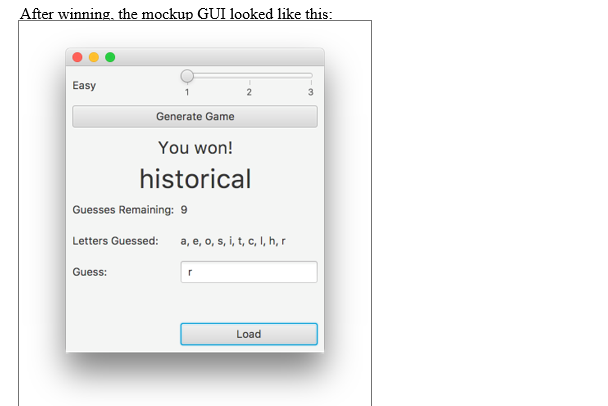
After winning, the mockup GUI looked like this Easy Generate Game You won! historical Guesses Remaining:9 Letters Guessed: a, e, o, s, i, t, c, I, h,r Guess: Load After winning, the mockup GUI looked like this Easy Generate Game You won! historical Guesses Remaining:9 Letters Guessed: a, e, o, s, i, t, c, I, h,r Guess: Load
Step by Step Solution
There are 3 Steps involved in it

Get step-by-step solutions from verified subject matter experts
 Study Help