







Question: Java Code Please. I was able to create the 3 overloaded ComputeInvoice but how do we create a code that does not instantiate an object?
Java Code Please.
I was able to create the 3 overloaded ComputeInvoice but how do we create a code that does not instantiate an object?
The hint for this assignment is
JOptionPane is a class.
showInputDialog() is a method that belongs to the JOptionPane class.
Try and use the showInputDialog() method has 6 overloaded versions.
This assignment will need to perform an import to gain access to the Invoicing class.
Once again, do not instantiate any objects. There are NO instance data fields. Do not include any extra methods (only include the 3 overloaded computeInvoice() methods).
instructions:
Homework Assignment Chapter 4a Create a Project named Chap4a Create a class named Invoicing that includes three overloaded computeInvoice() methods for a book store: see pages 140 and 183 for examples The 8% tax should be defined as a constant.
1. When computeInvoice() receives a single parameter, it represents the price of one book ordered. Add 8% tax and display the total due.
2. When computeInvoice() receives two parameters, they represent the price of a book and the quantity ordered. Multiply the two values, add 8% tax, and display the total due.
3. When computeInvoice() receives three parameters, they represent the price of a book, the quantity ordered, and a coupon value.
Multiply the quantity and price, reduce the result by the coupon value, and then add 8% tax and display the total due.
***Note: printing is completed within the computeInvoice() methods which are defined in the Invoicing class. Create a driver class named TestInvoice with a main() method that tests all three overloaded methods using the following data (do not instantiate any objects): Price $24.95 Price $17.50, quantity 4 Price $10.00, quantity 6, coupon $20.00 Expected Output printed to Eclipse Console: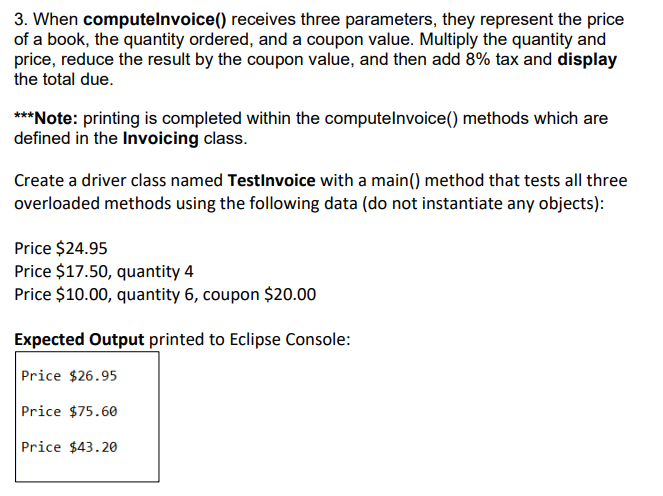
3. When computelnvoice() receives three parameters, they represent the price of a book, the quantity ordered, and a coupon value. Multiply the quantity and price, reduce the result by the coupon value, and then add 8% tax and display the total due. ***Note: printing is completed within the computeInvoice() methods which are defined in the Invoicing class. Create a driver class named TestInvoice with a main() method that tests all three overloaded methods using the following data (do not instantiate any objects): Price $24.95 Price $17.50, quantity 4 Price $10.00, quantity 6, coupon $20.00 Expected Output printed to Eclipse Console: Price $26.95 Price $75.60 Price $43.20
Step by Step Solution
There are 3 Steps involved in it

Get step-by-step solutions from verified subject matter experts
 Study Help