







Question: Java code please, I will give you a thumb up if you can help me please help, do as much as you can. you can
Java code please, I will give you a thumb up if you can help me
 please help, do as much as you can. you can only answer the inheritance hierarchy that you think will best solve the problem. so you dont have to write the whole code.
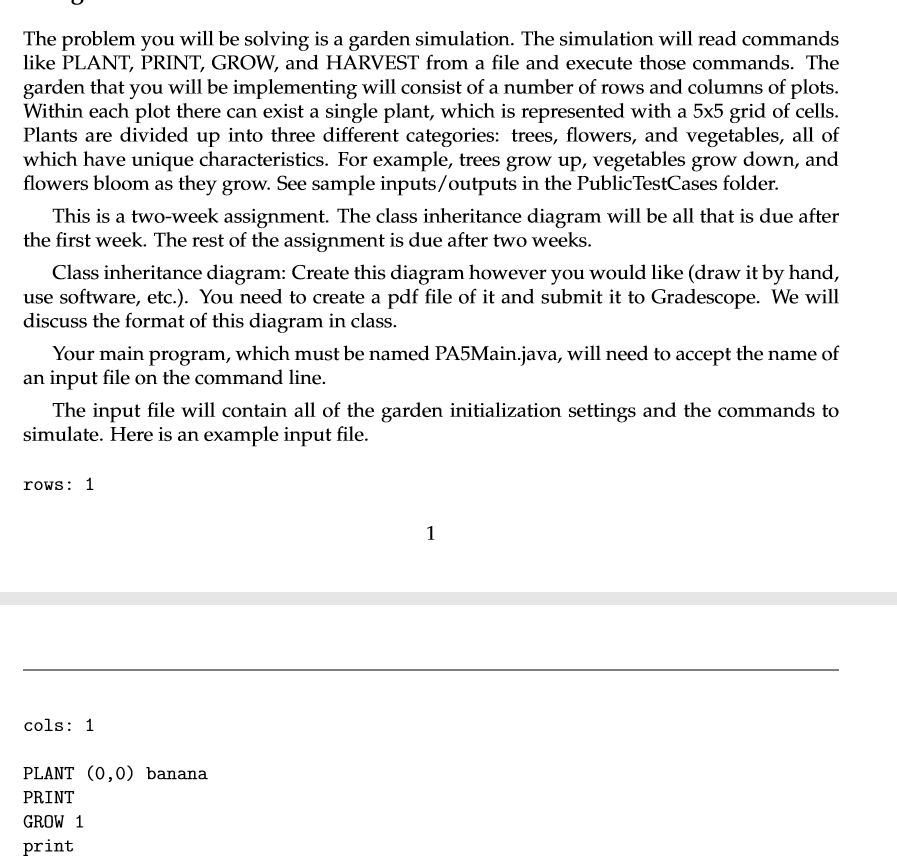
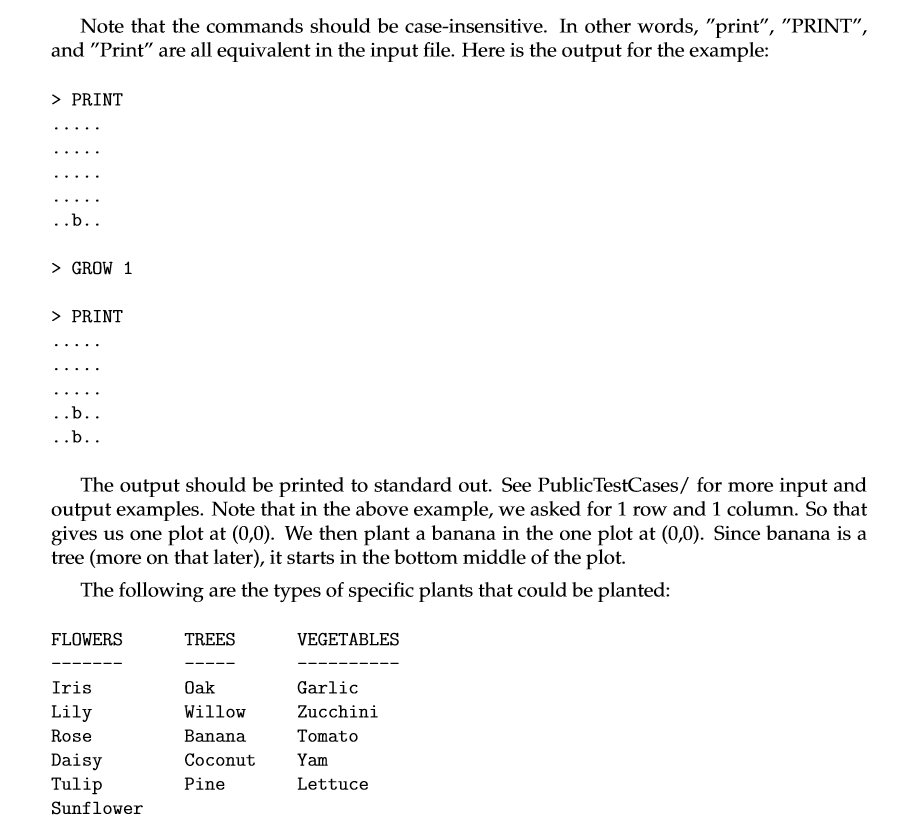
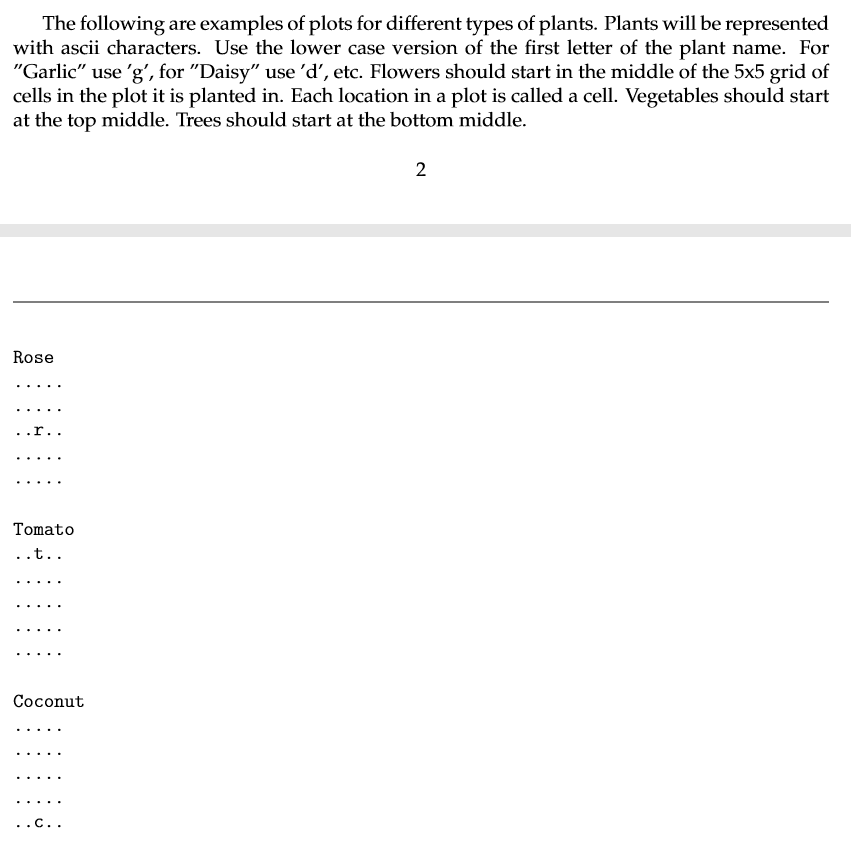
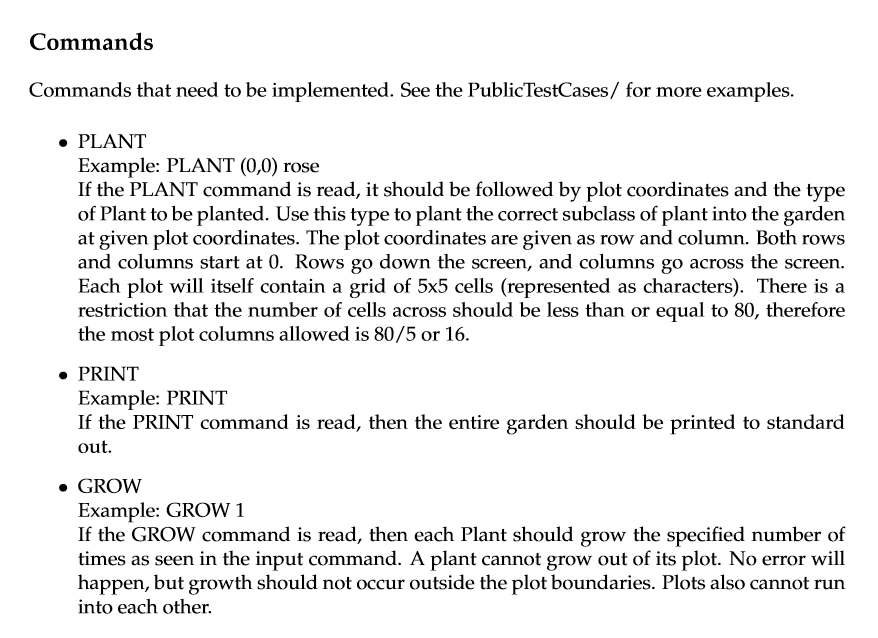
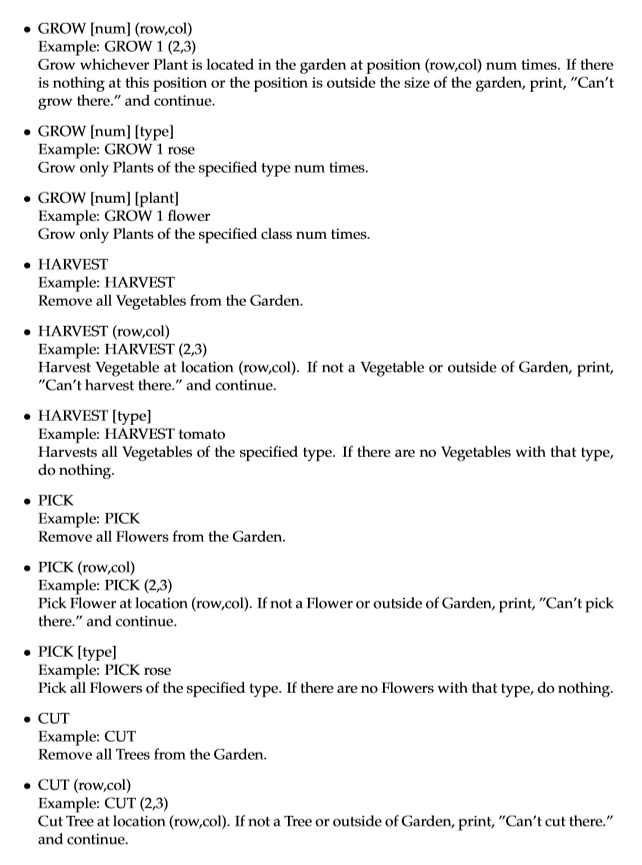
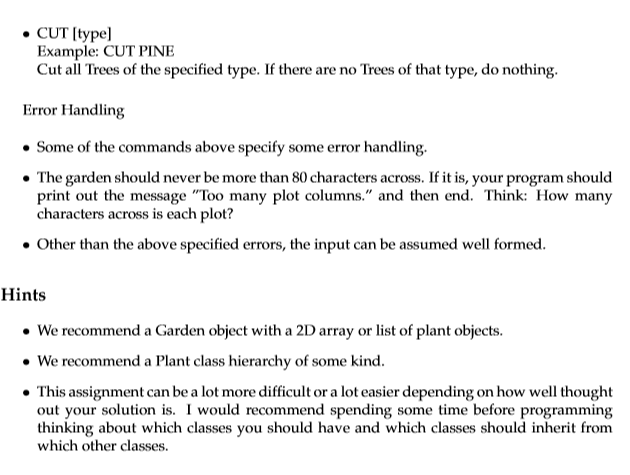
The problem you will be solving is a garden simulation. The simulation will read commands like PLANT, PRINT, GROW, and HARVEST from a file and execute those commands. The garden that you will be implementing will consist of a number of rows and columns of plots. Within each plot there can exist a single plant, which is represented with a 5x5 grid of cells. Plants are divided up into three different categories: trees, flowers, and vegetables, all of which have unique characteristics. For example, trees grow up, vegetables grow down, and flowers bloom as they grow. See sample inputs/outputs in the Public TestCases folder. This is a two-week assignment. The class inheritance diagram will be all that is due after the first week. The rest of the assignment is due after two weeks. Class inheritance diagram: Create this diagram however you would like (draw it by hand, use software, etc.). You need to create a pdf file of it and submit it to Gradescope. We will discuss the format of this diagram in class. Your main program, which must be named PA5Main.java, will need to accept the name of an input file on the command line. The input file will contain all of the garden initialization settings and the commands to simulate. Here is an example input file. rows: 1 1 cols: 1 PLANT (0,0) banana PRINT GROW 1 print Note that the commands should be case-insensitive. In other words, "print", "PRINT", and "Print" are all equivalent in the input file. Here is the output for the example: > PRINT ..b.. > GROW 1 > PRINT ..b.. ..b.. The output should be printed to standard out. See Public TestCases/ for more input and output examples. Note that in the above example, we asked for 1 row and 1 column. So that gives us one plot at (0,0). We then plant a banana in the one plot at (0,0). Since banana is a tree (more on that later), it starts in the bottom middle of the plot. The following are the types of specific plants that could be planted: FLOWERS TREES VEGETABLES Iris Lily Rose Daisy Tulip Sunflower Oak Willow Banana Coconut Pine Garlic Zucchini Tomato Yam Lettuce The following are examples of plots for different types of plants. Plants will be represented with ascii characters. Use the lower case version of the first letter of the plant name. For "Garlic" use 'g, for "Daisy" use 'd', etc. Flowers should start in the middle of the 5x5 grid of cells in the plot it is planted in. Each location in a plot is called a cell. Vegetables should start at the top middle. Trees should start at the bottom middle. 2 Rose ..r.. Tomato ..t.. Coconut ..C.. Commands Commands that need to be implemented. See the PublicTestCases/ for more examples. PLANT Example: PLANT (0,0) rose If the PLANT command is read, it should be followed by plot coordinates and the type of Plant to be planted. Use this type to plant the correct subclass of plant into the garden at given plot coordinates. The plot coordinates are given as row and column. Both rows and columns start at 0. Rows go down the screen, and columns go across the screen. Each plot will itself contain a grid of 5x5 cells (represented as characters). There is a restriction that the number of cells across should be less than or equal to 80, therefore the most plot columns allowed is 80/5 or 16. PRINT Example: PRINT If the PRINT command is read, then the entire garden should be printed to standard out. GROW Example: GROW 1 If the GROW command is read, then each Plant should grow the specified number of times as seen in the input command. A plant cannot grow out of its plot. No error will happen, but growth should not occur outside the plot boundaries. Plots also cannot run into each other. GROW [num] (row.col) Example: GROW 1 (2,3) Grow whichever Plant is located in the garden at position (row,col) num times. If there is nothing at this position or the position is outside the size of the garden, print, "Can't grow there." and continue. GROW (num] (type] Example: GROW 1 rose Grow only Plants of the specified type num times. GROW [num] (plant] Example: GROW 1 flower Grow only Plants of the specified class num times. HARVEST Example: HARVEST Remove all Vegetables from the Garden. HARVEST (row.col) Example: HARVEST (2,3) Harvest Vegetable at location (row.col). If not a Vegetable or outside of Garden, print, "Can't harvest there." and continue. HARVEST [type] Example: HARVEST tomato Harvests all Vegetables of the specified type. If there are no Vegetables with that type, do nothing. PICK Example: PICK Remove all Flowers from the Garden. PICK (row.col) Example: PICK (2,3) Pick Flower at location (row.col). If not a Flower or outside of Garden, print, "Can't pick there." and continue. . PICK [type] Example: PICK rose Pick all Flowers of the specified type. If there are no Flowers with that type, do nothing. CUT Example: CUT Remove all Trees from the Garden. CUT (row.col) Example: CUT (2,3) Cut Tree at location (row.col). If not a Tree or outside of Garden, print, "Can't cut there." and continue CUT [type] Example: CUT PINE Cut all Trees of the specified type. If there are no Trees of that type, do nothing. Error Handling Some of the commands above specify some error handling. The garden should never be more than 80 characters across. If it is, your program should print out the message "Too many plot columns." and then end. Think: How many characters across is each plot? Other than the above specified errors, the input can be assumed well formed. Hints We recommend a Garden object with a 2D array or list of plant objects. We recommend a Plant class hierarchy of some kind. This assignment can be a lot more difficult or a lot easier depending on how well thought out your solution is. I would recommend spending some time before programming thinking about which classes you should have and which classes should inherit from which other classes. The problem you will be solving is a garden simulation. The simulation will read commands like PLANT, PRINT, GROW, and HARVEST from a file and execute those commands. The garden that you will be implementing will consist of a number of rows and columns of plots. Within each plot there can exist a single plant, which is represented with a 5x5 grid of cells. Plants are divided up into three different categories: trees, flowers, and vegetables, all of which have unique characteristics. For example, trees grow up, vegetables grow down, and flowers bloom as they grow. See sample inputs/outputs in the Public TestCases folder. This is a two-week assignment. The class inheritance diagram will be all that is due after the first week. The rest of the assignment is due after two weeks. Class inheritance diagram: Create this diagram however you would like (draw it by hand, use software, etc.). You need to create a pdf file of it and submit it to Gradescope. We will discuss the format of this diagram in class. Your main program, which must be named PA5Main.java, will need to accept the name of an input file on the command line. The input file will contain all of the garden initialization settings and the commands to simulate. Here is an example input file. rows: 1 1 cols: 1 PLANT (0,0) banana PRINT GROW 1 print Note that the commands should be case-insensitive. In other words, "print", "PRINT", and "Print" are all equivalent in the input file. Here is the output for the example: > PRINT ..b.. > GROW 1 > PRINT ..b.. ..b.. The output should be printed to standard out. See Public TestCases/ for more input and output examples. Note that in the above example, we asked for 1 row and 1 column. So that gives us one plot at (0,0). We then plant a banana in the one plot at (0,0). Since banana is a tree (more on that later), it starts in the bottom middle of the plot. The following are the types of specific plants that could be planted: FLOWERS TREES VEGETABLES Iris Lily Rose Daisy Tulip Sunflower Oak Willow Banana Coconut Pine Garlic Zucchini Tomato Yam Lettuce The following are examples of plots for different types of plants. Plants will be represented with ascii characters. Use the lower case version of the first letter of the plant name. For "Garlic" use 'g, for "Daisy" use 'd', etc. Flowers should start in the middle of the 5x5 grid of cells in the plot it is planted in. Each location in a plot is called a cell. Vegetables should start at the top middle. Trees should start at the bottom middle. 2 Rose ..r.. Tomato ..t.. Coconut ..C.. Commands Commands that need to be implemented. See the PublicTestCases/ for more examples. PLANT Example: PLANT (0,0) rose If the PLANT command is read, it should be followed by plot coordinates and the type of Plant to be planted. Use this type to plant the correct subclass of plant into the garden at given plot coordinates. The plot coordinates are given as row and column. Both rows and columns start at 0. Rows go down the screen, and columns go across the screen. Each plot will itself contain a grid of 5x5 cells (represented as characters). There is a restriction that the number of cells across should be less than or equal to 80, therefore the most plot columns allowed is 80/5 or 16. PRINT Example: PRINT If the PRINT command is read, then the entire garden should be printed to standard out. GROW Example: GROW 1 If the GROW command is read, then each Plant should grow the specified number of times as seen in the input command. A plant cannot grow out of its plot. No error will happen, but growth should not occur outside the plot boundaries. Plots also cannot run into each other. GROW [num] (row.col) Example: GROW 1 (2,3) Grow whichever Plant is located in the garden at position (row,col) num times. If there is nothing at this position or the position is outside the size of the garden, print, "Can't grow there." and continue. GROW (num] (type] Example: GROW 1 rose Grow only Plants of the specified type num times. GROW [num] (plant] Example: GROW 1 flower Grow only Plants of the specified class num times. HARVEST Example: HARVEST Remove all Vegetables from the Garden. HARVEST (row.col) Example: HARVEST (2,3) Harvest Vegetable at location (row.col). If not a Vegetable or outside of Garden, print, "Can't harvest there." and continue. HARVEST [type] Example: HARVEST tomato Harvests all Vegetables of the specified type. If there are no Vegetables with that type, do nothing. PICK Example: PICK Remove all Flowers from the Garden. PICK (row.col) Example: PICK (2,3) Pick Flower at location (row.col). If not a Flower or outside of Garden, print, "Can't pick there." and continue. . PICK [type] Example: PICK rose Pick all Flowers of the specified type. If there are no Flowers with that type, do nothing. CUT Example: CUT Remove all Trees from the Garden. CUT (row.col) Example: CUT (2,3) Cut Tree at location (row.col). If not a Tree or outside of Garden, print, "Can't cut there." and continue CUT [type] Example: CUT PINE Cut all Trees of the specified type. If there are no Trees of that type, do nothing. Error Handling Some of the commands above specify some error handling. The garden should never be more than 80 characters across. If it is, your program should print out the message "Too many plot columns." and then end. Think: How many characters across is each plot? Other than the above specified errors, the input can be assumed well formed. Hints We recommend a Garden object with a 2D array or list of plant objects. We recommend a Plant class hierarchy of some kind. This assignment can be a lot more difficult or a lot easier depending on how well thought out your solution is. I would recommend spending some time before programming thinking about which classes you should have and which classes should inherit from which other classes
Step by Step Solution
There are 3 Steps involved in it

Get step-by-step solutions from verified subject matter experts
 Study Help