







Question: JAVA CODING HELP. Need help modifying my code below. Add a cardLayout to add 3 panels the user can select from Home, Congratulations Card, and
JAVA CODING HELP. Need help modifying my code below. Add a cardLayout to add 3 panels the user can select from Home, Congratulations Card, and Birthday Card. The application begins on the Home panel which asks for the user to type in the recipients name. The user may select to view a different panel using the Select menu. The Colors menu allows the user to change the color of all panels. The Font menu allows the user to change the font of the customizable display message.PLEASE HAVE THE CODE WORK
EXACTLY AS THE PICTURES BELOW The menu options are
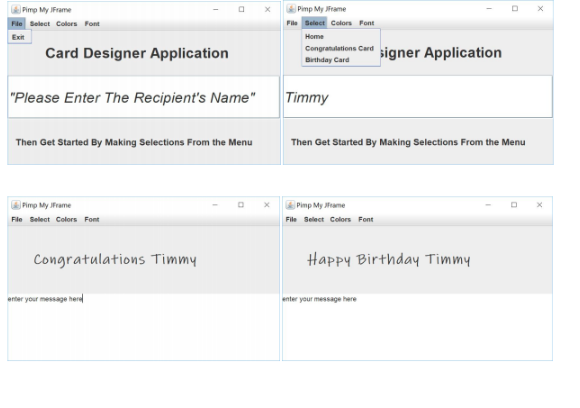
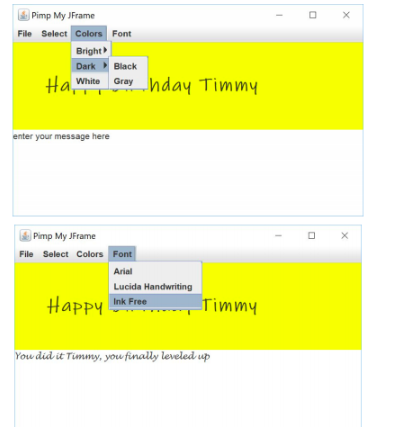
HERE IS MY CODE
package demo;
import javax.swing.*;
import java.awt.*;
import java.awt.event.*;
import java.awt.Color;
public class JKeyDemo extends JFrame implements
ActionListener {
private JMenuBar mainBar = new JMenuBar();
private JMenu menu1 = new JMenu("File");
private JMenu menu2 = new JMenu("Colors");
private JMenuItem exit = new JMenuItem("Exit");
private JMenu bright = new JMenu("Bright");
private JMenuItem dark = new JMenuItem("Dark");
private JMenuItem white = new JMenuItem("White");
private JMenuItem pink = new JMenuItem("Pink");
private JMenuItem yellow = new JMenuItem("Yellow");
private JLabel label = new JLabel("Hello");
public JKeyDemo() {
setLayout(new FlowLayout());
setJMenuBar(mainBar);
mainBar.add(menu1);
mainBar.add(menu2);
menu1.add(exit);
menu2.add(bright);
menu2.add(dark);
menu2.add(white);
bright.add(pink);
bright.add(yellow);
exit.addActionListener(this);
dark.addActionListener(this);
white.addActionListener(this);
pink.addActionListener(this);
yellow.addActionListener(this);
add(label);
label.setFont(new Font("Arial", Font.BOLD, 26)); }
@Override
public void actionPerformed(ActionEvent e) {
Object source = e.getSource();
Container con = getContentPane();
if(source == exit) System.exit(0);
else if(source == dark)
con.setBackground(Color.BLACK);
else if(source == white)
con.setBackground(Color.WHITE);
else if(source == pink)
con.setBackground(Color.PINK);
else con.setBackground(Color.YELLOW);
}
public static void main(String[] args) {
JKeyDemo mFrame = new JKeyDemo();
final int WIDTH = 250;
final int HEIGHT = 200;
mFrame.setSize(WIDTH, HEIGHT);
mFrame.setVisible(true);
}
}
imp My Frame Fle Selact Colors Font Flo Select Colors Fo Exnt Card Designer Application cunven caiencgner Application Birthday Card Please Enter The Recipient's Name" Timmy Then Get Started By Making Selections From the Menu Then Get Started By Making Selections From the Menu GPimp My Frame x Pimp My "name -Ox Congratulations Timmy Happy Birthday Timmy enter your message herd enter your message hene imp My Frame Fle Selact Colors Font Flo Select Colors Fo Exnt Card Designer Application cunven caiencgner Application Birthday Card Please Enter The Recipient's Name" Timmy Then Get Started By Making Selections From the Menu Then Get Started By Making Selections From the Menu GPimp My Frame x Pimp My "name -Ox Congratulations Timmy Happy Birthday Timmy enter your message herd enter your message hene
Step by Step Solution
There are 3 Steps involved in it

Get step-by-step solutions from verified subject matter experts
 Study Help