







Question: Java Data Structures (CS-204) Lab 2 Note: Download the code from blackboard and complete the TODO tasks within the classes. Once complete zip the project
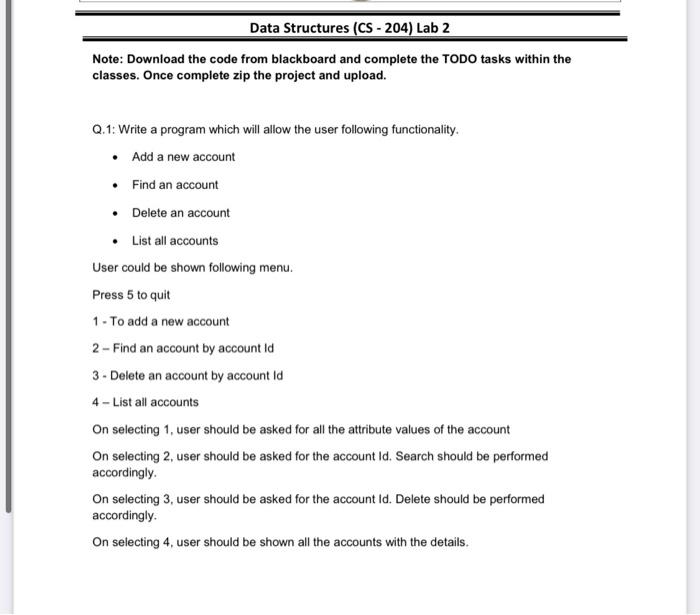
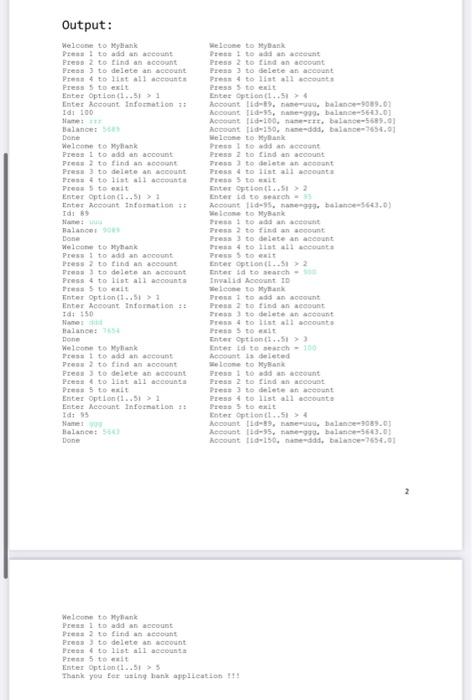
Data Structures (CS-204) Lab 2 Note: Download the code from blackboard and complete the TODO tasks within the classes. Once complete zip the project and upload. Q.1: Write a program which will allow the user following functionality. Add a new account Find an account Delete an account List all accounts User could be shown following menu. Press 5 to quit 1 - To add a new account 2 - Find an account by account id 3 - Delete an account by account Id 4 - List all accounts On selecting 1. user should be asked for all the attribute values of the account On selecting 2 user should be asked for the account id. Search should be performed accordingly. On selecting 3, user should be asked for the account Id. Delete should be performed accordingly. On selecting 4. user should be shown all the accounts with the details. Output: Welcome to My De to add an account Press 2 to find an account Press 3 to delete an account Press to list all accounts Press to exit Enter Option (1..5 > 1 Enter Account Information Idi 100 Balance Done Welcome to Myank Prees I to add an account Pre to find an scoot Press 3 to delete an account Testo list all acte Press to exit Ester Option (1..51> ; Inter Account information Idi 89 Balance Done Welcome to thank Press to add an account Press 2 to find an account Presto delete an account Press 4 to list all accounts Preto et Tnter option (1..311 Inter Account Information: Id 150 Name Italance: Done Welcome to Myank Ito add an account Press to find an account Press to delete an account Press to list all accounts Press to exit Ester Option.. > 1 Enter Account Information 11 Idt95 Balance: Done Welcome to Mybank Press I to add an account Press 2 to find an account Press 3 to delete an account Press to list all accounts Press to eat Enter Option(..16 Account id-1%, balance 9089.02 Account Id-95, 99. balance-563.01 Account 200 .. balance-5689.01 Account ide250. edd, balance 696.01 Welcome to Myank Press I toddan account Press 2 to find an account Tres to delete in cont Tress to list all accounts Press 5 to it Enter Option.. Enter td to search Account 11-15.999. balance-5661.0) Welcome to My Press to an account Press 2 to find an account Press to delete an account 4 to at all count Press to eat Enter option..12 Enter to search Invalid Account ID Welcome to Myank Frost to add an account Press 2 to find an account Tres to delete account Press 4 to list all account Press to it Enter option..51) Entret de satch - 100 Account is deleted Welcome to MyBank Tres Ito add an account Press 2 to find an account Press to delete an account Press 4 to list all account Press to exit Enter Option.. Account 11-19. c. balance 1089.01 Account 11d-95, 90 bal 5643.0 Kocount id-150. nameddid, balance 7656.01 Welcome to Mylink Pelto add an account Press to find a secon Press to delete an account Press to list all account Pret to it Enter option t..51 > 3 Thank you for ting han aplication 11
Step by Step Solution
There are 3 Steps involved in it

Get step-by-step solutions from verified subject matter experts
 Study Help