







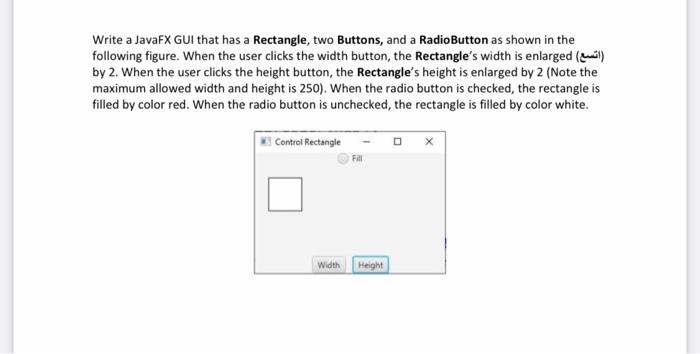
Question: java fx Write a JavaFX GUI that has a Rectangle, two Buttons, and a Radio Button as shown in the following figure. When the user
java fx
Write a JavaFX GUI that has a Rectangle, two Buttons, and a Radio Button as shown in the following figure. When the user clicks the width button, the Rectangle's width is enlarged (el) by 2. When the user clicks the height button, the Rectangle's height is enlarged by 2 (Note the maximum allowed width and height is 250). When the radio button is checked, the rectangle is filled by color red. When the radio button is unchecked, the rectangle is filled by color white. Control Rectangle Width Height
Step by Step Solution
There are 3 Steps involved in it
1 Expert Approved Answer
Step: 1 Unlock

Question Has Been Solved by an Expert!
Get step-by-step solutions from verified subject matter experts
Step: 2 Unlock
Step: 3 Unlock
 Study Help