







Question: Java Graphical Interface: Floating-point Calculator Assignment: Design a floating-point calculator. Must have a graphical interface and the following features: 1. Numeric buttons 0 9 and
Java Graphical Interface: Floating-point Calculator Assignment: Design a floating-point calculator. Must have a graphical interface and the following features: 1. Numeric buttons 0 9 and a decimal point
2. The ability to multiply, divide, subtract and add (these must actually perform work)
3. An equals button to perform the calculation
4. A display that outputs the values entered and the result
5. Allows for memory save (M+ button), memory recall (MR button) and memory clear (MC button). Extra Credit: Create a RPN calculator: +5% Add ability to display the equation entered: +5% Add the ability to calculate simple interest using user input for the interest rate and duration. +5%.
Example of what the graphical interface should look like: 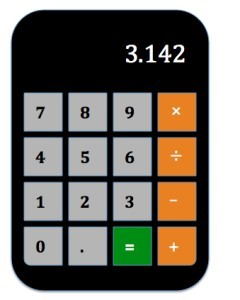
963 852 7.4 1 0
Step by Step Solution
There are 3 Steps involved in it

Get step-by-step solutions from verified subject matter experts
 Study Help