







Question: (JAVA GUI)Create the following GUI. You do not have to provide any functionality. You may use those hint: // Program creates a simple GUI. import
(JAVA GUI)Create the following GUI. You do not have to provide any functionality.
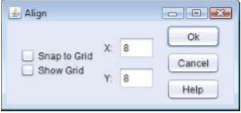
You may use those hint:
// Program creates a simple GUI.
import java.awt.GridLayout;
import java.awt.BorderLayout;
import java.awt.FlowLayout;
import javax.swing.JFrame;
import javax.swing.JButton;
import javax.swing.JTextField;
import javax.swing.JCheckBox;
import javax.swing.JLabel;
import javax.swing.JPanel;
public class AlignFrame extends JFrame
{
private JButton okJButton;
private JButton cancelJButton;
private JButton helpJButton;
private JTextField xJTextField;
private JTextField yJTextField;
private JCheckBox snapJCheckBox;
private JCheckBox showJCheckBox;
private JLabel xJLabel;
private JLabel yJLabel;
private JPanel checkJPanel;
private JPanel buttonJPanel;
private JPanel fieldJPanel1;
private JPanel fieldJPanel2;
private JPanel fieldJPanel;
// constructor sets up GUI
public AlignFrame()
{
super( "Align" );
// build checkJPanel
// create snapJCheckBox
// create showJCheckBox
// create checkJPanel
// use gridLayout
// add snapJCheckBox and showJcheckBox
// build field panel1
xJLabel = new JLabel( "X: " );
xJTextField = new JTextField( "8", 3 ); // set width of textfield
fieldJPanel1 = new JPanel();
fieldJPanel1.setLayout( new FlowLayout() ); // use flowlayout
fieldJPanel1.add( xJLabel );
fieldJPanel1.add( xJTextField );
// build field panel2
// create yJLabel
// set width of textfield
// create fieldJPanel2
// use flowlayout
// add yJLabel
// add yJTextField
// build field panel
// create new JPanel
// use border layout
// add fieldJPanel1 and fieldJPanel2
// build button panel
// create okJButton, cancelJButton, helpJButton
// create new JPanel
// use GridLayout(3,1,10,5)
// add buttons to the JPanel
// use flowlayout center-aligned and add Panel components
//setLayout( new FlowLayout( FlowLayout.CENTER, 10, 5 ) );
} // end AlignFrame constructor
} // end class AlignFrame
// Testing AlignFrame. import javax.swing.JFrame;
public class Align { public static void main( String[] args ) { AlignFrame alignFrame = new AlignFrame(); // create AlignFrame alignFrame.setDefaultCloseOperation( JFrame.EXIT_ON_CLOSE ); alignFrame.setSize( 300, 140 ); // set frame size alignFrame.setVisible( true ); // display frame } // end main } // end class Align
Align Ok 8 Snap to Grid Show Grid Cancel Y 8 Help
Step by Step Solution
There are 3 Steps involved in it

Get step-by-step solutions from verified subject matter experts
 Study Help