







Question: Java, How to run a new project in eclipse? I'm making a new project in eclipse, but when I click run, it is running the
Java, How to run a new project in eclipse? I'm making a new project in eclipse, but when I click run, it is running the old project. How do I make it run the new project. Here is the screenshot of what I trying to run. I already did make a class (just named it aaa i believe )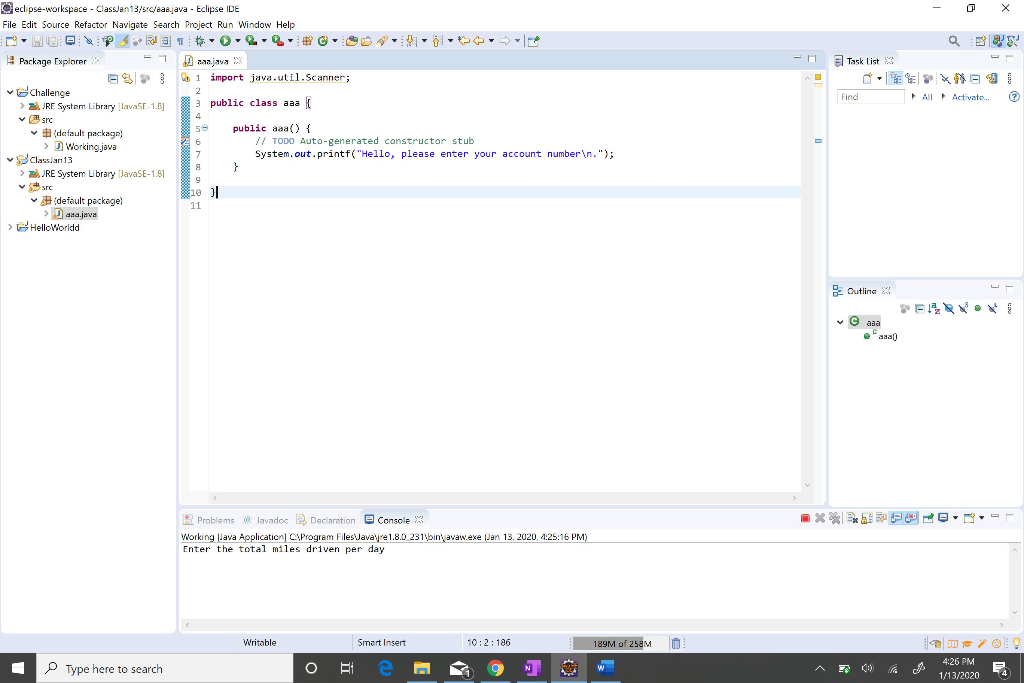
- O X Q: - Task List Find All Activate... Oeclipse-workspace - ClassJan 13/src/eae.ava - Eclipse IDE File Edit Source Refactor Navigate Search Project Run Window Help NEOB31# #04-02 Package Explorer x = 1 .java 3 1 import java.util.Scanner; Challenge > JRE System Library JavaSE-1.0] 3 public class aaa src #default package) se public aaa() { // TODO Auto-generated constructor stub > Workingjava v Class an 13 7 System.out.printf("Hello, please enter your account number ."); > JRE System Library JavaSE-1.8] src 10 ) #default package! Jana.java > HelloWorldd 26 g Outlina asa **BRO- Problems @ lavadoc Declaration Console X Working Java Application) C:\Program Files\Javavire 1.8.0 231\binavaw.exe Jan 13, 2020, 4:25:16 PM) Enter the total miles driven per day Writable Smart Insert 10:2: 186 189M of 258M O Type here to search Type here to search OBie 9 09 4:26 PM 1/13/2020
Step by Step Solution
There are 3 Steps involved in it

Get step-by-step solutions from verified subject matter experts
 Study Help