







Question: JAVA IDE 1. In the Converter project, create a new package named cop2210.converter.temperature 2. Create a new class named Temperature Converter inside the cop2210.converter.temperature package
JAVA IDE
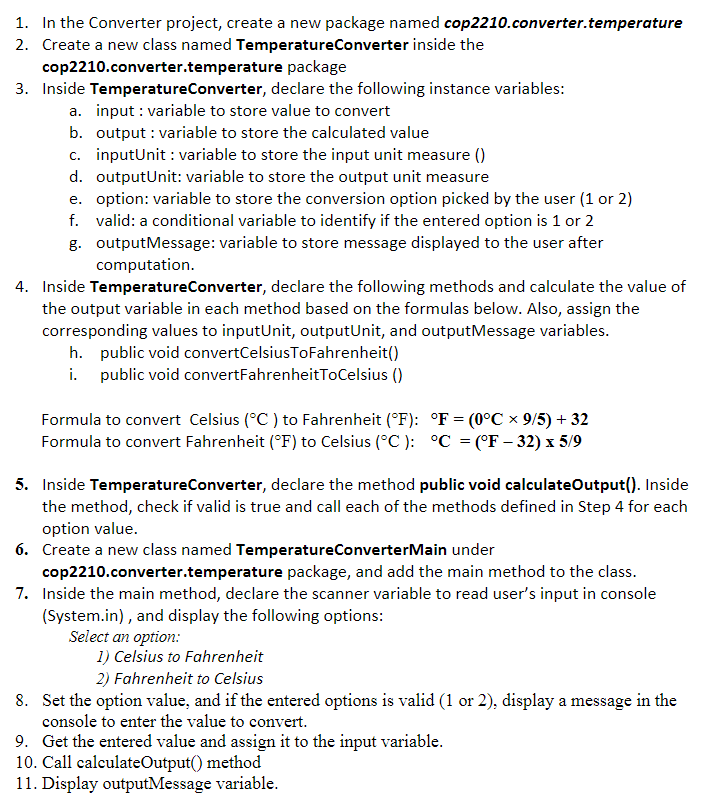
1. In the Converter project, create a new package named cop2210.converter.temperature 2. Create a new class named Temperature Converter inside the cop2210.converter.temperature package 3. Inside Temperature Converter, declare the following instance variables: a. input : variable to store value to convert b. output : variable to store the calculated value c. inputUnit : variable to store the input unit measure () d. outputUnit: variable to store the output unit measure e. option: variable to store the conversion option picked by the user (1 or 2) f. valid: a conditional variable to identify if the entered option is 1 or 2 g. OutputMessage: variable to store message displayed to the user after computation. 4. Inside Temperature Converter, declare the following methods and calculate the value of the output variable in each method based on the formulas below. Also, assign the corresponding values to inputUnit, outputUnit, and outputMessage variables. h. public void convertCelsiusToFahrenheit() i. public void convertFahrenheitToCelsius) = Formula to convert Celsius (C) to Fahrenheit (F): F = (0C ~ 9/5) + 32 Formula to convert Fahrenheit (F) to Celsius (C): C = (F - 32) x 5/9 = 5. Inside Temperature Converter, declare the method public void calculateOutput(). Inside the method, check if valid is true and call each of the methods defined in Step 4 for each option value. 6. Create a new class named Temperature ConverterMain under cop2210.converter.temperature package, and add the main method to the class. 7. Inside the main method, declare the scanner variable to read user's input in console (System.in), and display the following options: Select an option: 1) Celsius to Fahrenheit 2) Fahrenheit to Celsius 8. Set the option value, and if the entered options is valid (1 or 2), display a message in the console to enter the value to convert. 9. Get the entered value and assign it to the input variable. 10. Call calculateOutput() method 11. Display outputMessage variable
Step by Step Solution
There are 3 Steps involved in it

Get step-by-step solutions from verified subject matter experts
 Study Help