







Question: Java & JavaFX: Random Card Displayer Deck of Cards Image Folder - https://www.dropbox.com/sh/x3asvea8i21ftci/AAA5dw0OwRblxke3Nm_TLPAxa?dl=0 Can anyone help me figure this program out? I am having a
Java & JavaFX: Random Card Displayer
Deck of Cards Image Folder - https://www.dropbox.com/sh/x3asvea8i21ftci/AAA5dw0OwRblxke3Nm_TLPAxa?dl=0
Can anyone help me figure this program out? I am having a decent amount of trouble with it and would appreciate some help please..
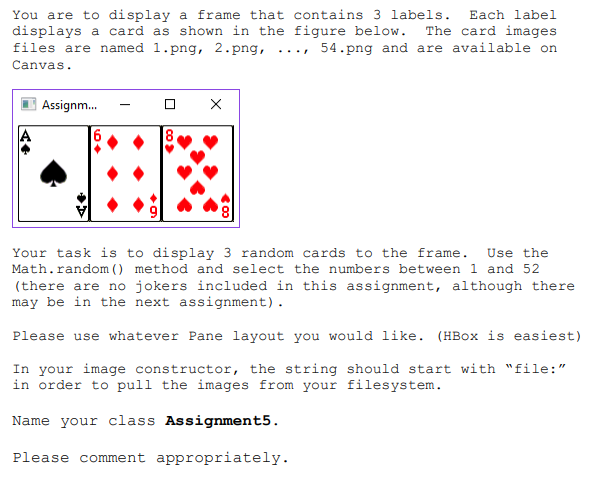
You are to display a frame that contains 3 labels. Each label displays a card as shown in the figure below. The card images files are named 1.png, 2.png, .. ., 54.png and are available on Canvas. [1] Assignm Your task is to display 3 random cards to the frame. Use the Math.random ) method and select the numbers between 1 and 52 (there are no jokers included in this assignment, although there may be in the next assignment). Please use whatever Pane layout you would like. (HBox is easiest) In your image constructor, the string should start with "file:" in order to pull the images from your filesystem. Name your class Assignment5 Please comment appropriately. You are to display a frame that contains 3 labels. Each label displays a card as shown in the figure below. The card images files are named 1.png, 2.png, .. ., 54.png and are available on Canvas. [1] Assignm Your task is to display 3 random cards to the frame. Use the Math.random ) method and select the numbers between 1 and 52 (there are no jokers included in this assignment, although there may be in the next assignment). Please use whatever Pane layout you would like. (HBox is easiest) In your image constructor, the string should start with "file:" in order to pull the images from your filesystem. Name your class Assignment5 Please comment appropriately
Step by Step Solution
There are 3 Steps involved in it

Get step-by-step solutions from verified subject matter experts
 Study Help