







Question: Java (Jframe form) Excirse #1: Create a Student class that has a name (String), Id (String) and a GPA (double). 1. Create the following GUI
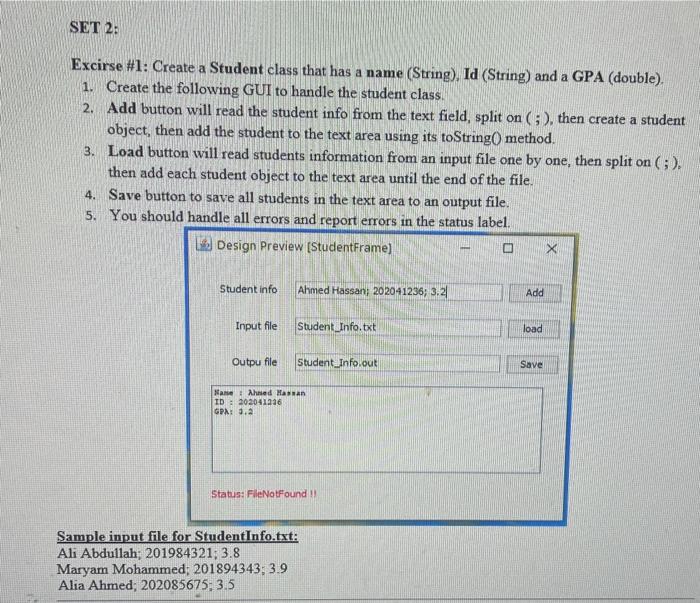
Excirse \#1: Create a Student class that has a name (String), Id (String) and a GPA (double). 1. Create the following GUI to handle the student class. 2. Add button will read the student info from the text field, split on (; ), then create a student object, then add the student to the text area using its toString 0 method. 3. Load button will read students information from an input file one by one, then split on (;). then add each student object to the text area until the end of the file. 4. Save button to save all students in the text area to an output file. 5. You should handle all errors and report errors in the status label. Sample input file for StudentInfo.txt: Ali Abdullah; 201984321; 3.8 Maryam Mohammed; 201894343;3.9 Alia Ahmed; 202085675;3.5
Step by Step Solution
There are 3 Steps involved in it

Get step-by-step solutions from verified subject matter experts
 Study Help