







Question: Java language Just need to fix something on the bold code. Question: For any element in keysList with a value smaller than 50, print the
Java language
Just need to fix something on the bold code.
Question:
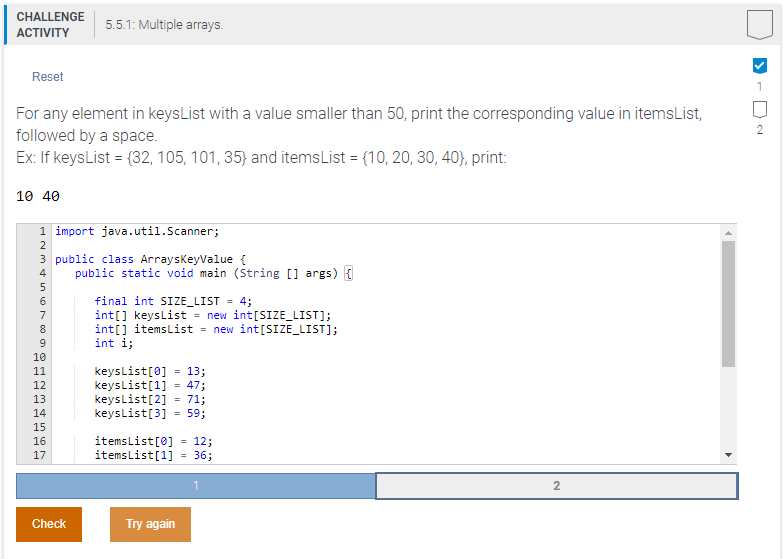
For any element in keysList with a value smaller than 50, print the corresponding value in itemsList, followed by a space. Ex: If keysList = {32, 105, 101, 35} and itemsList = {10, 20, 30, 40}, print:
10 40
Code:
import java.util.Scanner;
public class ArraysKeyValue { public static void main (String [] args) {
final int SIZE_LIST = 4; int[] keysList = new int[SIZE_LIST]; int[] itemsList = new int[SIZE_LIST]; int i;
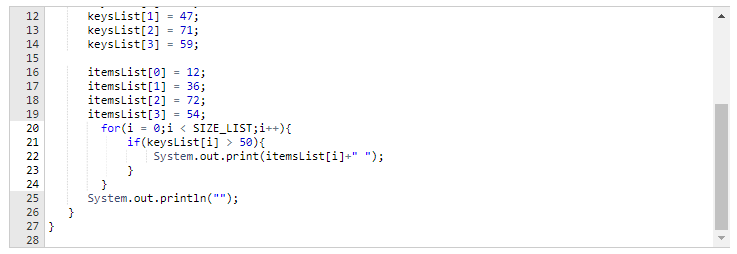
keysList[0] = 13; keysList[1] = 47; keysList[2] = 71; keysList[3] = 59;
itemsList[0] = 12; itemsList[1] = 36; itemsList[2] = 72; itemsList[3] = 54; for(i = 0;i 50){ System.out.print(itemsList[i]+" "); } } System.out.println(""); } }
Screenshot:
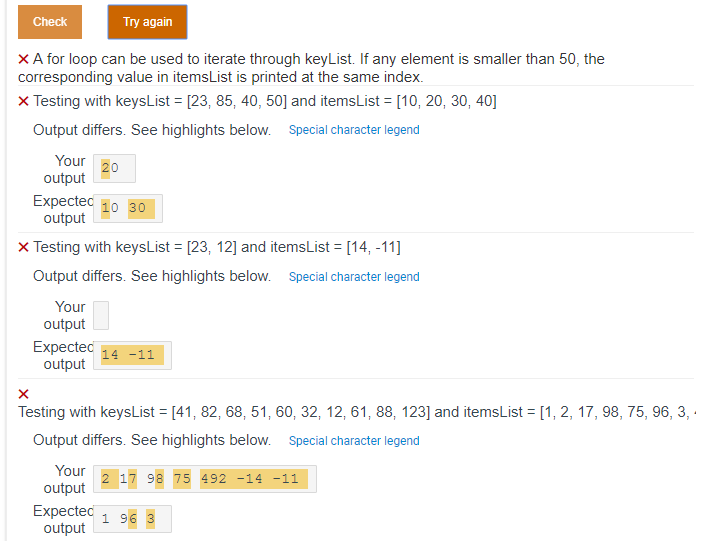
CHALLENGE ACTIVITY 5.5.1: Multiple arrays Reset For any element in keysust with a value smaller than 50, print the corresponding value in itemsList. followed by a space Ex: If keysList (32, 105, 101, 35) and itemsList (10, 20, 30, 40), print 10 40 1 import java.util.Scanner; 3 public class ArraysKeyValue 4 public static void main (String [ args) final int SIZE_LIST 4 int[] keys1st new int [SIZE-LIST]; int[] itens List new int[SIZE-LIST]; int i keys List[0] keysList[1] keysList2] keys List[3] = 13; -47; 71; 59; 12 15 16 items List [0] items List [1] 12; 36; = = 2 Check Try again 12 keysList[1]-47; keysList[2] keys List[3] 71; = 59; 14 15 16 17 18 19 20 itemsList[0] items List [1] itemsList[2] itemsList[3] = 12; = 6; 72; 54; for( = 0; 50)1 System.out.print(itemsList[i]+" "); 23 25 27 System.out.println("") Check Iry again X A for loop can be used to iterate through keyList. If any element is smaller than 50, the corresponding value in itemsList is printed at the same index Testing with keysList= [23, 85, 40, 501 and itemsList-[10, 20, 30, 401 Output differs. See highlights below. Special character legend Your 20 output Expec output X Testing with keysList [23, 12] and itemsList[14,-11] Output differs. See highlights below. Special character legend Your output 14 -11 output Testing with keysList [41, 82, 68, 51, 60, 32, 12, 61, 88, 123] and itemsList [1, 2, 17, 98, 75, 96, 3 Output differs. See highlights below. Special character legend output 27975 492-1411 2 17 98 75 492 -14 -11 Ex
Step by Step Solution
There are 3 Steps involved in it

Get step-by-step solutions from verified subject matter experts
 Study Help