







Question: JAVA Objective: Sorting Algorithms (first set) comprehension Here is the code for the first set of sorting algorithms we have seen: public int select(Comparable[] a,
JAVA Objective: Sorting Algorithms (first set) comprehension
Here is the code for the first set of sorting algorithms we have seen:
public int select(Comparable[] a, int k)
{
//find the location of the smallest element in the array
//between position k and the end of the array
int smallestPos = k;
for (int j = k; j
{
numComps++;
if (a[j].compareTo(a[smallestPos])
smallestPos = j;
}
return smallestPos;
}
//-----------------------------------------------------------------
/**
* The selection sort method: sorts the given unsorted array a
* @param Comparable[] a -- the array to be sorted
* calls: findSmallestLoc and swap methods
* Time Complexity: O(N ** 2)
*/
public void selectionSort(Comparable[] a)
{
int pos; //position of the smallest elelemt
int temp; //temp variable for swap
numComps = 0;
for (int k = 0; k
{
pos = select(a, k); //find the smallest element
swap(a, k, pos);
}
System.out.println("NumComps = "+numComps);
}
//-----------------------------------------------------------------
/**
* The insertion sort method: Sorts the given array a
*
* @param Comparable[] a -- the array to be sorted
* calls: insert and swap methods
* Time Complexity: O(N ** 2)
*/
public void insertionSort(Comparable a[])
{
numComps = 0;
for (int k = 1; k
{
insert(a, a[k], k-1);
}
System.out.println("NumComps = "+numComps);
}
//-----------------------------------------------------------------
/**
* The insert method. It is assumed that the part of the array between
* position 0 and position end is sorted. It inserts a new element x into
* the array, by moving other elements down and making space for the new
* element. It maintains the increasing order of the array.
* @param Comparable[] a - the sorted array into which insertion is made
* @param x -- the integer that is to be inserted
* @param end -- array is assumed to be sorted from 0 to end
*
* Called by: the insertionSort method
*/
public void insert(Comparable a[], Comparable x, int end)
{
int k = end;
boolean done = false;
while ((k >= 0) && (! done))
{
// As long as the element in the array is > x, keep moving
// it one position down.
numComps++;
if (a[k].compareTo(x)>0)
{
a[k+1] = a[k];
k--;
}
// Stop moving elements down as soon as you find an element >= x
else
{
done = true;
}
}
// Insert the new element at position k+1
a[k+1] = x;
}
//-----------------------------------------------------------------
/**
* pass: It makes one "pass" over the data, starting at position 0 up to
* position end. It compares a[0] with a[1], a[1] with a[2] ... and
* a[end-1] with a[end], and makes a swap if necessary. In case it swaps
* it will record that fact by setting didSwap to true. This is what is
* returned by the method.
* @param Comparable[] a -- the array to be sorted
* @param end -- 0 to end is the part of the array to focus on.
* The elements at positions end+1 ... will be sorted.
*/
public static boolean pass(Comparable[] a, int end)
{
boolean didSwap = false;
for (int k = 0; k
{
numComps++;
if (a[k].compareTo(a[k+1]) > 0)
{
swap(a, k, k+1);
didSwap = true;
}
}
return didSwap;
}
//-----------------------------------------------------------------
/**
* The bubblesort method. It makes as many "pass"es as needed over the
* array until it is sorted.
* @param Comparable[] a -- the array to be sorted
* Time Complexity: O(N ** 2)
*/
public static void bubbleSort(Comparable[] a)
{
numComps = 0;
boolean swapped = true;
// Keep track of whether we made a swap in this pass
// Initially set to true, because we have to make at
// least one pass
int passCount = 0;
// Counts the number of passes. We need no more than
// n-1 passes, where n is the length of the array
int end = a.length-1;
// 0 to end is the part of the array to focus on
// Loop as long as passCount
while ((passCount
{
swapped = pass(a, end);
passCount++;
end--;
}
System.out.println("NumComps = "+numComps);
}
public static int getNumComps()
{
return numComps;
}
}
Type (or copy-paste) this code into Eclipse, into the package called sortingsearching. Note that the most relevant methods we will be focusing on in this code have the following signatures:
public static void selectionSort(Comparable[] a)
public static void insertionSort(Comparable a[])
public static void bubbleSort(Comparable[] a)
Now, write a class called SortComparator which contains the public static void main method. It should do the following:
- Create an Integer array of size 128. Call it a.
- Fill it up with random numbers between 0 and 100,000. Use
for (int k = 0; k
a[k] = (int) (Math.random() * 100000);
to generate your random numbers.
- Make 2 more copies of a, call them b and c. Dont just write b = a, etc. Create brand new arrays b and c of the same size as that of a and copy the elements of a into them using for loops. (Note: as a result, all these arrays - a, b, c finally contain exactly the same elements)
- Run the Selection sort algorithm on a and note the number of comparisons.
- Run the Insertion sort algorithm on b and note the number of comparisons.
- Run the Bubblesort algorithm on c and note the number of comparisons.
Repeat 1-6 above for sizes 512, 2048, and 8192. Based on the results you observe from these runs, complete the following tables and submit the RUN
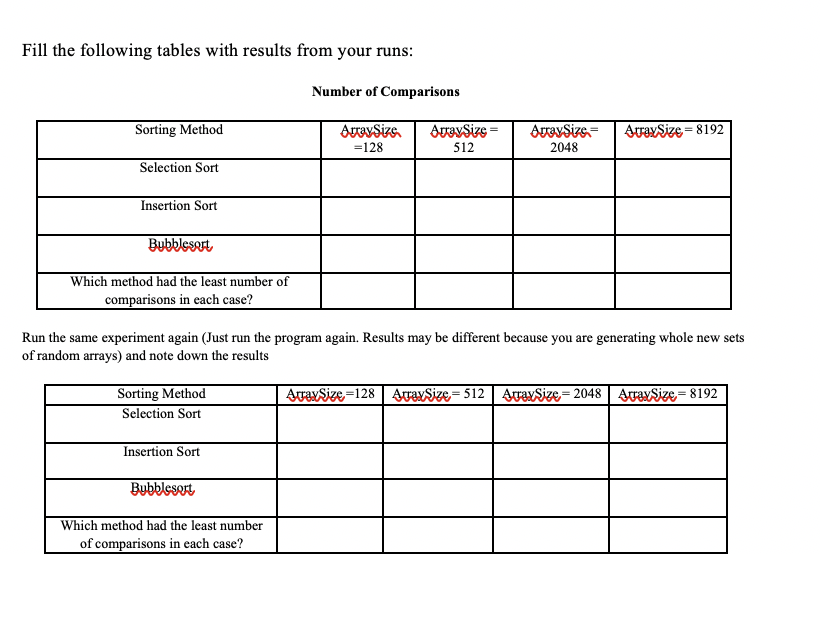
Fill the following tables with results from your runs: Number of Comparisons Sorting Method Array Sizs. =128 Array Size = 512 ArraySize = 2048 straxSize = 8192 Selection Sort Insertion Sort Bubblesort Which method had the least number of comparisons in each case? Run the same experiment again (Just run the program again. Results may be different because you are generating whole new sets of random arrays) and note down the results AtraxSize=128 straxSize=512 AtraxSize = 2048 AtraxSize=8192 Sorting Method Selection Sort Insertion Sort Bubblesort Which method had the least number of comparisons in each case
Step by Step Solution
There are 3 Steps involved in it

Get step-by-step solutions from verified subject matter experts
 Study Help