







Question: Java only please ******************************PROVIDED CODE*********************************** // UpdateAccountBalance // Read a file of AccountRecord objects sequentially with ObjectInputStream, // modify the account balance for each object,
Java only please
******************************PROVIDED CODE***********************************
// UpdateAccountBalance
// Read a file of AccountRecord objects sequentially with ObjectInputStream, // modify the account balance for each object, then output each to a new serialized file
// Import statements for Input/Output classes for handling serialized objects // ADD necessary import statements here
// Import statements for necessary Exception classes // ADD necessary Exception class import statements here
public class UpdateAccountBalance { oldAccts; // Initial declaration/reference of serialized input stream newAccts; // Initial declaration/reference of serialized output stream
/* "Mainline" of process Invoke method to open all files needed in process Invoke method to process input & create output Invoke method to close all files used in process ** THERE ARE NO CHANGES TO BE MADE HERE ** */ public static void main( String[] args) { try { openFiles(); processRecords(); closeFiles(); } catch( Exception oops ) { System.err.printf( "Something went wrong. You'll need to debug this and try again." ); } }
// Open the input & output files, based on the initial declarations above // Add code required to complete instantiation of stream objects and open associated files.
public static void openFiles( ) // ADD appropriate clause here for exception handling { try // open input and output files { "Accounts.ser"
"ModAccounts.ser" } catch ( ) // ADD Exception class and Exception object name { // ADD code to output appropriate message and rethrow the exception to main // You do not need to CHAIN the exception, a rethrow will suffice } }
/* Process records Deserialize an AccountRecord from input Modify the value of the balance instance variable Serialize the updated AccountRecord to the output Look for notes indicating where code must be added */ public static void processRecords( ) // ADD appropriate clause here for exception handling { // declare a 'holding' space for the DESERIALIZED objects AccountRecord record;
// headings for screen output generated during update System.out.println( "Updated Account Records" ); System.out.printf( "%-10s%-12s%-12s%10s ", "Account","First Name", "Last Name", "Balance" );
try { while ( true ) // essentially infinite loop; will be ended by EOFException DO NOT CHANGE { // ADD code to deserialize object
setAccount( getBalance( ) - 20 ); // COMPLETE code to update account balance
// display updated record contents DO NOT CHANGE System.out.printf( "%-10d%-12s%-12s%10.2f%n", record.getAccount( ), record.getFirstName( ), record.getLastName( ), record.getBalance( ) );
// ADD code to serialize modified object
} }
catch ( ) // ADD Exception class & Exception object name { // ADD code to PROPERLY TERMINATE WHILE LOOP }
catch ( ) // ADD Exception class and Exception object name { // ADD code to output appropriate message and rethrow exception }
catch ( ) // ADD Exception class & Exception object name { // ADD code to output appropriate message and rethrow exception } }
// Close the files used in process public static void closeFiles() { try // close input file { if ( oldAccts != null ) // ADD code to close the "old" file here if ( newAccts != null) // ADD code to close the "new" file here } catch ( ) // ADD Exception class and Exception object name { System.err.println( "Error closing file." ); // NO OTHER CHANGES NEEDED HERE // ADD statement to rethrow the exception. }
} }
*****************************************************************************************************
// Reading a file of objects sequentially with ObjectInputStream and displaying each record.
import java.nio.file.Paths; import java.nio.file.Files; import java.io.ObjectInputStream;
import java.io.EOFException; import java.io.IOException;
public class ReadAccountFile { private static ObjectInputStream input;
public static void main( String[] args) { openFile(); readRecords(); closeFile();
}
public static void openFile() { try { input = new ObjectInputStream( Files.newInputStream( Paths.get( "Accounts.ser" ) ) ); } catch ( IOException ioException ) { System.err.println( "Error opening file." ); } }
public static void readRecords() { AccountRecord record; System.out.printf( "%-10s%-12s%-12s%10s ", "Account","First Name", "Last Name", "Balance" );
try { while ( true ) { record = ( AccountRecord ) input.readObject();
System.out.printf( "%-10d%-12s%-12s%10.2f ", record.getAccount(), record.getFirstName(), record.getLastName(), record.getBalance() ); } } catch ( EOFException endOfFileException ) { return; } catch ( ClassNotFoundException classNotFoundException ) { System.err.println( "Unable to create object." ); } catch ( IOException ioException ) { System.err.println( "Error during reading from file." ); } }
public static void closeFile() { try { if ( input != null ) input.close(); } catch ( IOException ioException ) { System.err.println( "Error closing file." ); System.exit( 1 ); } } }
************************************************************************************
// AccountRecord class
// It implements the interface Serializable, allowing the object to be written out, or stored, as SERIALIZED OBJECTS. // The interface also allows the reading in (or DESERIALIZATION) of those objects.
import java.io.Serializable;
public class AccountRecord implements Serializable { private int account; private String firstName; private String lastName; private double balance;
public AccountRecord() { }
public AccountRecord( int acct, String first, String last, double bal ) { setAccount( acct ); setFirstName( first ); setLastName( last ); setBalance( bal ); }
public void setAccount( int acct ) { account = acct; }
public int getAccount() { return account; }
public void setFirstName( String first ) { firstName = first; }
public String getFirstName() { return firstName; }
public void setLastName( String last ) { lastName = last; }
public String getLastName() { return lastName; }
public void setBalance( double bal ) { balance = bal; }
public double getBalance() { return balance; } public String toString() { String stuff = getFirstName() + " " + getLastName(); return stuff; } }
****************************************END CODE*******************************************
If needed, the accounts.ser file is available here:
https://drive.google.com/file/d/1dWcYbHEOUbBLhPeDCH3bMOiIVkWXiuSH/view?usp=sharing
*************************************************************************************************
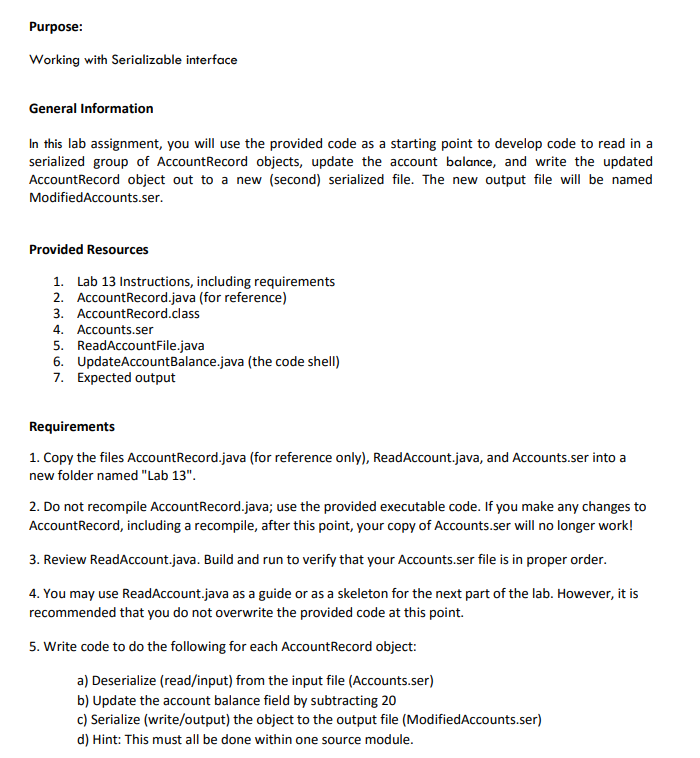
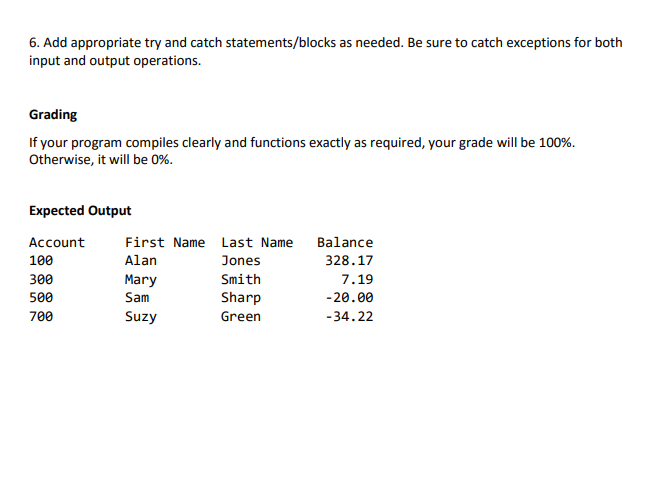
Purpose: Working with Serializable interface General Information In this lab assignment, you will use the provided code as a starting point to develop code to read in a serialized group of AccountRecord objects, update the account balance, and write the updated AccountRecord object out to a new (second) serialized file. The new output file will be named ModifiedAccounts.ser Provided Resources 1. Lab 13 Instructions, including requirements 2. AccountRecord.java (for reference) 3. AccountRecord.class 4. Accounts.ser 5. ReadAccountFile.java 6. UpdateAccountBalance.java (the code shell) 7. Expected output Requirements 1. Copy the files AccountRecord.java (for reference only), ReadAccount.java, and Accounts.ser into a new folder named "Lab 13" 2. Do not recompile AccountRecord.java; use the provided executable code. If you make any changes to AccountRecord, including a recompile, after this point, your copy of Accounts.ser will no longer work! 3. Review ReadAccount.java. Build and run to verify that your Accounts.ser file is in proper order 4. You may use ReadAccount.java as a guide or as a skeleton for the next part of the lab. However, it is recommended that you do not overwrite the provided code at this point. 5. Write code to do the following for each AccountRecord object: a) Deserialize (read/input) from the input file (Accounts.ser) b) Update the account balance field by subtracting 20 c) Serialize (write/output) the object to the output file (ModifiedAccounts.ser) d) Hint: This must all be done within one source module Purpose: Working with Serializable interface General Information In this lab assignment, you will use the provided code as a starting point to develop code to read in a serialized group of AccountRecord objects, update the account balance, and write the updated AccountRecord object out to a new (second) serialized file. The new output file will be named ModifiedAccounts.ser Provided Resources 1. Lab 13 Instructions, including requirements 2. AccountRecord.java (for reference) 3. AccountRecord.class 4. Accounts.ser 5. ReadAccountFile.java 6. UpdateAccountBalance.java (the code shell) 7. Expected output Requirements 1. Copy the files AccountRecord.java (for reference only), ReadAccount.java, and Accounts.ser into a new folder named "Lab 13" 2. Do not recompile AccountRecord.java; use the provided executable code. If you make any changes to AccountRecord, including a recompile, after this point, your copy of Accounts.ser will no longer work! 3. Review ReadAccount.java. Build and run to verify that your Accounts.ser file is in proper order 4. You may use ReadAccount.java as a guide or as a skeleton for the next part of the lab. However, it is recommended that you do not overwrite the provided code at this point. 5. Write code to do the following for each AccountRecord object: a) Deserialize (read/input) from the input file (Accounts.ser) b) Update the account balance field by subtracting 20 c) Serialize (write/output) the object to the output file (ModifiedAccounts.ser) d) Hint: This must all be done within one source module
Step by Step Solution
There are 3 Steps involved in it

Get step-by-step solutions from verified subject matter experts
 Study Help