







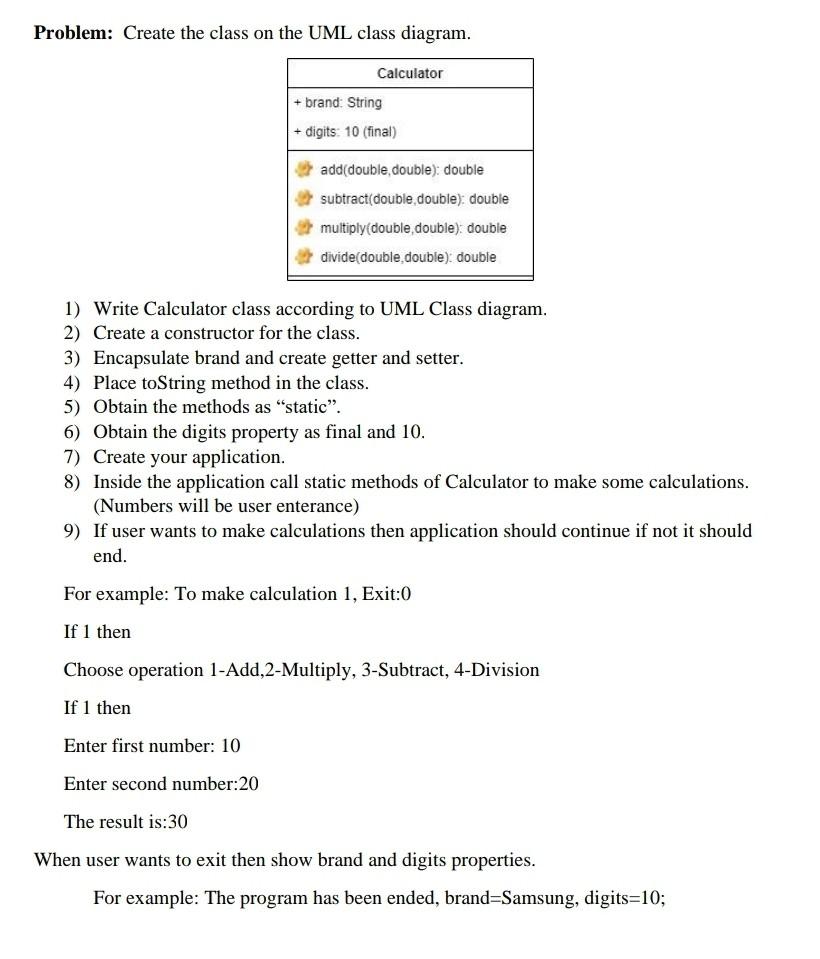
Question: Java oop Problem: Create the class on the UML class diagram. begin{tabular}{|l|} hline multicolumn{2}{|c|}{ Calculator } hline + brand: String + digits: 10
Java oop
Problem: Create the class on the UML class diagram. \begin{tabular}{|l|} \hline \multicolumn{2}{|c|}{ Calculator } \\ \hline + brand: String \\ + digits: 10 (final) \\ \hline add(double,double): double \\ subtract(double,double): double \\ multiply(double, double): double \\ divide(double,double): double \\ \hline \hline \end{tabular} 1) Write Calculator class according to UML Class diagram. 2) Create a constructor for the class. 3) Encapsulate brand and create getter and setter. 4) Place toString method in the class. 5) Obtain the methods as "static". 6) Obtain the digits property as final and 10. 7) Create your application. 8) Inside the application call static methods of Calculator to make some calculations. (Numbers will be user enterance) 9) If user wants to make calculations then application should continue if not it should end. For example: To make calculation 1, Exit:0 If 1 then Choose operation 1-Add, 2-Multiply, 3-Subtract, 4-Division If 1 then Enter first number: 10 Enter second number:20 The result is: 30 When user wants to exit then show brand and digits properties. For example: The program has been ended, brand=Samsung, digits =10
Step by Step Solution
There are 3 Steps involved in it

Get step-by-step solutions from verified subject matter experts
 Study Help