







Question: java please Download the project (MidLab202) from Blackboard. This project has 8 files. In order to solve the exam, question you will need import the
java please
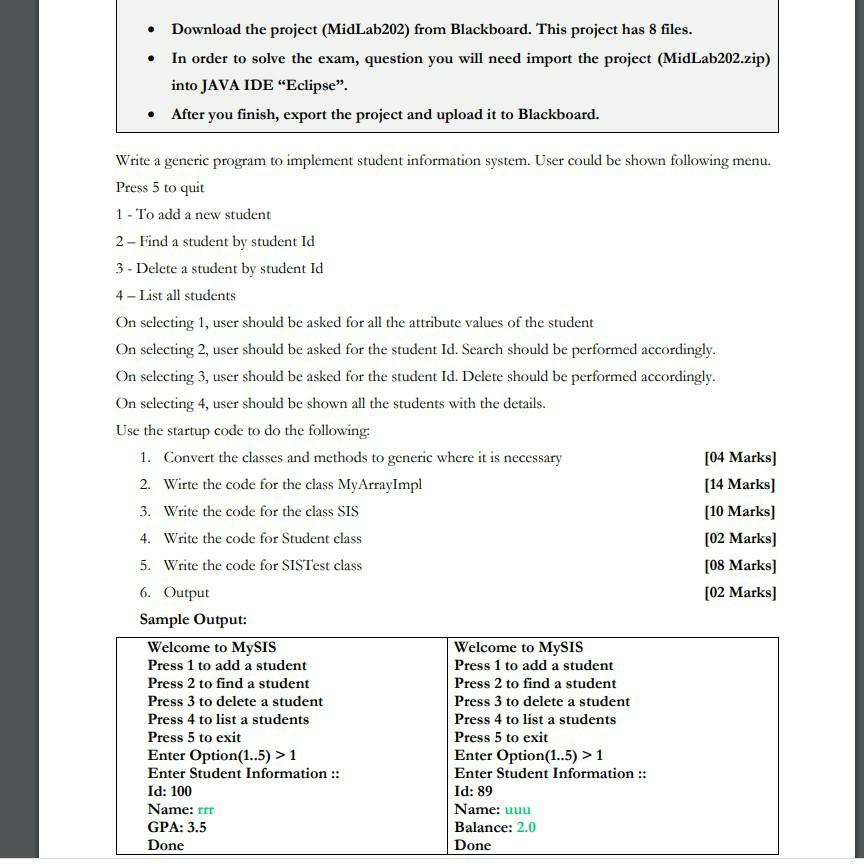
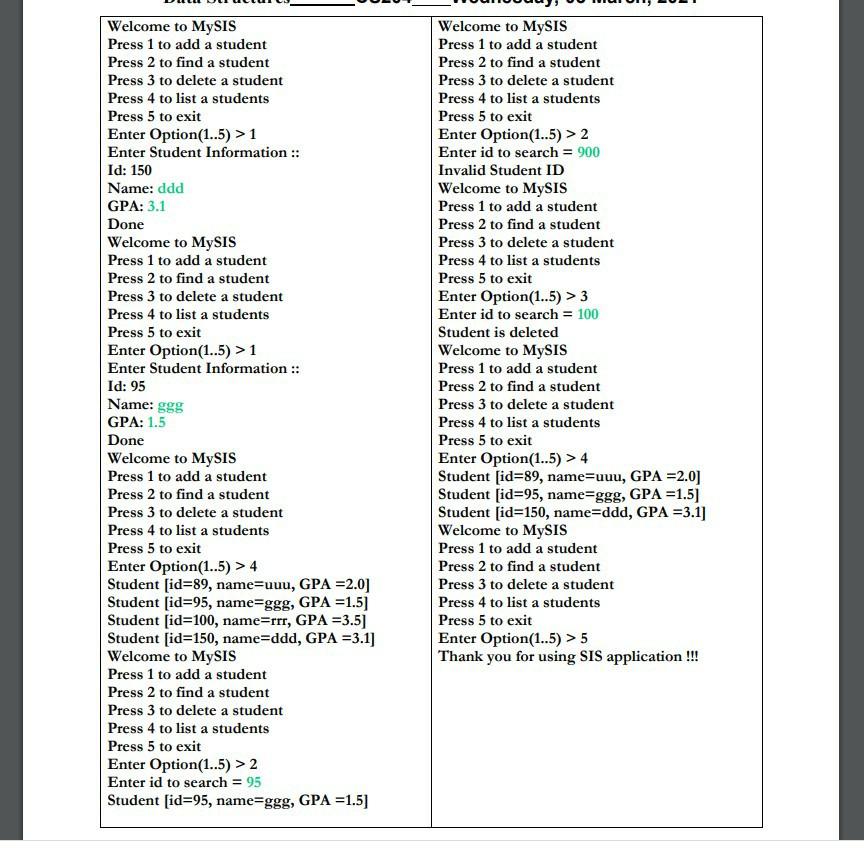
Download the project (MidLab202) from Blackboard. This project has 8 files. In order to solve the exam, question you will need import the project (MidLab202.zip) into JAVA IDE Eclipse". After you finish, export the project and upload it to Blackboard. Write a generic program to implement student information system. User could be shown following menu. Press 5 to quit 1 - To add a new student 2 - Find a student by student Id 3 - Delete a student by student Id 4 - List all students On selecting 1, user should be asked for all the attribute values of the student On selecting 2 user should be asked for the student Id. Search should be performed accordingly. On selecting 3, user should be asked for the student Id. Delete should be performed accordingly. On selecting 4, user should be shown all the students with the details. Use the startup code to do the following 1. Convert the classes and methods to generic where it is necessary [04 Marks ] 2. Wirte the code for the class MyArrayImpl [14 Marks] 3. Write the code for the class SIS [10 Marks] 4. Write the code for Student class [02 Marks) 5. Write the code for SISTest class [08 Marks) 6. Output [02 Marks) Sample Output: Welcome to MySIS Welcome to MySIS Press 1 to add a student Press 1 to add a student Press 2 to find a student Press 2 to find a student Press 3 to delete a student Press 3 to delete a student Press 4 to list a students Press 4 to list a students Press 5 to exit Press 5 to exit Enter Option(1..5) > 1 Enter Option(1..5) > 1 Enter Student Information :: Enter Student Information :: Id: 100 Id: 89 Name: rrr Name: uuu GPA: 3.5 Balance: 2.0 Done Done Welcome to MySIS Press 1 to add a student Press 2 to find a student Press 3 to delete a student Press 4 to list a students Press 5 to exit Enter Option(1..5) > 1 Enter Student Information :: Id: 150 Name: ddd GPA: 3.1 Done Welcome to MySIS Press 1 to add a student Press 2 to find a student Press 3 to delete a student Press 4 to list a students Press 5 to exit Enter Option(1..5) > 1 Enter Student Information :: Id: 95 Name: ggg GPA: 1.5 Done Welcome to MySIS Press 1 to add a student Press 2 to find a student Press 3 to delete a student Press 4 to list a students Press 5 to exit Enter Option(1..5) > 4 Student [id=89, name=uuu, GPA =2.0] Student [id=95, name=ggg, GPA =1.5) Student id=100, name=rrr, GPA =3.5] Student [id=150, name=ddd, GPA =3.1] Welcome to MySIS Press 1 to add a student Press 2 to find a student Press 3 to delete a student Press 4 to list a students Press 5 to exit Enter Option(1..5) > 2 Enter id to search = 95 Student [id=95, name=ggg, GPA =1.5) Welcome to MySIS Press 1 to add a student Press 2 to find a student Press 3 to delete a student Press 4 to list a students Press 5 to exit Enter Option(1..5) > 2 Enter id to search = 900 Invalid Student ID Welcome to MySIS Press 1 to add a student Press 2 to find a student Press 3 to delete a student Press 4 to list a students Press 5 to exit Enter Option(1..5) > 3 Enter id to search = 100 Student is deleted Welcome to MySIS Press 1 to add a student Press 2 to find a student Press 3 to delete a student Press 4 to list a students Press 5 to exit Enter Option(1..5) > 4 Student [id=89, name=uuu, GPA =2.0) Student [id=95, name=ggg, GPA =1.5) Student [id=150, name=ddd, GPA =3.1] Welcome to MySIS Press 1 to add a student Press 2 to find a student Press 3 to delete a student Press 4 to list a students Press 5 to exit Enter Option(1..5) > 5 Thank you for using SIS application !!! Download the project (MidLab202) from Blackboard. This project has 8 files. In order to solve the exam, question you will need import the project (MidLab202.zip) into JAVA IDE Eclipse". After you finish, export the project and upload it to Blackboard. Write a generic program to implement student information system. User could be shown following menu. Press 5 to quit 1 - To add a new student 2 - Find a student by student Id 3 - Delete a student by student Id 4 - List all students On selecting 1, user should be asked for all the attribute values of the student On selecting 2 user should be asked for the student Id. Search should be performed accordingly. On selecting 3, user should be asked for the student Id. Delete should be performed accordingly. On selecting 4, user should be shown all the students with the details. Use the startup code to do the following 1. Convert the classes and methods to generic where it is necessary [04 Marks ] 2. Wirte the code for the class MyArrayImpl [14 Marks] 3. Write the code for the class SIS [10 Marks] 4. Write the code for Student class [02 Marks) 5. Write the code for SISTest class [08 Marks) 6. Output [02 Marks) Sample Output: Welcome to MySIS Welcome to MySIS Press 1 to add a student Press 1 to add a student Press 2 to find a student Press 2 to find a student Press 3 to delete a student Press 3 to delete a student Press 4 to list a students Press 4 to list a students Press 5 to exit Press 5 to exit Enter Option(1..5) > 1 Enter Option(1..5) > 1 Enter Student Information :: Enter Student Information :: Id: 100 Id: 89 Name: rrr Name: uuu GPA: 3.5 Balance: 2.0 Done Done Welcome to MySIS Press 1 to add a student Press 2 to find a student Press 3 to delete a student Press 4 to list a students Press 5 to exit Enter Option(1..5) > 1 Enter Student Information :: Id: 150 Name: ddd GPA: 3.1 Done Welcome to MySIS Press 1 to add a student Press 2 to find a student Press 3 to delete a student Press 4 to list a students Press 5 to exit Enter Option(1..5) > 1 Enter Student Information :: Id: 95 Name: ggg GPA: 1.5 Done Welcome to MySIS Press 1 to add a student Press 2 to find a student Press 3 to delete a student Press 4 to list a students Press 5 to exit Enter Option(1..5) > 4 Student [id=89, name=uuu, GPA =2.0] Student [id=95, name=ggg, GPA =1.5) Student id=100, name=rrr, GPA =3.5] Student [id=150, name=ddd, GPA =3.1] Welcome to MySIS Press 1 to add a student Press 2 to find a student Press 3 to delete a student Press 4 to list a students Press 5 to exit Enter Option(1..5) > 2 Enter id to search = 95 Student [id=95, name=ggg, GPA =1.5) Welcome to MySIS Press 1 to add a student Press 2 to find a student Press 3 to delete a student Press 4 to list a students Press 5 to exit Enter Option(1..5) > 2 Enter id to search = 900 Invalid Student ID Welcome to MySIS Press 1 to add a student Press 2 to find a student Press 3 to delete a student Press 4 to list a students Press 5 to exit Enter Option(1..5) > 3 Enter id to search = 100 Student is deleted Welcome to MySIS Press 1 to add a student Press 2 to find a student Press 3 to delete a student Press 4 to list a students Press 5 to exit Enter Option(1..5) > 4 Student [id=89, name=uuu, GPA =2.0) Student [id=95, name=ggg, GPA =1.5) Student [id=150, name=ddd, GPA =3.1] Welcome to MySIS Press 1 to add a student Press 2 to find a student Press 3 to delete a student Press 4 to list a students Press 5 to exit Enter Option(1..5) > 5 Thank you for using SIS application
Step by Step Solution
There are 3 Steps involved in it

Get step-by-step solutions from verified subject matter experts
 Study Help