







Question: JAVA -- PLEASE EXPLAIN WITH COMMENTS Create slideshows with combo box containing 3 items, Cars, Trees and Sports. Each item is a slideshow of 3
JAVA -- PLEASE EXPLAIN WITH COMMENTS
Create slideshows with combo box containing 3 items, Cars, Trees and Sports. Each item is a slideshow of 3 images of your choices. When a user clicks on an item in the combo box, it takes the user to the corresponding slideshow. Add three buttons that allow the user to change the background colour of the slideshow. Include also a slider (using JSlider) that changes the size of the image within the enclosing frame depending on the value selected. There should only be one class called 'Slideshow'. You don't need a separate main class.
the output (the buttons at the bottom should be labelled appropriately, e.g. green, blue, yellow).
for example;
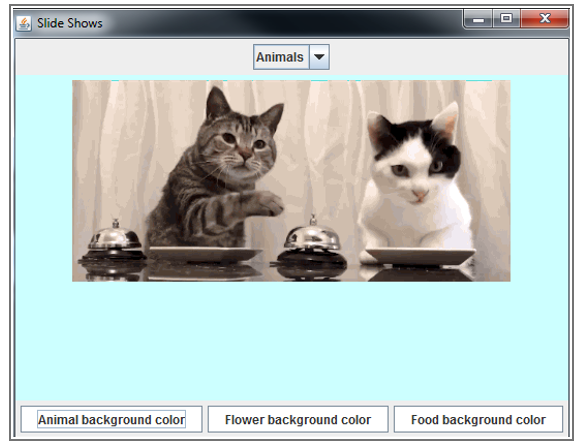
at the top there should be a drop down menu that has cars, trees and sports. when one of these is selected the first image of we'll say for example is trees then an image appears for 2 seconds and changes to the second image and finally the last image is shown (3 images each for trees, cars and sports). At the bottom is three buttons green, blue and yellow that change the background colour and then a jslider to change size of image
Slide Shows Animals Animal background r Flower background color Food background color Slide Shows Animals Animal background r Flower background color Food background color
Step by Step Solution
There are 3 Steps involved in it

Get step-by-step solutions from verified subject matter experts
 Study Help