







Question: Java: Please help with the following assignment. Thank you: ASSIGNMENT: Simple! The left JPanel contains two radio buttons and an Order button. The right JPanel
Java: Please help with the following assignment. Thank you:
ASSIGNMENT:
Simple! The left JPanel contains two radio buttons and an Order button. The right JPanel defines what to put into your coffee. It should just print out an order confirmation.Simple! The left JPanel contains two radio buttons and an Order button. The right JPanel defines what to put into your coffee. It should just print out an order confirmation.
Radio button code sample:
JRadioButton rb1 = new JRadioButton("...", true); // First with label, true means selected
JRadioButton rb2 = new JRadioButton("..."); // Second with label
... // and so on
ButtonGroup bg = new ButtonGroup(); // Place them in a ButtonGroup which makes sure only one is selected
bg.add(rb1);
bg.add(rb2);
...
add(rb1); // Add the buttons to the JFrame/JPanel, not the button group
add(rb2);
In the Listener use .isSelected() like in the class room example.
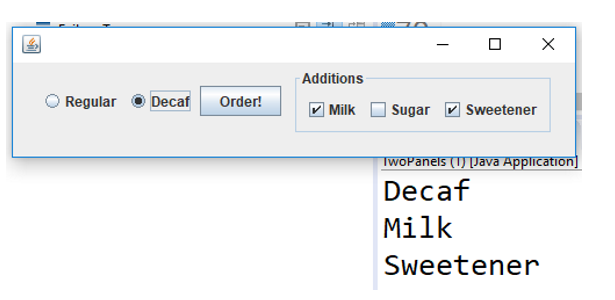
O Regular (e) Decaf Regular Decaf/ Order! | Additions Order! Milk Sugar L/sweetener TwoPanels (Java Application Decaf Milk Sweetener
Step by Step Solution
There are 3 Steps involved in it
To create the Java application that simulates the ordering of coffee with different options using JRadioButton and JCheckBox follow these steps Step 1 ... View full answer

Get step-by-step solutions from verified subject matter experts
 Study Help