







Question: java please . . . Overview This programming assignment is intended to demonstrate your knowledge of the following: Using loops Using if statements Declaring Arrays
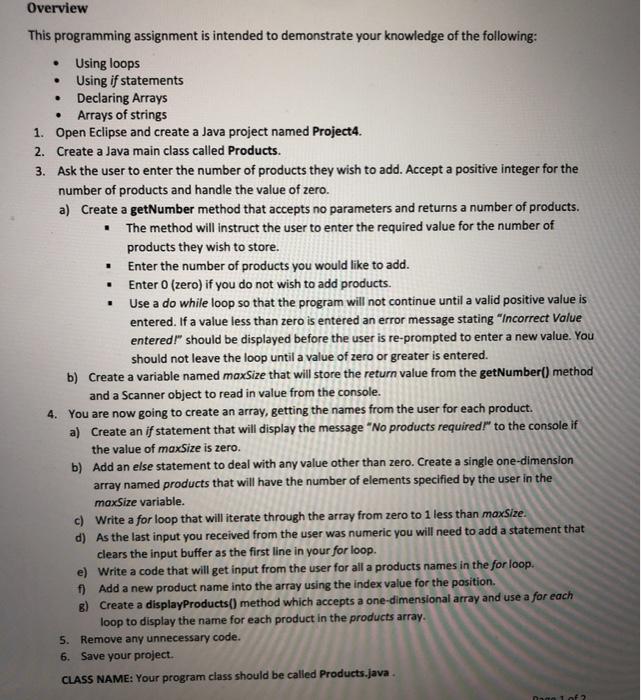
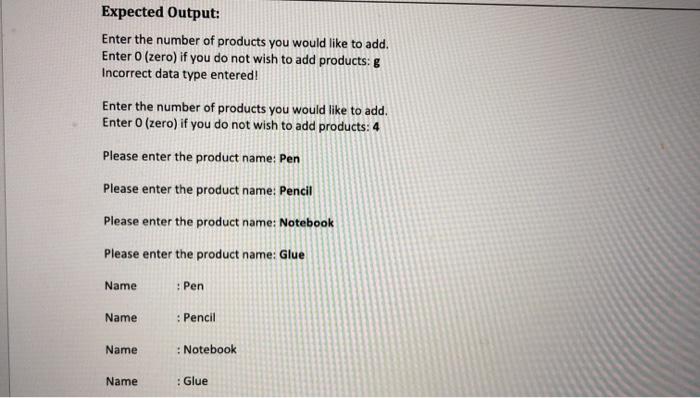
. . . Overview This programming assignment is intended to demonstrate your knowledge of the following: Using loops Using if statements Declaring Arrays Arrays of strings 1. Open Eclipse and create a Java project named Project4. 2. Create a Java main class called Products. 3. Ask the user to enter the number of products they wish to add. Accept a positive integer for the number of products and handle the value of zero. a) Create a getNumber method that accepts no parameters and returns a number of products. The method will instruct the user to enter the required value for the number of products they wish to store, Enter the number of products you would like to add. Enter 0 (zero) if you do not wish to add products. Use a do while loop so that the program will not continue until a valid positive value is entered. If a value less than zero is entered an error message stating "Incorrect Value entered!" should be displayed before the user is re-prompted to enter a new value. You should not leave the loop until a value of zero or greater is entered. b) Create a variable named maxSize that will store the return value from the getNumber() method and a Scanner object to read in value from the console. 4. You are now going to create an array, getting the names from the user for each product a) Create an if statement that will display the message "No products required!" to the console if the value of maxSize is zero. b) Add an else statement to deal with any value other than zero. Create a single one-dimension array named products that will have the number of elements specified by the user in the maxSize variable. c) Write a for loop that will iterate through the array from zero to 1 less than maxsize. d) As the last input you received from the user was numeric you will need to add a statement that clears the input buffer as the first line in your for loop. e) Write a code that will get input from the user for all a products names in the for loop. f) Add a new product name into the array using the index value for the position. 8) Create a displayProducts() method which accepts a one-dimensional array and use a for each loop to display the name for each product in the products array. 5. Remove any unnecessary code. 6. Save your project. CLASS NAME: Your program class should be called Products.java. Expected Output: Enter the number of products you would like to add. Enter 0 (zero) if you do not wish to add products: g Incorrect data type entered! Enter the number of products you would like to add. Enter 0 (zero) if you do not wish to add products: 4 Please enter the product name: Pen Please enter the product name: Pencil Please enter the product name: Notebook Please enter the product name: Glue Name : Pen Name : Pencil Name : Notebook Name : Glue
Step by Step Solution
There are 3 Steps involved in it

Get step-by-step solutions from verified subject matter experts
 Study Help