







Question: java please, the output should be same as the picture, here is the grade scale This class has a fixed number of grading assessments and
java please, the output should be same as the picture, here is the grade scale
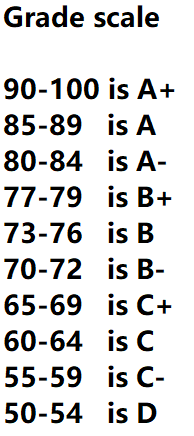
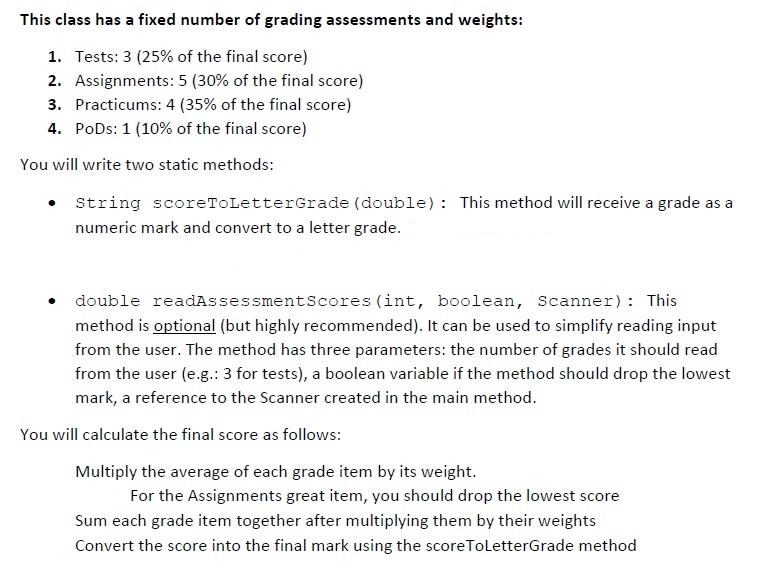
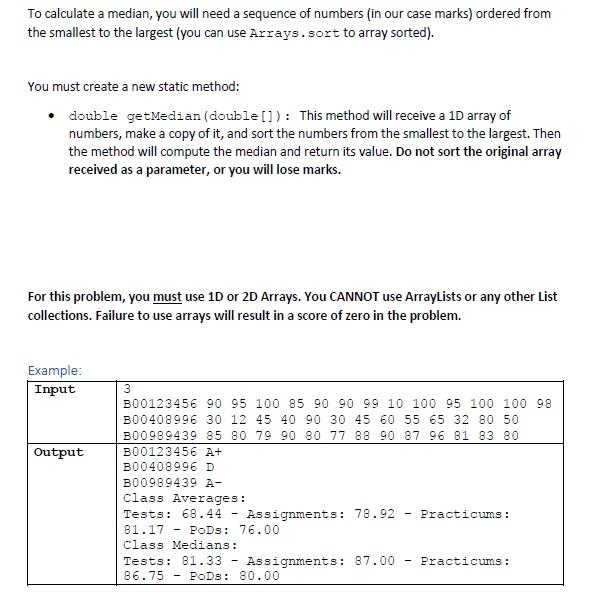
This class has a fixed number of grading assessments and weights: 1. Tests: 3 (25% of the final score) 2. Assignments: 5 (30% of the final score) 3. Practicums: 4 (35% of the final score) 4. PoDs: 1 (10% of the final score) You will write two static methods: String scoreToLetterGrade (double): This method will receive a grade as a numeric mark and convert to a letter grade. double readAssessmentscores (int, boolean, Scanner): This method is optional (but highly recommended). It can be used to simplify reading input from the user. The method has three parameters: the number of grades it should read from the user (e.g.: 3 for tests), a boolean variable if the method should drop the lowest mark, a reference to the Scanner created in the main method. You will calculate the final score as follows: Multiply the average of each grade item by its weight. For the Assignments great item, you should drop the lowest score Sum each grade item together after multiplying them by their weights Convert the score into the final mark using the scoreToLetterGrade method To calculate a median, you will need a sequence of numbers (in our case marks) ordered from the smallest to the largest (you can use Arrays. sort to array sorted). You must create a new static method: double getMedian (double[]): This method will receive a 10 array of numbers, make a copy of it, and sort the numbers from the smallest to the largest. Then the method will compute the median and return its value. Do not sort the original array received as a parameter, or you will lose marks. For this problem, you must use 10 or 2D Arrays. You CANNOT use ArrayLists or any other List collections. Failure to use arrays will result in a score of zero in the problem. Example: Input Output 3 B00123456 90 95 100 85 90 90 99 10 100 95 100 100 98 B00408996 30 12 45 40 90 30 45 60 55 65 32 80 50 B00989439 85 80 79 90 80 77 88 90 87 96 81 83 80 B00123456 A+ B00408996 D B00989439 A- Class Averages: Tests: 68.44 - Assignments: 78.92 Practicums : 81.17 - PODs: 76.00 Class Medians : Tests: 81.33 - Assignments: 87.00 - Practicums : 86.75 - Pods: 80.00 - Grade scale 90-100 is A+ 85-89 is A 80-84 is A- 77-79 is B+ 73-76 is B 70-72 is B- 65-69 is C+ 60-64 is C 55-59 is C- 50-54 is D This class has a fixed number of grading assessments and weights: 1. Tests: 3 (25% of the final score) 2. Assignments: 5 (30% of the final score) 3. Practicums: 4 (35% of the final score) 4. PoDs: 1 (10% of the final score) You will write two static methods: String scoreToLetterGrade (double): This method will receive a grade as a numeric mark and convert to a letter grade. double readAssessmentscores (int, boolean, Scanner): This method is optional (but highly recommended). It can be used to simplify reading input from the user. The method has three parameters: the number of grades it should read from the user (e.g.: 3 for tests), a boolean variable if the method should drop the lowest mark, a reference to the Scanner created in the main method. You will calculate the final score as follows: Multiply the average of each grade item by its weight. For the Assignments great item, you should drop the lowest score Sum each grade item together after multiplying them by their weights Convert the score into the final mark using the scoreToLetterGrade method To calculate a median, you will need a sequence of numbers (in our case marks) ordered from the smallest to the largest (you can use Arrays. sort to array sorted). You must create a new static method: double getMedian (double[]): This method will receive a 10 array of numbers, make a copy of it, and sort the numbers from the smallest to the largest. Then the method will compute the median and return its value. Do not sort the original array received as a parameter, or you will lose marks. For this problem, you must use 10 or 2D Arrays. You CANNOT use ArrayLists or any other List collections. Failure to use arrays will result in a score of zero in the problem. Example: Input Output 3 B00123456 90 95 100 85 90 90 99 10 100 95 100 100 98 B00408996 30 12 45 40 90 30 45 60 55 65 32 80 50 B00989439 85 80 79 90 80 77 88 90 87 96 81 83 80 B00123456 A+ B00408996 D B00989439 A- Class Averages: Tests: 68.44 - Assignments: 78.92 Practicums : 81.17 - PODs: 76.00 Class Medians : Tests: 81.33 - Assignments: 87.00 - Practicums : 86.75 - Pods: 80.00 - Grade scale 90-100 is A+ 85-89 is A 80-84 is A- 77-79 is B+ 73-76 is B 70-72 is B- 65-69 is C+ 60-64 is C 55-59 is C- 50-54 is D
Step by Step Solution
There are 3 Steps involved in it

Get step-by-step solutions from verified subject matter experts
 Study Help