







Question: Java, please. The production code is partially written. You only need to add code to the existing classes. package production.business; public class UserAccount { private
Java, please. The production code is partially written. You only need to add code to the existing classes.
package production.business;
public class UserAccount {
private String userName;
private String password;
private String firstName;
private String lastName;
private String email;
private String phone;
public UserAccount() {
}
public static String checkInputError(String userName, String password, String firstName, String lastName, String email, String phone){
String errorMessage ="";
if (!isUserNameValid(userName))
errorMessage += "Invalid user name. ";
if (!isPasswordValid(password))
errorMessage += "Invalid password. ";
if (!isFirstNameValid(firstName))
errorMessage += "Invalid first name. ";
if (!isLastNameValid(lastName))
errorMessage += "Invalid last name. ";
if (!isEmailValid(email))
errorMessage += "Invalid email. ";
if (!isPhoneNumberValid(phone))
errorMessage += "Invalid phone number. ";
return errorMessage;
}
public String getUserName(){
return userName;
}
public void setUserName(String userName){
this.userName = userName;
}
// you need to finish this method; do not change the return type
public static boolean isUserNameValid(String userName){
// check if userName is valid
return true;
}
public String getPassword() {
return password;
}
public void setPassword(String password) {
this.password = password;
}
// you need to finish this method; do not change the return type
public static boolean isPasswordValid(String password){
// check if password is valid
return true;
}
public boolean isValidCredential(String userName, String password) {
return matchUserName(userName) && matchPassword(password);
}
public boolean matchUserName(String userName) {
return userName != null && userName.equalsIgnoreCase(this.userName);
}
private boolean matchPassword(String password) {
return password != null && password.equals(this.password);
}
public String getFirstName(){
return firstName;
}
public void setFirstName(String firstName){
this.firstName = firstName;
}
// you need to finish this method; do not change the return type
public static boolean isFirstNameValid(String firstName){
// check if firstName is valid
return true;
}
public String getLastName(){
return lastName;
}
public void setLastName(String lastName){
this.lastName = lastName;
}
// you need to finish this method; do not change the return type
public static boolean isLastNameValid(String lastName){
// check if lastName is valid
return true;
}
public String getEmail(){
return email;
}
public void setEmail(String email){
this.email = email;
}
// you need to finish this method; do not change the return type
public static boolean isEmailValid(String email){
// check if email is valid
return true;
}
public String getPhoneNumber(){
return phone;
}
public void setPhoneNumber(String phone){
this.phone = phone;
}
// you need to finish this method; do not change the return type
public static boolean isPhoneNumberValid(String phone){
// check if phone (number) is valid
return true;
}
}
package production.business;
import java.util.ArrayList;
public class UserAccountManager {
public static final String NOINPUTERROR ="";
private ArrayList
public UserAccountManager() {
userAccounts = new ArrayList
}
// return an empty string if user registration is successful (all inputs are valid)
// otherwise an error message.
public String registerNewUser(String userName, String password, String reenteredPassword,
String firstName, String lastName, String email, String phone){
String inputCheckResult = UserAccount.checkInputError(userName, password, firstName, lastName, email, phone);
if (!inputCheckResult.equals(""))
return inputCheckResult;
if (doesUserNameExist(userName))
return "User name is not available!";
if (!password.equals(reenteredPassword)) {
return "Re-entered password does not match!";
}
UserAccount newAccount = new UserAccount();
setAccountProfile(newAccount, userName, password, firstName, lastName, email, phone);
userAccounts.add(newAccount);
return NOINPUTERROR;
}
private void setAccountProfile(UserAccount userAccount, String userName, String password, String firstName, String lastName, String email, String phone){
userAccount.setUserName(userName);
userAccount.setPassword(password);
userAccount.setFirstName(firstName);
userAccount.setLastName(lastName);
userAccount.setEmail(email);
userAccount.setPhoneNumber(phone);
}
// return the user account if the given userName and password are correct
// otherwise null
public UserAccount login(String userName, String password) {
for (UserAccount userAccount: userAccounts)
if(userAccount.isValidCredential(userName, password))
return userAccount;
return null;
}
public boolean doesUserNameExist(String userName){
for (UserAccount userAccount: userAccounts)
if(userAccount.matchUserName(userName))
return true;
return false;
}
}
--------
package test.acceptancetests;
import junit.framework.TestCase;
public class LoginTests extends TestCase{
}
Your code LoginTests here:
|
package test.acceptancetests;
import junit.framework.TestCase;
public class RegisterNewUserTests extends TestCase{
}
Your code RegisterNewUserTests here:
--------
package test.sampleAcceptanceTests;
import junit.framework.TestCase;
import production.business.UserAccount;
import production.business.UserAccountManager;
public class SampleTest extends TestCase {
private UserAccountManager userAccountManager;
protected void setUp() throws Exception {
super.setUp();
userAccountManager = new UserAccountManager();
userAccountManager.registerNewUser("admin", "@umkcFH310", "@umkcFH310", "Scrum", "Master", "..n@umnc.edu",
"9132231105");
}
public void testSuccessfulRegistration() {
String registrationResult = userAccountManager.registerNewUser("jsmith", "@White0House", "@White0House", "John",
"Smith", "..n@ email address", "7024265734");
assertEquals(registrationResult, UserAccountManager.NOINPUTERROR);
UserAccount userAccount = userAccountManager.login("jsmith", "@W..n@ email adress "));
}
// this test may fail if the isUserNameValid method is not completed
public void testRegistrationWithInvalidUserName() {
String registrationResult = userAccountManager.registerNewUser("2020", "@White0House", "@White0House",
"John", "Smith", "..n@ email adress", "7024265734");
System.out.println(registrationResult);
assertFalse(registrationResult.equalsIgnoreCase(UserAccountManager.NOINPUTERROR));
}
}
-------
package test.unittests;
import junit.framework.TestCase;
import production.business.UserAccount;
public class EmailAddressTests extends TestCase {
public void testValidEmailAddress() {..n@ email adress"));
}
}
Your code for EmailAddressTests here:
|
package test.unittests;
import junit.framework.TestCase;
import production.business.UserAccount;
public class FirstNameTests extends TestCase {
public void testValidFirstName() {
assertTrue(UserAccount.isLastNameValid("john"));
}
}
Your code FirstNameTests here:
|
package test.unittests;
import junit.framework.TestCase;
import production.business.UserAccount;
public class LastNameTests extends TestCase {
public void testValidLastName() {
assertTrue(UserAccount.isFirstNameValid("Smith"));
}
}
Your code for LastNameTests here:
|
package test.unittests;
import junit.framework.TestCase;
import production.business.UserAccount;
public class PasswordTests extends TestCase {
public void testValidPassword() {
assertTrue(UserAccount.isPasswordValid("@White0House"));
}
}
Your code PasswordTests here:
|
package test.unittests;
import junit.framework.TestCase;
import production.business.UserAccount;
public class PhoneNumberTests extends TestCase {
public void testValidPhoneNumber() {
assertTrue(UserAccount.isPhoneNumberValid("8162356218"));
}
}
Your code PhoneNumberTests here:
|
package test.unittests;
import junit.framework.TestCase;
import production.business.UserAccount;
public class UserNameTests extends TestCase {
public void testValidUserName() {
assertTrue(UserAccount.isUserNameValid("admin"));
}
}
Your code UserNameTests here:
|
CRITERIA:
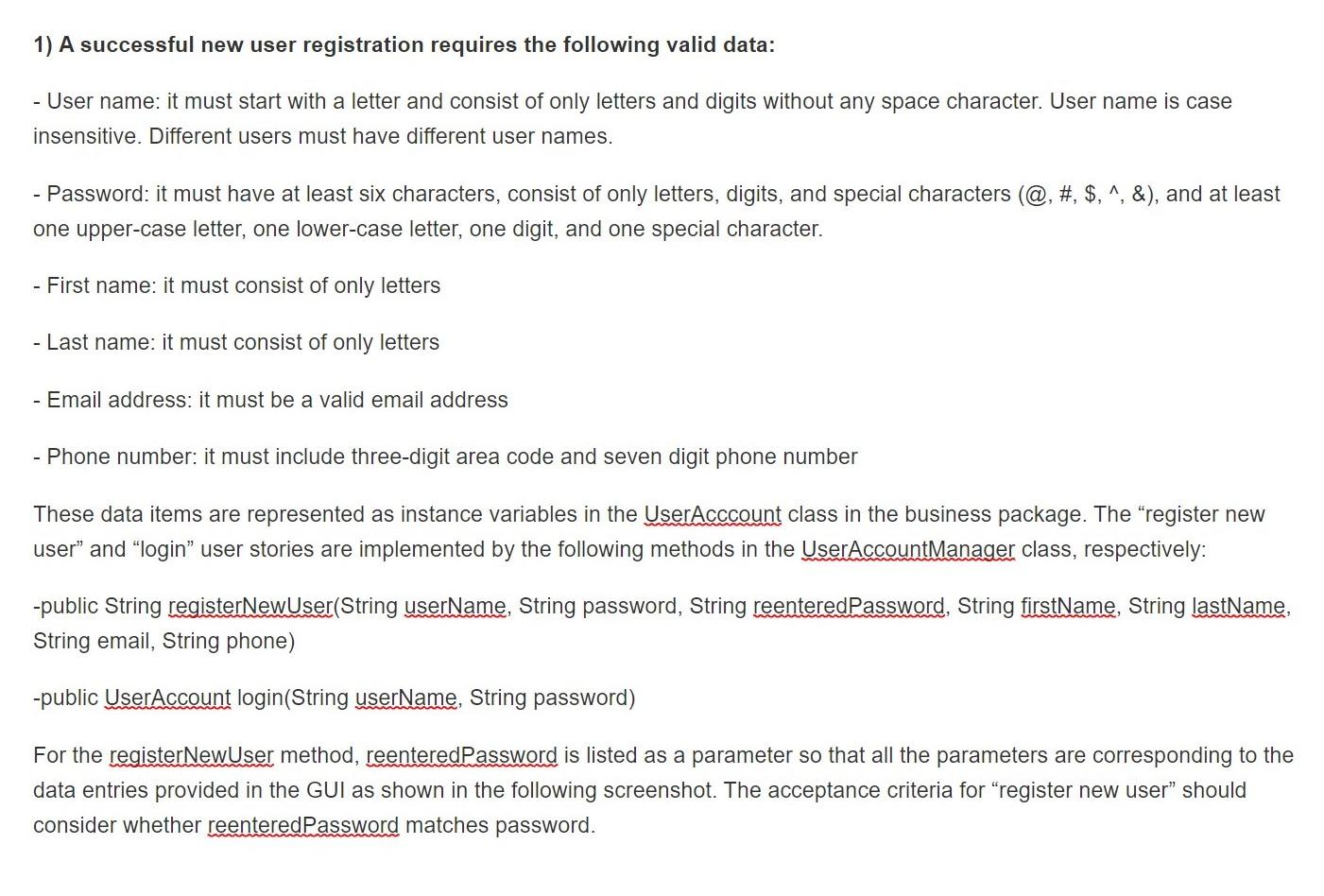
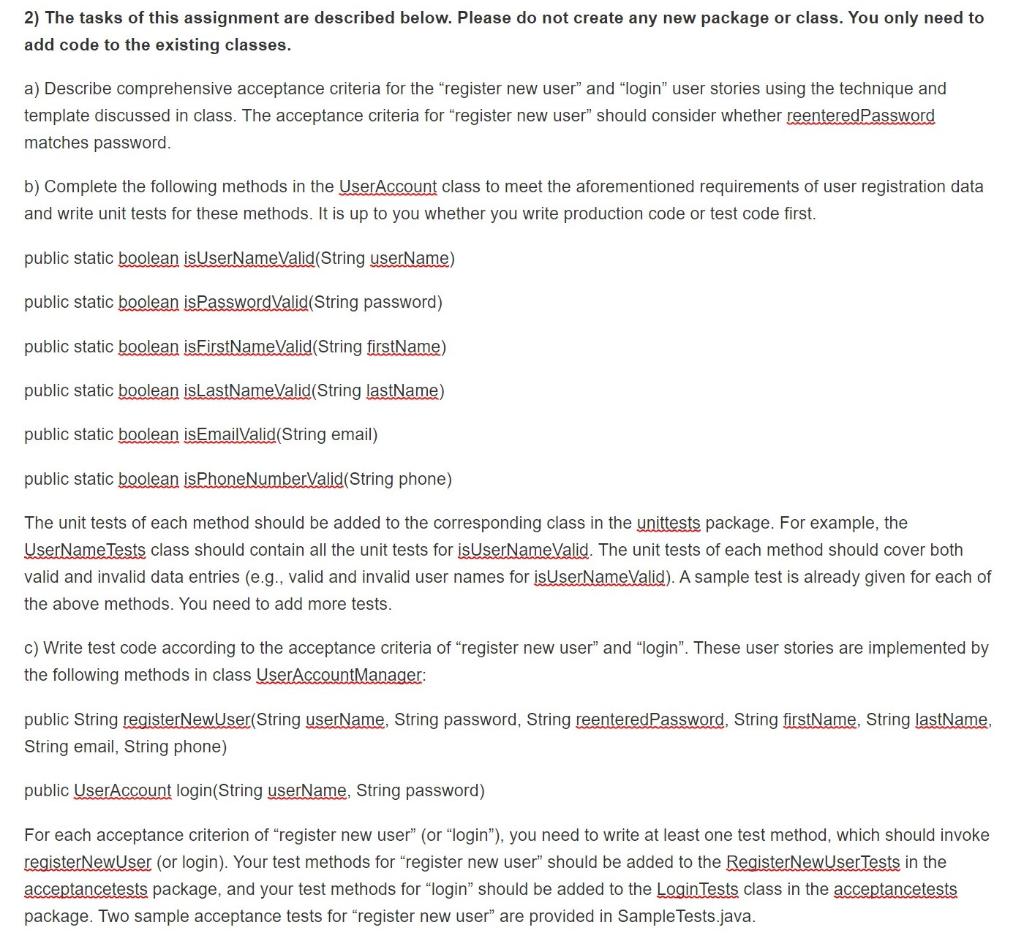
1) A successful new user registration requires the following valid data: - User name: it must start with a letter and consist of only letters and digits without any space character. User name is case insensitive. Different users must have different user names. - Password: it must have at least six characters, consist of only letters, digits, and special characters (@, #, $,^, &), and at least one upper-case letter, one lower-case letter, one digit, and one special character. - First name: it must consist of only letters - Last name: it must consist of only letters - Email address: it must be a valid email address - Phone number: it must include three-digit area code and seven digit phone number These data items are represented as instance variables in the User Acccount class in the business package. The "register new user and login" user stories are implemented by the following methods in the User Account Manager class, respectively: -public String registerNewUser(String userName, String password, String reentered Password, String firstName, String lastName, String email, String phone) -public UserAccount login(String userName, String password) For the register NewUser method, reenteredpassword is listed as a parameter so that all the parameters are corresponding to the data entries provided in the GUI as shown in the following screenshot. The acceptance criteria for register new user" should consider whether reentered Password matches assword. 2) The tasks of this assignment are described below. Please do not create any new package or class. You only need to add code to the existing classes. a) Describe comprehensive acceptance criteria for the "register new user" and "login" user stories using the technique and template discussed in class. The acceptance criteria for "register new user" should consider whether reenteredPassword matches password. b) Complete the following methods in the User Account class to meet the aforementioned requirements of user registration data and write unit tests for these methods. It is up to you whether you write production code or test code first. public static boolean is UserNameValid (String userName) public static boolean isPassword Valid(String password) public static boolean isFirstNameValid(String firstName) public static boolean islastNameValid (String lastName) public static boolean isEmailValid (String email) public static boolean isPhone NumberValid(String phone) The unit tests of each method should be added to the corresponding class in the unittests package. For example, the UserName Tests class should contain all the unit tests for isUserNameValid. The unit tests of each method should cover both valid and invalid data entries (e.g., valid and invalid user names for isUserName Valid). A sample test is already given for each of the above methods. You need to add more tests. c) Write test code according to the acceptance criteria of "register new user" and "login". These user stories are implemented by the following methods in class User Account Manager: public String registerNewUser(String userName, String password, String reenteredPassword, String firstName, String lastName, String email, String phone) public User Account login(String userName, String password) For each acceptance criterion of register new user" (or "login"), you need to write at least one test method, which should invoke registerNewUser (or login). Your test methods for "register new user" should be added to the RegisterNewUser Tests in the acceptancetests package, and your test methods for "login" should be added to the Login Tests class in the acceptancetests package. Two sample acceptance tests for "register new user" are provided in Sample Tests.java
Step by Step Solution
There are 3 Steps involved in it

Get step-by-step solutions from verified subject matter experts
 Study Help