







Question: java program Extend the application with dialog elements in which the list of all synonyms of the searched term and a list of all media
java program
Extend the application with dialog elements in which the list of all synonyms of the searched term and a list of all media contained in the Zettelkasten with a suitable one titles are displayed. These lists should be updated at about the same time as the web browser element below. In preparation, we need to write code that finds the synonyms for a given term. We use the vocabulary service of the University of Leipzig in the form of a REST web service. For processing this task you should use the service
Use "Similarity Service"
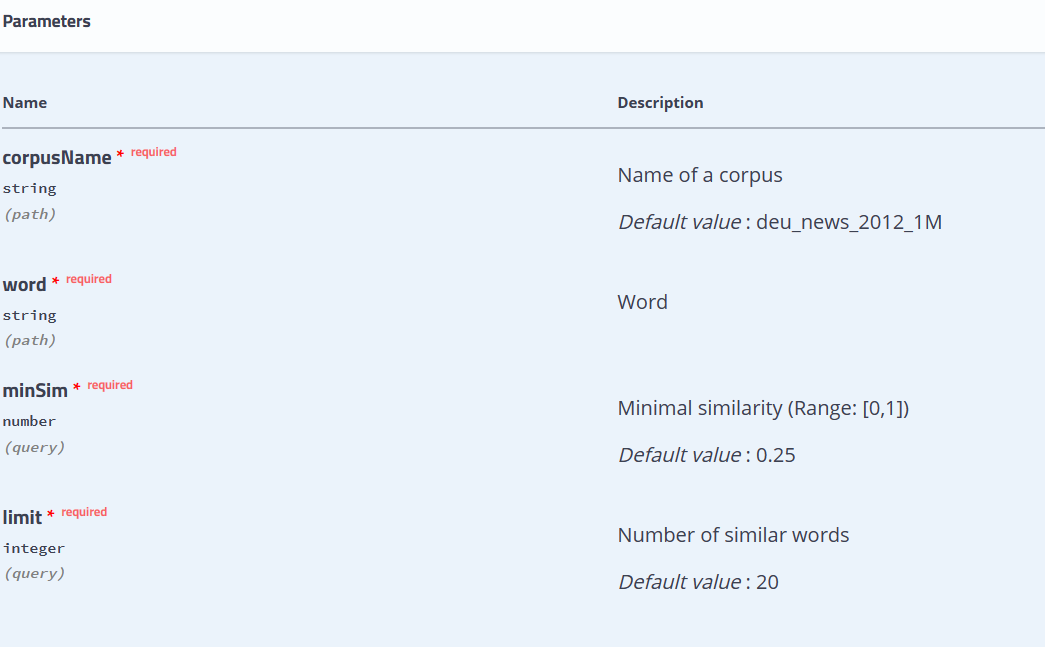
. For this you need: 1. Installation of a library that can process JSON data. Here, for example, the JSON-Simple variant is suitable. . Libraries are integrated in IntelliJ or Eclipse in the project properties. a. [IntelliJ] Right click on the project and select "Open Module Settings". Alternatively, you can also use "F4"; In the window that opens Click "Libraries" and add Jar (using "+"). b. [ECLIPSE] To do this, right-click on the project name in the Package Explorer. In the menu that opens, select Properties and then left Java Build Path in the window that opens. Under the Libraries tab the library can be selected using the Add External JARs... button if it can be found anywhere in the file tree. If the library jar is already in the src directory, i.e. within the class path, you use Add JARs. 2.The documentation for the parameters of the service can be found at the above foto 3. The following program demonstrates general access to the service:
import java.io.IOException; import java.io.InputStream; import java.net.URL; import java.util.Scanner; import org.json.simple.JSONArray; import org.json.simple.JSONObject; import org.json.simple.parser.JSONParser; import org.json.simple.parser.ParseException; public class Syn2 { public static void main(String[] args) throws ParseException, IOException { String BasisUrl = "leipzig similarity serviec as in picture above"; String Corpus = "deu_news_2012_1M"; String request type = "/coocsim/"; String search term = "see"; String parameters = "?minSim=0.1&limit=50"; URL myURL; myURL = new URL(BaseUrl + Corpus + query type + search term + parameters); JSONParser jsonParser = new JSONParser(); String jsonResponse = streamToString(myURL.openStream()); // parse the supplied string into an array JSONArray jsonResponseArr = (JSONArray) jsonParser.parse(jsonResponse); // the first element in this array JSONObject firstEntry = (JSONObject) jsonResponseArr.get(0); // get the container for the synonym from the element JSONObject wordContainer = (JSONObject) firstEntry.get("word"); // Get the synonym from the container String synonymous = (String) wordContainer.get("word"); // output System.out.println(synonymous); System.out.println(System.lineSeparator()); // all queried synonyms for (Object el : jsonResponseArr) { wordContainer = (JSONObject) ((JSONObject) el).get("word"); synonym = (String) wordContainer.get("word"); System.out.println(synonymous); } } /** * Reads InputStream's contents into String * * @param is - the InputStream * @return String representing is' contents * @throws IOException */
public static String streamToString(InputStream is) throws IOException { string result = ""; other options: stackoverflow-->questions-->read-convert an-inputstream-to-a-string try (Scanner s = new Scanner(is)) { s.useDelimiter("\\A"); result = s.hasNext() ? s.next() : ""; is.close(); } return result; } }
Add two ListViews to your GUI. These are meant to be an alphabetically sorted list of Synonyms and a list of Zettelkasten titles (in their current order) included. Also, allow the user to select a synonym from the list by selecting a can initiate a new search. Realize this with another button "Search Synonym next to the list of synonyms. The term selected and searched for in this way should automatically copied into the term input field by your program. Watch out Make sure that your list view only allows single selection (SINGLE). Your program should still react to a double-click on the ListView in the same way as the user would have pressed the "Search synonym" button.
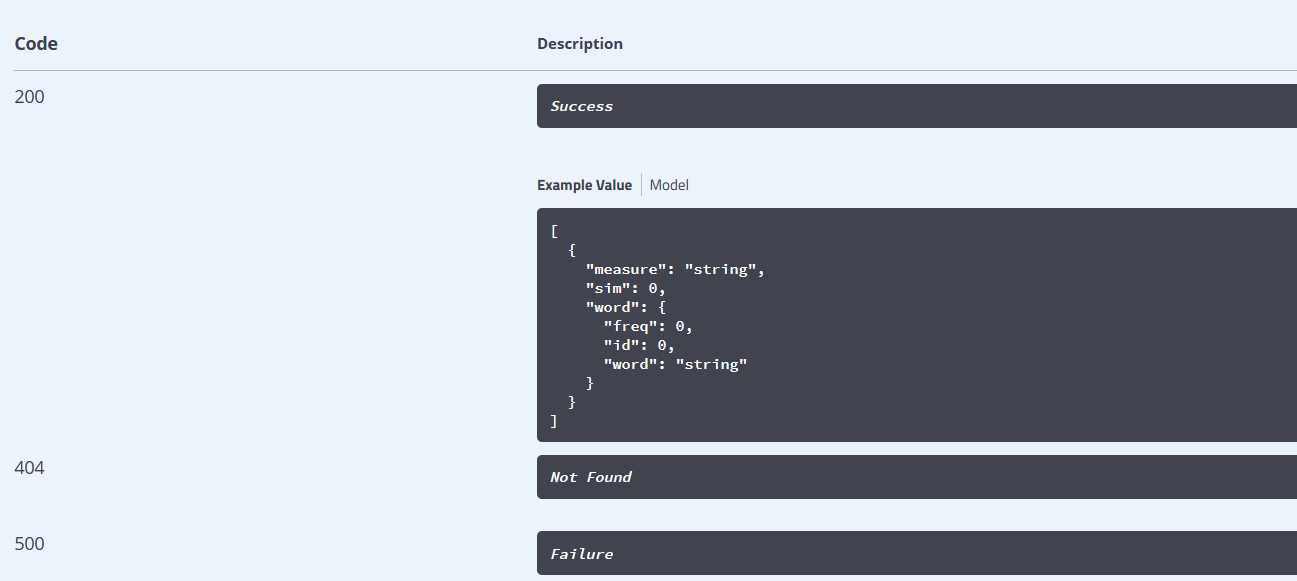
Parameters Name Description corpusName * required Name of a corpus Default value: deu_news_2012_1M Word Minimal similarity (Range: [0,1] ) Default value: 0.25 limit * required Number of similar words (query) Default value : 20 Code Description 200 Success Example Value Model [{}"measure":"string","sim":0,"word":{"freq":0,"id":0,"word":"string" 404 Not Found 500 Failure
Step by Step Solution
There are 3 Steps involved in it

Get step-by-step solutions from verified subject matter experts
 Study Help