







Question: Java program I've been given a set of premade classes and I need to develop a JFrame that looks like this using these classes and
Java program I've been given a set of premade classes and I need to develop a JFrame that looks like this using these classes and interfaces:
// Main class
//Imports are listed in full to show what's being used //could just import javax.swing.* and java.awt.* etc.. import java.awt.BorderLayout; import java.awt.Color; import java.awt.Graphics; import javax.swing.JButton; import java.awt.event.ActionListener; import java.awt.event.ActionEvent; import java.awt.event.ItemEvent; import java.awt.event.ItemListener; import java.awt.event.MouseEvent; import java.util.ArrayList; import javax.swing.JPanel; import javax.swing.JToggleButton; import javax.swing.JToolBar; import javax.swing.JFrame; import javax.swing.border.EtchedBorder;
enum ShapeSelected{ None, Circle, Square, Cube; };
public class Assignment4 extends javax.swing.JFrame implements java.awt.event.MouseListener{ final int NUMBER_OF_SHAPES = 3; JToolBar mToolbar; ShapeSelected mSelectedAction; JToggleButton mCircleButton; JToggleButton mCubeButton; JToggleButton mSquareButton; DrawPanel mDrawPanel; static ArrayList
private JToggleButton addButton(String title, ShapeSelected shapeSelected){ JToggleButton button = new JToggleButton(title); button.addItemListener(new ItemListener() { public void itemStateChanged(ItemEvent ev) { if(ev.getStateChange()==ItemEvent.SELECTED){ // First if there is a button previously selected, reset it switch (mSelectedAction){ case Circle: mCircleButton.setSelected(false); break; case Cube: mCubeButton.setSelected(false); break; case Square: mSquareButton.setSelected(false); break; } // Update the selected button shape mSelectedAction = shapeSelected; } else if(ev.getStateChange()==ItemEvent.DESELECTED){ mSelectedAction = ShapeSelected.None; } } }); this.mToolbar.add(button); return (button); } public Assignment4() { final int WIDTH = 1000; final int HEIGHT = 800; this.mSelectedAction = ShapeSelected.None; JFrame guiFrame = new JFrame(); //make sure the program exits when the frame closes guiFrame.setDefaultCloseOperation(JFrame.EXIT_ON_CLOSE); guiFrame.setTitle("SHAPE GUI"); guiFrame.setSize(WIDTH, HEIGHT); //This will center the JFrame in the middle of the screen guiFrame.setLocationRelativeTo(null); // Create a toolbar and give it an etched border. this.mToolbar = new JToolBar(); this.mToolbar.setBorder(new EtchedBorder()); this.mDrawPanel = new DrawPanel(); this.mDrawPanel.setBackground(Color.blue); this.mDrawPanel.paintDisplay(this.mShapes); guiFrame.add(mDrawPanel); guiFrame.add(this.mToolbar, BorderLayout.NORTH); this.mCircleButton = addButton("Circle", ShapeSelected.Circle); this.mCubeButton = addButton("Cube", ShapeSelected.Cube); this.mSquareButton = addButton("Square", ShapeSelected.Square); // Add the Exit Action JButton button = new JButton("Quit"); button.setToolTipText("Quit the program"); button.addActionListener(new ActionListener() { public void actionPerformed(ActionEvent e) { System.exit(0); } }); mToolbar.add(button); guiFrame.addMouseListener(this); //make sure the JFrame is visible guiFrame.setVisible(true); }
@Override public void mouseClicked(MouseEvent e) { int x = e.getX(); int y = e.getY(); switch(this.mSelectedAction){ case Circle: Circle circle = new Circle(Color.yellow, "crl", 50); circle.setPos(x, y - 50); mShapes.add(circle); break; case Cube: Cube cube = new Cube(Color.red, "cb", 100); cube.setPos(x, y - 50); mShapes.add(cube); break; case Square: Square square = new Square(Color.green, "sq", 100); square.setPos(x, y - 50); mShapes.add(square); break; } this.mDrawPanel.paintDisplay(mShapes); }
@Override public void mousePressed(MouseEvent e) { }
@Override public void mouseReleased(MouseEvent e) { }
@Override public void mouseEntered(MouseEvent e) { }
@Override public void mouseExited(MouseEvent e) { } }
class DrawPanel extends JPanel{
ArrayList
public void paintDisplay(ArrayList
}
// Circle class
import java.awt.Color; import java.awt.Graphics;
public class Circle extends Shape implements I_twoD{ private int mRadius;
public Circle(Color color, String name, int radius) { super(color, name); this.mRadius = radius; mX = -1; mY = -1; }
@Override public float computeArea() { return (float) (Math.PI * this.mRadius * this.mRadius); }
@Override public float computePerimeter() { return (float)(2.f * Math.PI * this.mRadius); }
@Override public void print() { System.out.println("Circle ("+this.mName+") radius : "+this.mRadius+" and color : "+this.mColor.toString()); }
public void paint(Graphics g) { } }
// Cube class
import java.awt.Color; import java.awt.Graphics;
public class Cube extends Square implements I_threeD{
public Cube(Color color, String name, int side) { super(color, name, side); }
public float computeVolume() { return (this.mSide * this.mSide * this.mSide); } public void print(){ System.out.println("Cube ("+this.mName+") side : "+this.mSide+" and color : "+this.mColor.toString()); } public void paint(Graphics g) { final int step = 20; } }
// Square class
import java.awt.Color; import java.awt.Graphics;
public class Square extends Shape implements I_twoD{ protected int mSide;
Square(Color color, String name, int side){ super (color, name); this.mSide = side; } @Override public float computeArea() { return (this.mSide * this.mSide); }
@Override public float computePerimeter() { return (4.f * this.mSide); } public void print(){ System.out.println("Square ("+this.mName+") side : "+this.mSide+" and color : "+this.mColor.toString()); }
@Override public void paint(Graphics g) { } }
// Shape class
import java.awt.Color; import java.awt.Graphics;
public abstract class Shape { protected Color mColor; String mName; protected int mX; protected int mY; public Shape (Color color, String name){ this.mColor = color; this.mName = name; } public String getName(){ return (this.mName); } public Color getColor(){ return (this.mColor); } public void setName(String name){ this.mName = name; } public void setColor(Color color){ this.mColor = color; } public abstract void print(); public abstract void paint(Graphics g); public void setPos(int x, int y){ mX = x; mY = y; } }
// Interface 1
public interface I_threeD { float computeVolume(); }
// Interface 2
public interface I_twoD { float computeArea(); float computePerimeter(); }
// This is what the output should look like
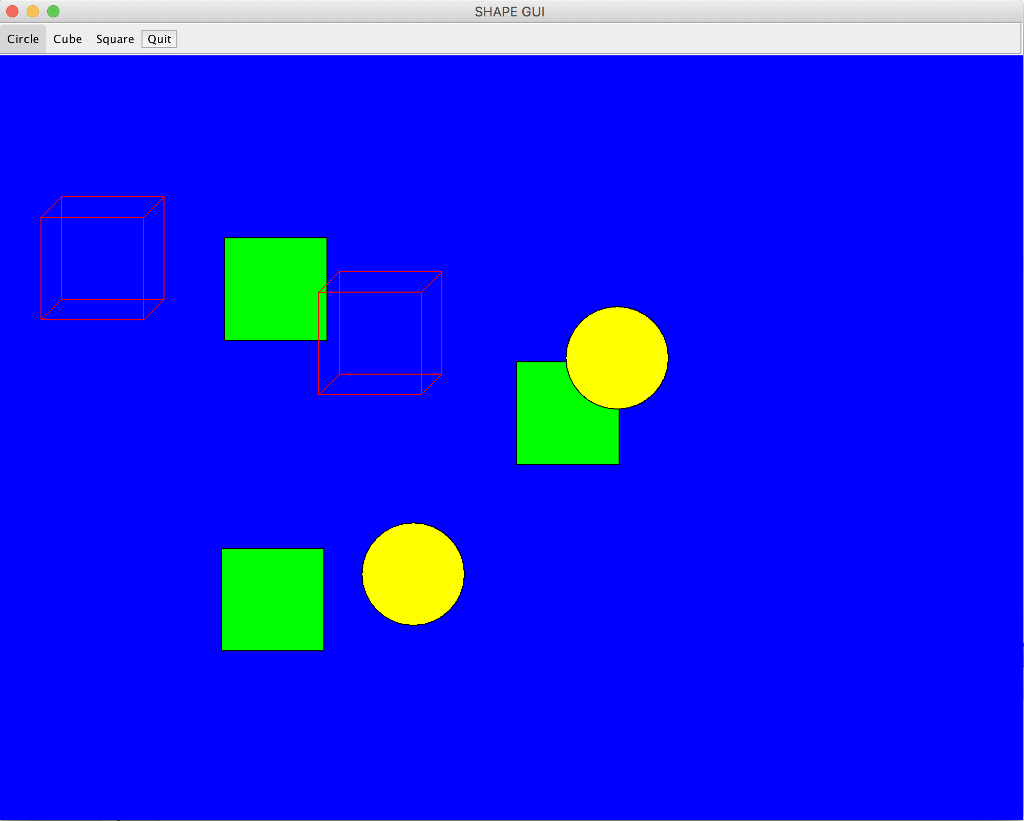
SHAPE GUI Circle Cube Square Quit SHAPE GUI Circle Cube Square Quit
Step by Step Solution
There are 3 Steps involved in it

Get step-by-step solutions from verified subject matter experts
 Study Help